Category: best practices

tidyverse: Example: Trump Approval Rate

tidyverse: Example: Trump Approval Rate

For those of you unfamiliar with the tidyverse, it is a collection of R packages that share common philosophies and are designed to work together. Most if not all, are created by R-god Hadley Wickham, one of the leads at RStudio. I was introduced to the tidyverse-packages such as ggplot2 and dplyr in my second R-course, and they have cleaned and sped up my workflow tremendously ever since.

Although I don’t want to mix in the political debate, I came across such a wonderful example of how the tidyverse has simplified coding in R. On the downside, those unfamiliar with the syntax have trouble understanding what happens in the code the author uses.

Running the following R-code will install the core packages of the tidyverse:

install.packages(‘tidyverse’)

These consist among others of the following:

  • ggplot2: a more potent way of visualization
  • tibble: an upgrade to the standard data.frame
  • dplyr: adds great new functionality for manipulating data frames
  • tidyr: adds even more new functions for wrangling data frames
  • magrittr: adds piping functionality to improve code readability and workflow
  • readr: provides easier functions to load in data
  • purr: adds new functional programming functionality

There are several other packages included (e.g, stringr), but the above are the ones you are most likely to use in everyday projects.

Now, how about dissecting the code in the post. The author (1) loads some functionality in R,  (2) scrapes data on approval rates from the web, (3) cleans it up, and creates a wonderful visualization. S/He does this all in only 35 lines of code! Better even, 2 of these code lines are blank, 3 are setup, 6 have aesthetic purposes, and many others could be combined being only several characters long. Due to the tidyverse syntax, the code is easy to read, transparent, and reproducible (it only consists of two chained code blocks, after loading the packages), and takes only 7 seconds to run!

   user  system elapsed 
   5.67    0.85    6.53

In the rest of this article, I walk you through the code of this post to explain what’s happening:

  • hrbrthemes includes additional ggplot2 themes (plot colors, etc.)
  • rvest includes functionalities for web scraping
  • tidyverse we discussed earlier
library(hrbrthemes) 
library(rvest)
library(tidyverse)

Below, the author then creates a list containing the links to the online data to scrape and run it through a magrittr pipe (%>%) to apply the next bit of code to it.

map_df() comes from the purrr package and applies the subsequent code to every element in the earlier list:

  • Read in the html files specified earlier in the list %>%
  • Convert them to a table %>%
  • Store the name of the list (this is the name of the president) as .id %>%
  • Store that as a data.frame %>%
  • Select columns (and rename them) %>%
  • Use the earlier stored president id and add it as a column (‘who’) %>%
  • Save the output as a dataframe called ratings.
list(
  Obama="http://m.rasmussenreports.com/public_content/politics/obama_administration/obama_approval_index_history",
  Trump="http://m.rasmussenreports.com/public_content/politics/trump_administration/trump_approval_index_history"
) %>% 
map_df(~{
    read_html(.x) %>%
      html_table() %>%
      .[[1]] %>%
      tbl_df() %>%
      select(date=Date, approve=`Total Approve`, disapprove=`Total Disapprove`)
  }, .id="who") -> ratings

Below, the author then starts a new chained code block. S/He first changes (mutate()), from the ratings dataframe, the approval & disapproval data with a custom function (get rid of the % sign and divide by 100), which is then piped through:

  • Mutate dates to a data format (lubridate is yet another tidyverse package) %>%
  • Filter out any missing values %>%
  • Group by the ‘who’-column (President name) %>%
  • Sort the data file by earlier specified date %>%
  • Give every line an id number, from 1 up to the number of records (n() returns the sample size per President due to the earlier group_by()) %>%
  • Ungroup the data %>%

For readability, I split the code here, but it actually still continues as depicted by the %>% at the end.

mutate_at(ratings, c("approve", "disapprove"), function(x) as.numeric(gsub("%", "", x, fixed=TRUE))/100) %>%
  mutate(date = lubridate::dmy(date)) %>%
  filter(!is.na(approve)) %>%
  group_by(who) %>%
  arrange(date) %>%
  mutate(dnum = 1:n()) %>%
  ungroup() %>%

The output is now entered into the ggplot2 visualization function below:

  • ggplot() creates a layered plot, where the aes(thetics) (parameters) are defined as
    • x = the id number,
    • y = the approval rate,
    • and the color = the President name

Layers and details to this plot are specified/added using +

  • The first (bottom) layer of the plot is geom_hline() which creates a horizontal line at [x = 0; y = 0.5] with a size = 0.5. +
  • The 2nd layer is a scatterplot as geom_point() adds points with size = 0.25 on the x & y predefined in ggplot(aes()) +
  • Next the limits of the Y-axis are set to run from 0 to 1 +
  • A custom/manual color scheme is set +
  • Custom titles and labels are applied to the axis +
  • A predefined theme for the plot is used, drawn from hrbrthemes-package loading in at the start +
  • The direction of the legend is set +
  • The position of the legend is set
  ggplot(aes(dnum, approve, color=who)) +
  geom_hline(yintercept = 0.5, size=0.5) +
  geom_point(size=0.25) +
  scale_y_percent(limits=c(0,1)) +
  scale_color_manual(name=NULL, values=c("Obama"="#313695", "Trump"="#a50026")) +
  labs(x="Day in office", y="Approval Rating",
       title="Presidential approval ratings from day 1 in office",
       subtitle="For fairness, data was taken solely from Trump's favorite polling site (Ramussen)",
       caption="Data Source: \nCode: ") +
  theme_ipsum_rc(grid="XY", base_size = 16) +
  theme(legend.direction = "horizontal") +
  theme(legend.position=c(0.8, 1.05))

Theggplot()command at the start automatically prints the plot when it is finished (when no more + is found). The result is just wonderful, isn’t it? With only 35 lines, 2 chained commands, and 7 seconds runtime.

Rplot

Found on https://www.r-bloggers.com.

Light GBM vs. XGBOOST in Python & R

XGBOOST stands for eXtreme Gradient Boosting. A big brother of the earlier AdaBoost, XGB is a supervised learning algorithm that uses an ensemble of adaptively boosted decision trees. For those unfamiliar with adaptive boosting algorithms, here’s a 2-minute explanation video and a written tutorial. Although XGBOOST often performs well in predictive tasks, the training process can be quite time-consuming (similar to other bagging/boosting algorithms (e.g., random forest)).

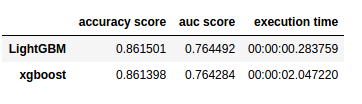
In a recent blog, Analytics Vidhya compares the inner workings as well as the predictive accuracy of the XGBOOST algorithm to an upcoming boosting algorithm: Light GBM. The blog demonstrates a stepwise implementation of both algorithms in Python. The table below reflects the main conclusion of the comparison: Although the algorithms are comparable in terms of their predictive performance, light GBM is much faster to train. With continuously increasing data volumes, light GBM, therefore, seems the way forward.

Laurae also benchmarked lightGBM against xgboost on a Bosch dataset and her results show that, on average, LightGBM (binning) is between 11x to 15x faster than xgboost (without binning):

View interactively online: https://plot.ly/~Laurae/9/

However, the differences get smaller as more threads are used due to thread inefficiencies (idle-time increases because threads are not scheduled a next task fast enough).

Light GBM is also available in R:

devtools::install_github("Microsoft/LightGBM", subdir = "R-package")

Neil Schneider tested the three algorithms for gradient boosting in R (GBM, xgboost, and lightGBM) and sums up their (dis)advantages:

  • GBM has no specific advantages but its disadvantages include no early stopping, slower training and decreased accuracy,
  • xgboost has demonstrated successful on kaggle and though traditionally slower than lightGBM, tree_method = 'hist' (histogram binning) provides a significant improvement.
  • lightGBM has the advantages of training efficiency, low memory usage, high accuracy, parallel learning, corporate support, and scale-ability. However, its’ newness is its main disadvantage because there is little community support.

Outliers 101

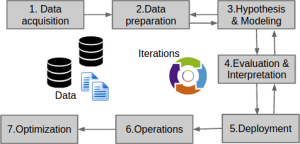
Data Science Project Life-cycle
Data science project cycle according to http://www.DataScienceCentral.com

Data preparation forms a large part of every data science project. Claims go to extremes, stating that 80-95% of the workload for data scientists consists of data preparation.

Outlier detection is one of the actions that make up this preparation phase. It is the process by which the analyst takes a closer look at the data and observes whether there are data points that behave differently. Such anomalies we call outliers and depending on the nature of the outlier the analyst might (not) want to handle them before continuing on to the modeling phase.

Outliers exist for several reasons, including:

  • The data may be incorrect.
  • The data may be missing but has not been registered as such.
  • The data may belong to a different sample.
  • The data may have (more) extreme underlying distributions (than expected).

Moreover, there are various types of outliers:

  • Point outliers are individual data points that are different from the rest of the dataset. This is the most common outlier in practice. An example would be a person of 2.10 meters tall in a dataset of sampled population lengths.
  • Contextual outliers are individual data points that would not necessarily be outliers based on their value but are because of the combination of their value with their current context. An example would be an outside temperature of 25 degrees Celcius, which is not necessarily weird but is most definitely unusual during the December month.
  • Collective outliers are collections of data points that are collective different from the rest of the data sample. Again, the individual data points would not necessarily be outliers based on their individual value but are because of their values combined. An example would be a prolonged period of extreme drought. Where days without rain may not be outliers necessarily, a long stretch without precipitation can be considered an anomaly.

There is no rigid definition of what makes a data point an outlier. One could even state that determining whether or not a data point is an outlier is a quite subjective exercise. Nevertheless, there are multiple approaches and best practices to detecting (potential) outliers.

  • Univariate outliers: When a case or data point has an extreme value on a single variable, we refer to it as a univariate outlier. Standardized values (Z-scores) are a frequently used method to detect univariate outliers on continuous variables. However, here the researcher will have to determine a certain threshold. For example, (-)3.29 is frequently used, where data points whose Z-value lies beyond this value are considered outliers. Here, chances would be 0.005%, or 1 in 2000, of obtaining this value if the variable follows a normal distribution. As you can see, the larger the dataset, the more likely you are to find such extreme values.
  • Bi- & multivariate outliers: A combination of unusual values on multiple variables simultaneously is referred to as a multivariate outlier. Here, a bivariate outlier is an outlier based on two variables. Normally you’d first check and handle univariate outliers, before turning to bi- or multivariate outliers. The process here is somewhat more complicated than for univariate outliers, and there are multiple approaches one can take (e.g. distance, leverage, discrepancy, influence). For example, you can look at the distance of each data point in the multivariate space (X1 to Xp) compared to the other data points in that space. If the distance is larger than a certain threshold, the data point can be considered a multivariate outlier, as it is that much different from the rest of the data considering multiple variables simultaneously.
  • Visualization: In trying to detect univariate outliers, data visualizations may come in handy. For example, histograms or frequency distributions will quickly demonstrate any data point that has unusually high or low values. Boxplots can similarly hint at values that fall only just outside of the expected range or are really extreme outliers. Boxplots combine visualization with model-based detected.
  • Model-based: Apart from the above-mentioned standardization with Z-values, there are multiple model-based methods for outlier detection. Most assume that the data follows a normal or Gaussian distribution, and hence identify which data points are unlikely based on the data’s mean and standard deviation. Examples are Dixon’s Q-test, Tukey’s test, Thompson Tau test, and Grubb’s test.
  • Grouped data: If there is a grouping variable involved in the analysis (e.g., logistic regression, analyses of variance) then the data of each group can best be assessed for outliers separately. What can be considered an outlier in one group is not necessarily an unusual observation in a different group. If the analysis to be performed does not contain a grouping variable (e.g., linear regression, SEM), then the complete dataset can be assessed for outliers as a whole.

There are several ways to handle outliers:

  • Keep them as is.
  • Exclude the data point (i.e., censoring/trimming/truncating).
  • Replace the data point with a missing value.
  • Replace the data point by the nearest ‘regular’ value (i.e., Winsoring).
  • Run models both with and without outliers.
  • Run model corrections within the analysis (only possible in specific models)

There are several reasons why you may not want to deal with outliers: 

  • When taking a large sample, outliers are part of what one would expect.
  • Outliers may be part of the explanation for the phenomena under investigation
  • Several machine learning and modeling techniques are robust to outliers or may be able to correct for them.

To end on a light note, Malcolm Gladwell wrote a wonderful book called Outliers. In it, he examines the factors for personal success; the reasons why “outliers” such as Bill Gates have become so stinkingly wealthy. He goes to show that these successful people are not necessarily random anomalies or outliers, but that there are perfectly sensible explanations for their success.


References and further reading:

AI at P&G and American Express

HBR frequently features articles that elaborate on how management approaches are changing as a response to the rise of analytics. Authors Thomas Davenport and Randy Bean notice that “there is a tendency with any new technology to believe that it requires new management approaches, new organizational structures, and entirely new personnel.” This is not true they claim, and they continue to provide “two good examples of combining well-established practices with cognitive technology to achieve business success: Procter &Gamble and American Express. These two companies employ several (seemingly) best practices that prove successful in the transition to the digital age:

  • Build on current strengths: Current analytical personnel can (easily) be trained to work with machine learning techniques. Cognitive technology and AI are not so much a new domain, as they are extensions of applied statistics.
  • Focus on talent: Build your data science talent pool by combining internal development and mobility with external hiring.
  • Do it yourself: It is often more effective and cost-efficient to develop analytical capabilities internally, than to partner up with consultants/vendors.
  • A customer focus: Focus on win-win applications first, those which create value for the organization as well as the customers.
  • Augmentation, not automation: Focus should not be on cutting labor costs (automating jobs), but on creating human-AI synergies (augmenting jobs).

Read the full article here.

Expanding the methodological toolbox of HRM researchers

Expanding the methodological toolbox of HRM researchers

Update 26-10-2017: the paper has been published open access and is freely available here: http://onlinelibrary.wiley.com/doi/10.1002/hrm.21847/abstract.  

The HR technology landscape is evolving rapidly and with it, the HR function is becoming more and more data-driven (though not fast enough, some argue). HRM research, however, is still characterized by a strong reliance on general linear models like linear regression and ANOVA. In our forthcoming article in the special issue on Workforce Analytics of Human Resource Management, my co-authors and I argue that HRM research would benefit from an outside-in perspective, drawing on techniques that are commonly used in fields other than HRM.

Our article first outlines how the current developments in the measurement of HRM implementation and employee behaviors and cognitions may cause the more traditional statistical techniques to fall short. Using the relationship between work engagement and performance as a worked example, we then provide two illustrations of alternative methodologies that may benefit HRM research:

Using latent variables, bathtub models are put forward as the solution to examine multi-level mechanisms with outcomes at the team or organizational level without decreasing the sample size or neglecting the variation inherent in employees’ responses to HRM activities (see figure 1). Optimal matching analysis is proposed as particularly useful to examine the longitudinal patterns that occur in repeated observations over a prolonged timeframe. We describe both methods in a fair amount of detail, touching on elements such as the data requirements all the way up to the actual modeling steps and limitations.


figure-bathtub-model
An illustration of the two parts of a latent bathtub model.


I want to thank my co-authors and Shell colleagues Zsuzsa Bakk, Vasileios Giagkoulas, Linda van Leeuwen, and Esther Bongenaar for writing this, in my own biased opinion, wonderful article with me and I hope you will enjoy reading it as much as we did writing it.

Link to pre-publication