Tag: r

Animated GIFs in R

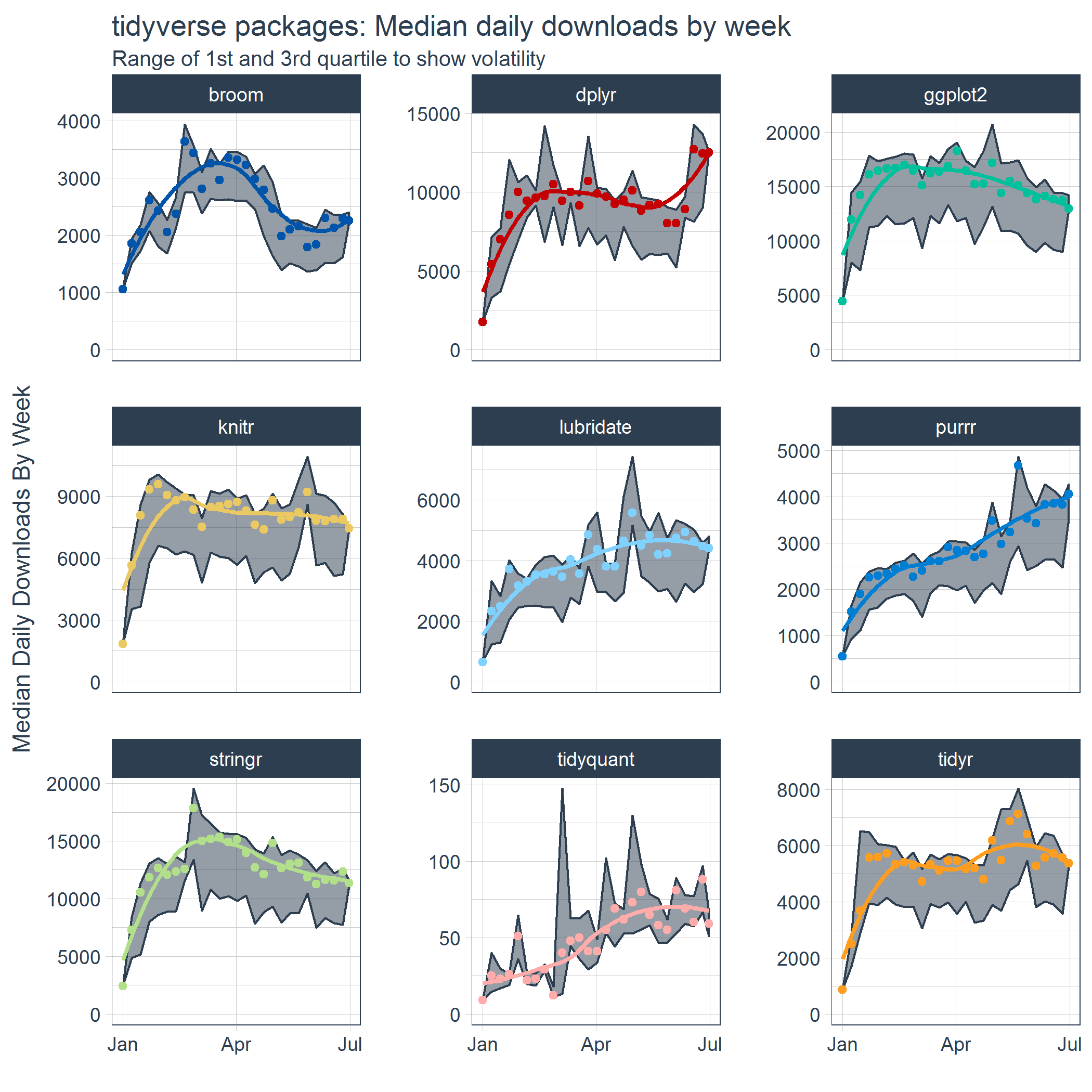
Sometimes, it can be of interest to examine how two variables correlate over time. For example, how people in a social network (e.g., an organization) behave or move over the course of time. However, it can be hard to display multi-dimensional data in a single plot. Instead of including time as an additional dimension and providing stakeholders with complicated 3-D plots, ggplot2 now has a support package called gganimate, which allows you to create custom GIFs. Particularly helpful when you seek to demonstrate trends over time.

See this recent post by Analytics Vidhya for a tutorial on the implementation.


Keras: Deep Learning in R or Python within 30 seconds

Keras is a high-level neural networks API that was developed to enabling fast experimentation with Deep Learning in both Python and R. According to its author Taylor Arnold: Being able to go from idea to result with the least possible delay is key to doing good research. The ideas behind deep learning are simple, so why should their implementation be painful?

Keras comes with the following key features:

  • Allows the same code to run on CPU or on GPU, seamlessly.
  • User-friendly API which makes it easy to quickly prototype deep learning models.
  • Built-in support for convolutional networks (for computer vision), recurrent networks (for sequence processing), and any combination of both.
  • Supports arbitrary network architectures: multi-input or multi-output models, layer sharing, model sharing, etc. This means that Keras is appropriate for building essentially any deep learning model, from a memory network to a neural Turing machine
  • Fast implementation of dense neural networks, convolution neural networks (CNN) and recurrent neural networks (RNN) in R or Python, on top of  TensorFlow or Theano.

R

R: Installation

The R interface to Keras uses TensorFlow™ as it’s underlying computation engine. First, you have to install the keras R package from GitHub:

devtools::install_github("rstudio/keras")

Using the install_tensorflow() function you can then install TensorFlow:

library(keras)
install_tensorflow()

This will provide you with a default installation of TensorFlow suitable for use with the keras R package. See the article on TensorFlow installation to learn about more advanced options, including installing a version of TensorFlow that takes advantage of Nvidia GPUs if you have the correct CUDA libraries installed.

R: Getting started in 30 seconds

Keras uses models to organize layers. Sequential models are the simplest structure, simply stacking layers. More complex architectures require the Keras functional API, which allows to build arbitrary graphs of layers.

Here is an example of a sequential model (hosted on this website):

library(keras)

model keras_model_sequential() 

model %>% 
  layer_dense(units = 64, input_shape = 100) %>% 
  layer_activation(activation = 'relu') %>% 
  layer_dense(units = 10) %>% 
  layer_activation(activation = 'softmax')

model %>% compile(
  loss = 'categorical_crossentropy',
  optimizer = optimizer_sgd(lr = 0.02),
  metrics = c('accuracy')
)

The above demonstrates the little effort needed to define your model. Now, you can iteratively train your model on batches of training data:

model %>% fit(x_train, y_train, epochs = 5, batch_size = 32)

Next, performance evaluation can be prompted in a single line of code:

loss_and_metrics %>% evaluate(x_test, y_test, batch_size = 128)

Similarly, generating predictions on new data is easily done:

classes %>% predict(x_test, batch_size = 128)

Building more complex models, for example, to answer questions or classify images, is just as fast.

Python

A step-by-step implementation of several Neural Network architectures with Keras in Python can be found on DataCamp. Similarly, one may use this quick cheatsheet to deploy the most basic models.

Additional resources:

Online Resource: Efficient R Programming

Public Service Motivation is a theorized attribute of government and non-governmental organization employment that explains why individuals have a desire to serve the public and link their personal actions with the overall public interest (Wikipedia, 2017). Academics are often said to score highly on this public service motivation and I can’t but admire those that share their knowledge freely with the public.

Colin Gillespie and Robin Lovelace are perfect examples of altruistic contributors to society. Their latest book – Efficient R Programming – is a definite recommendation for anybody who wants to power-up their R code, beginner or more advanced programmer. On top of this, the authors provide the digital version free-of-charge!

Gradient Descent 101

Gradient Descent is, in essence, a simple optimization algorithm. It seeks to find the gradient of a linear slope, by which the resulting linear line best fits the observed data, resulting in the smallest or lowest error(s). It is THE inner working of the linear functions we get taught in university statistics courses, however, many of us will finish our Masters (business) degree without having heard the term. Hence, this blog.

Linear regression is among the simplest and most frequently used supervised learning algorithms. It reduces observed data to a linear function (Y = a + bX) in order to retrieve a set of general rules, or to predict the Y-values for instances where the outcome is not observed.

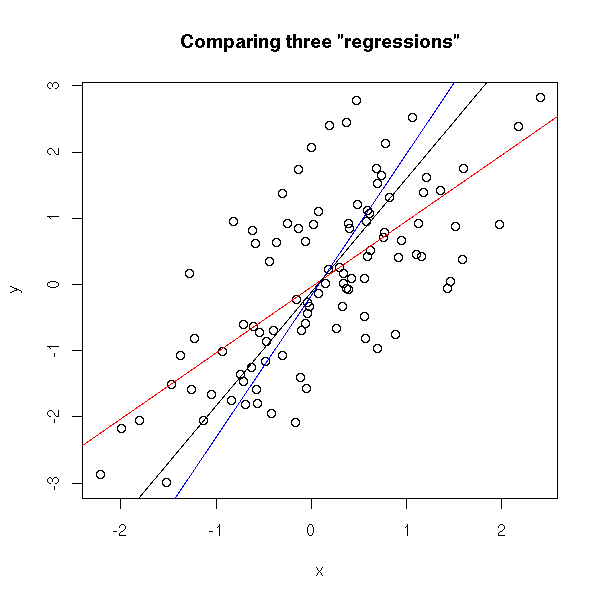
One can define various linear functions to model a set of data points (e.g. below). However, each of these may fit the data better or worse than the others. How can you determine which function fits the data best? Which function is an optimal representation of the data? Enter stage Gradient Descent. By iteratively testing values for the intersect (a; where the linear line intersects with the Y-axis (X = 0)) and the gradient (b; the slope of the line; the difference in Y when X increases with 1) and comparing the resulting predictions against the actual data, Gradient Descent finds the optimal values for the intersect and the slope. These optimal values can be found because they result in the smallest difference between the predicted values and the actual data – the least error.

Afbeeldingsresultaat voor linear regression plot r

The video below is part of a Coursera machine learning course of Stanford University and it provides a very intuitive explanation of the algorithm and its workings:

A recent blog demonstrates how one could program the gradient descent algorithm in R for him-/herself. Indeed, the code copied below provides the same results as the linear modelling function in R’s base environment.

gradientDesc  max_iter) { 
      abline(c, m) 
      converged = T
      return(paste("Optimal intercept:", c, "Optimal slope:", m))
    }
  }
}

# compare resulting coefficients
coef(lm(mpg ~ disp, data = mtcars)
gradientDesc(x = disp, y = mpg, learn_rate = 0.0000293, conv_theshold = 0.001, n = 32, max_iter = 2500000)

Although the algorithm may result in a so-called “local optimum”, representing the best fitting set of values (a & b) among a specific range of X-values, such issues can be handled but deserve a separate discussion.

Time Series Analysis 101

Time Series Analysis 101

A time series can be considered an ordered sequence of values of a variable at equally spaced time intervals. To model such data, one can use time series analysis (TSA). TSA accounts for the fact that data points taken over time may have an internal structure (such as autocorrelation, trend, or seasonal variation) that should be accounted for.

TSA has several purposes:

  1. Descriptive: Identify patterns in correlated data, such as trends and seasonal variations.
  2. Explanation: These patterns may help in obtaining an understanding of the underlying forces and structure that produced the data.
  3. Forecasting: In modelling the data, one may obtain accurate predictions of future (short-term) trends.
  4. Intervention analysis: One can examine how (single) events have influenced the time series.
  5. Quality control: Deviations on the time series may indicate problems in the process reflected by the data.

TSA has many applications, including:

  • Economic Forecasting
  • Sales Forecasting
  • Budgetary Analysis
  • Stock Market Analysis
  • Yield Projections
  • Process and Quality Control
  • Inventory Studies
  • Workload Projections
  • Utility Studies
  • Census Analysis
  • Strategic Workforce Planning

AlgoBeans has a nice tutorial on implementing a simple TS model in Python. They explain and demonstrate how to deconstruct a time series into daily, weekly, monthly, and yearly trends, how to create a forecasting model, and how to validate such a model.

Analytics Vidhya hosts a more comprehensive tutorial on TSA in R. They elaborate on the concepts of a random walk and stationarity, and compare autoregressive and moving average models. They also provide some insight into the metrics one can use to assess TS models. This web-tutorial runs through TSA in R as well, showing how to perform seasonal adjustments on the data. Although the datasets they use have limited practical value (for businesses), the stepwise introduction of the different models and their modelling steps may come in handy for beginners. Finally, business-science.io has three amazing posts on how to implement time series in R following the tidyverse principles using the tidyquant package (Part 1; Part 2; Part 3; Part 4).