Processingis a flexible software sketchbook and a language for learning how to code within the context of the visual arts. It’s open-source, there are many online materials, and the language itself is very accessible.
I recently stumbled upon 17-year-old Joseff Nic from Cardiff who has been making GIFs in Processing only since 2018, but which are turning out fantastic already. You can hire him here, and have a look at his Twitter, Tumbler or Drimble channels for the originals:
Some of Joseff’s work seems inspired by David Whyte, a graphic designer from Ireland. His portfolio is quite impressive as well, very visually pleasing, and you can hire him here.
If you’re interesting in learning Processing, Daniel Shiffman demonstrates how to create the most amazing things in Processing via his Youtube channel the Coding Train, which I’ve covered before.
I’ve seen some uses of reinforcement learning and generative algorithms for architectural purposes already, like these evolving blueprints for school floorplans. However, this new application called ArchiGAN blew me away!
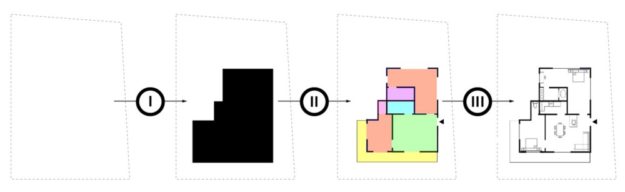
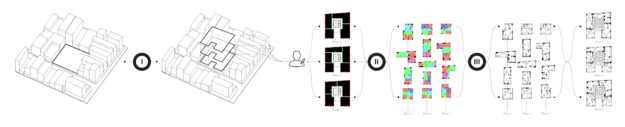
ArchiGAN (try here) was made by Stanislas Chaillou as a Harvard master’s thesis project. The program functions in three steps:
building footprint massing
program repartition
furniture layout
Stanislas’ three generation steps
Each of these three steps uses a TensorFlow Pix2Pix GAN-model (Christopher Hesse’s implementation) in the back-end, and their combination makes for a entire apartment building “generation stack” — according to Stanislas — which also allows for user input at each step.
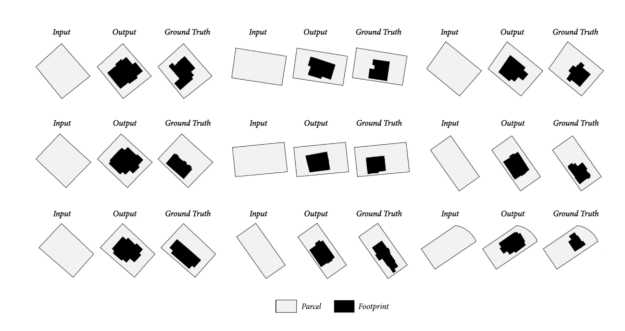
The design of a building can be inferred from the piece of land it stands on. Hence, Stanislas fed his first model using GIS-data (Geographic Information System) from the city of Boston in order to generate typical footprints based on parcel shapes.
The inputs and outputs of model I
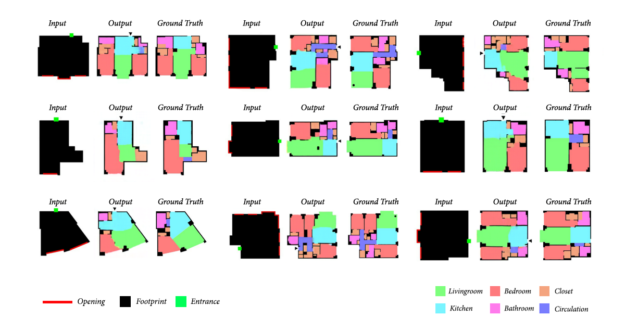
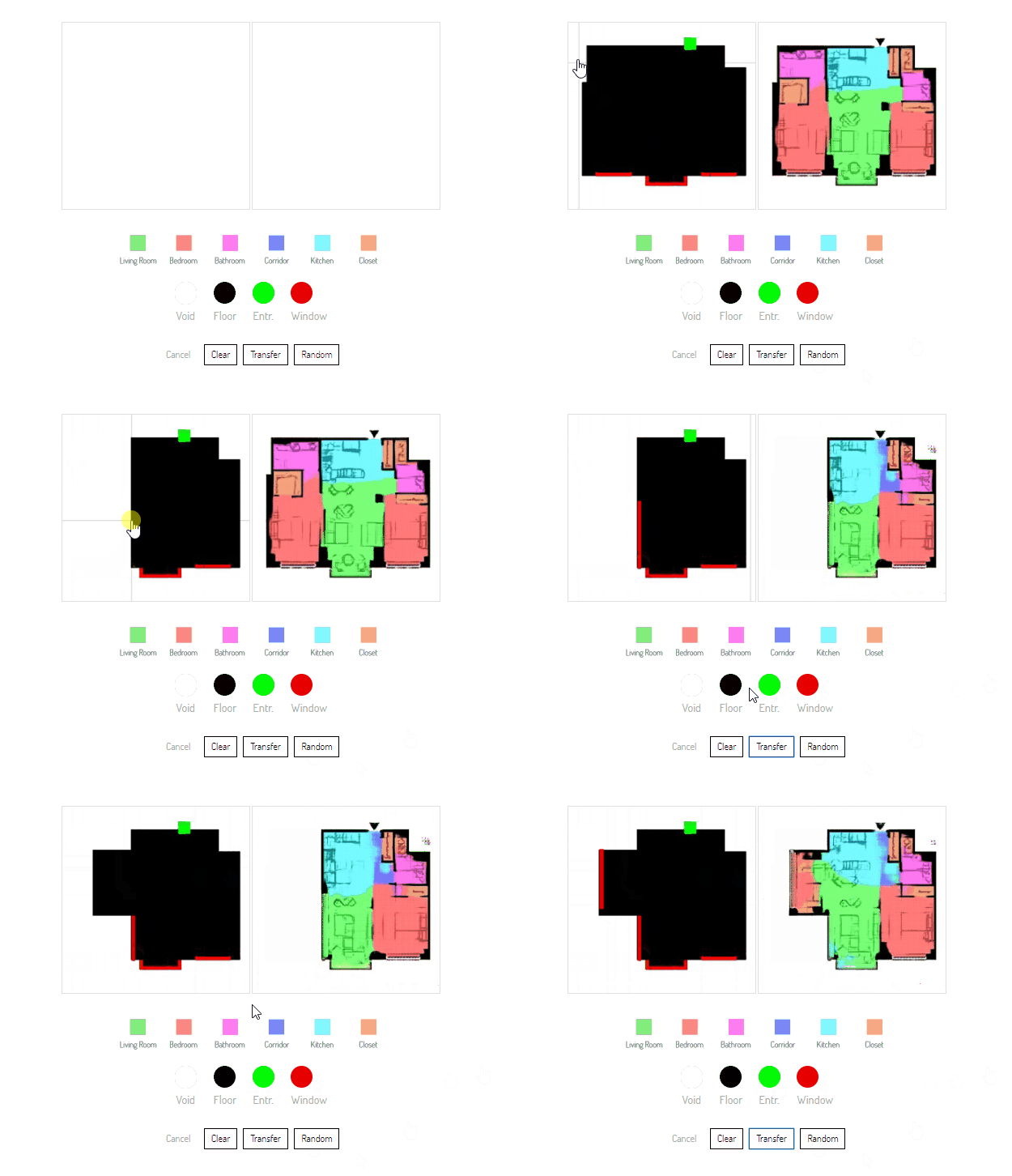
Stanislas’ second model was responsible for repartition and fenestration (the placement of windows and doors). This GAN took the footprint of the building (the output of model I) as input, along with the position of the entrance door (green square), and the positions of the user-specified windows.
Stanislas used a database of 800+ plans of apartments for training. To visualize the output, rooms are color-coded and walls and fenestration are blackened.
The inputs and outputs of model II
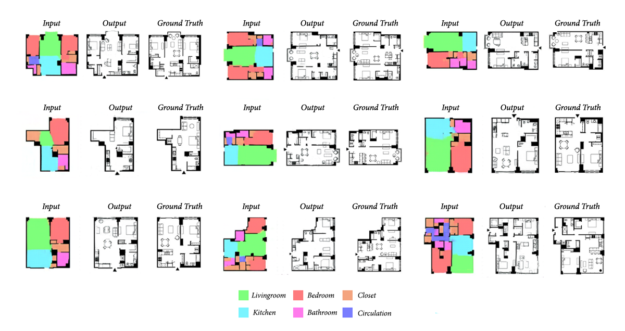
Finally, in the third model, the rooms are filled with appropriate furniture. What training data Stanislas has used here, he did not specify in the original blog.
The inputs and outputs of model III
Now, to put all things together, Stanislas created a great interactive tool you can play with yourself. The original NVIDEA blog contains some great GIFs of the tool being used:
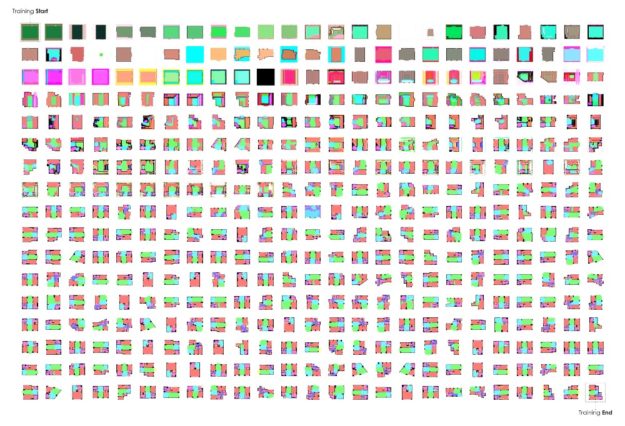
Stanislas’ GAN-models progressively learned to design rooms and realistically position doors and windows. It took about 250 iterations to get some realistic floorplans out of the algorithm. Here’s how an example learning sequence looked like:
Visualization of the training process
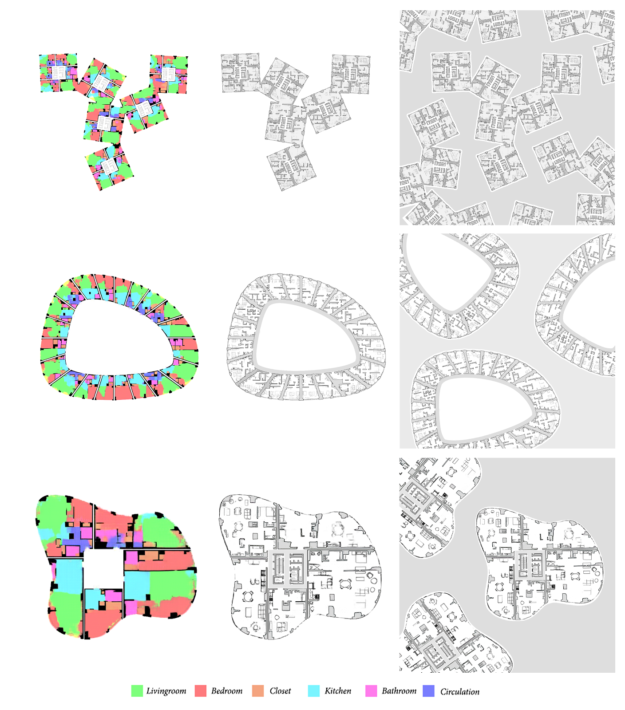
Now, Stanislas was not done yet. He also scaled the utilization of GANs to design whole apartment buildings. Here, he chains the models and processes multiple units as single images at each step.
Generating whole appartment blocks using ArchiGAN
Stanislas did other cool things to improve the flexibility of his ArchiGAN models, about which you can read more in the original blog. Let these visuals entice you to read more:
ArchiGAN scaled to handle whole appartment blocks and neighborhoods.
I believe a statistical approach to design conception will shape AI’s potential for Architecture. This approach is less deterministic and more holistic in character. Rather than using machines to optimize a set of variables, relying on them to extract significant qualities and mimicking them all along the design process represents a paradigm shift.
I am so psyched about these innovative applications of machine learning, so please help me give Stanislas the attention and credit he deserved.
Currently, Stanislas is Data Scientist & Architect at Spacemaker.ai. Read more about him in his NVIDEA developer bio here. He recently published a sequence of articles, laying down the premise of AI’s intersection with Architecture. Read here about the historical background behind this significant evolution, to be followed by AI’s potential for floor plan design, and for architectural style analysis & generation.
I came across this 1999-2003 e-book by Eric Raymond, on the Art of Unix Programming. It contains several relevant overviews of the basic principles behind the Unix philosophy, which are probably useful for anybody working in hardware, software, or other algoritmic design.













 paulvanderlaken.com