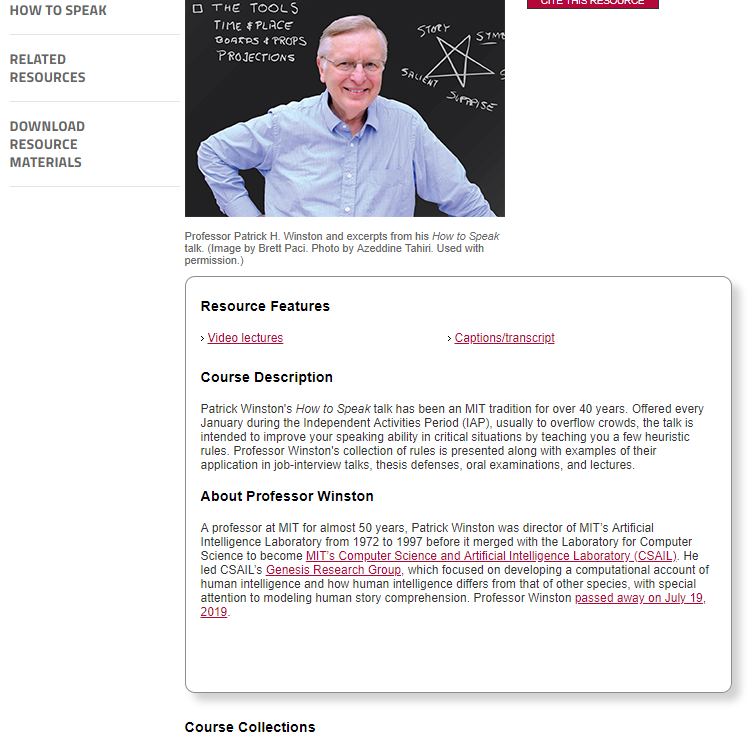
Patrick Winston was a professor of Artificial Intelligence at MIT. Having taught with great enthusiasm for over 50 years, he passed away past June.
As a speaker [Patrick] always had his audience in the palm of his hand. He put a tremendous amount of work into his lectures, and yet managed to make them feel loose and spontaneous. He wasn’t flashy, but he was compelling and direct.
I’ve written about Patrick’s MIT course on Artificial Intelligence before, as all 20+ lectures have been shared open access online on Youtube. I’ve worked through the whole course in 2017/2018, and it provided me many new insights into the inner workings of common machine learning algorithms.
Now, I stumbled upon another legacy of Patrick that has been opened up as of December 20th 2019. A lecture on “How to Speak” – where Patrick explains what he think makes a talk enticing, inspirational, and interesting.
Patrick Winston’s How to Speak talk has been an MIT tradition for over 40 years. Offered every January, the talk is intended to improve your speaking ability in critical situations by teaching you a few heuristic rules.
That’s all I’m going to say about it, you should have a look yourself! If you don’t apply these techniques yet, do try them out, they will really upgrade your public speaking effectiveness:
Typography plays a crucial role in design and finding the right font can take a few minutes or a few days. According to Vijay Verma, every font has specific design intent, communicates certain attributes. Fortunately, there are many (free) online libraries to help you these days, such as Google Fonts, MyFonts, Lineto, TypeAtelier, or TypeMates.
Geometric fonts
Geometric fonts are sans-serif typefaces building on geometric shapes like near-perfect circles and squares.
Today many technology brands currently deploy geometric fonts that represent minimalism, simplicity, and cleanliness, like — Product Sans by Google, Cereal by Airbnb etc.
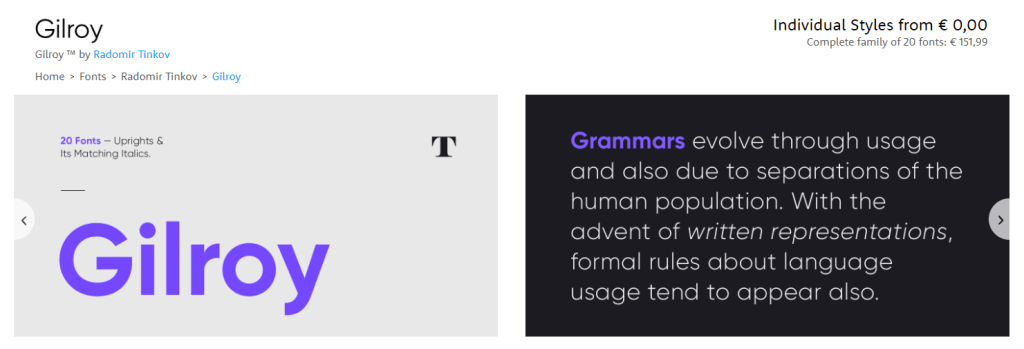
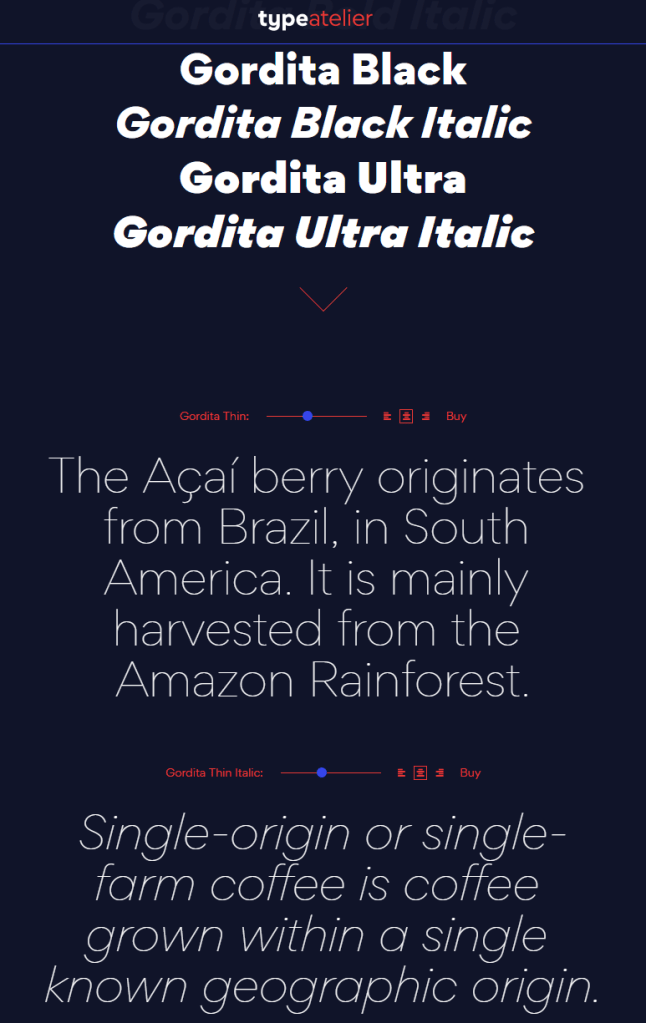
Design experts argue (here, here) that the geometric fonts below will work very well in modern user interfaces. These fonts are used among others by IKEA, Spotify, NASA, AirBnB, Volkswagen, Apple, Marvel, and Snapchat. Can you guess which is which?
You can click the images to visit the source pages.
Although very aesthetically pleasing, some of these fonts can be pretty expensive if you’re just hobbying. While there are many more fonts out there that may be perfectly free.
Do have a look atGoogle Fonts, as they provide nearly a 1000 pretty interesting typefaces, all for free!
Moreover, if you’re specifically looking for a geometric font, have a look at these 18 free geometric typefaces!
Over the course of last week, I built a Python program that scrapes quotes from Goodreads.com in a tidy format. For instance, these are the first three results my program returns when scraping for the tag robot:
Quote
author
source
likes
tags
Goodbye, Hari, my love. Remember always–all you did for me.
Isaac Asimov
Forward the Foundation
33
[‘asimov’, ‘foundation’, ‘human’, ‘robot’]
Unfortunately this Electric Monk had developed a fault, and had started to believe all kinds of things, more or less at random. It was even beginning to believe things they’d have difficulty believing in Salt Lake City.
As it’s bio reads, ArtificialStupidity is a highly sentient AI intelligently matching quotes and comics through state-of-the-art robotics, sophisticated machine learning, and blockchain technology.
Basically, every 15 minutes, a Python script is triggered on my computer (soon on my Raspberry Pi 4). Each time it triggers, this script generates a random number to determine whether it should post something. If so, the script subsequently generates another random number to determine what is should post: a quote, a comic, or both. Behind the scenes, some other functions add hastags and — voila — a tweet is born!
(An upcoming post will elaborate on the inner workings of my ArtificialStupidity Python script)
More often than not, ArtificialStupidity produces some random, boring tweet:
Now, in order to compile these tweets, my computer hosts two databases. One containing data- and tech- related comics; the other a variety of inspirational quotes. Each time the ArtificialStupidity bot posts a tweet, it draws from one or both of these datasets randomly. With, on average, one post every couple hours, I thus need several hundreds of items in these databases in order to prevent repetition — which is definitely not entertaining.
Up until last week, I manually expanded these databases every week or so. Adding new comics and quotes as I encountered them online. However, this proved a tedious task. Particularly for the quotes, as I set up the database in a specific format (“quote” – author). In contrast, websites like Goodreads.com display their quotes in a different format (e.g., “quote” ― author, source \n tags \n likes). Apart from the different format, the apostrophes and long slash also cause UTF-8 issues in my Python script. Hence, weekly reformatting of quotes proved an annoying task.
Up until this week!
While reformatting some bias-related quotes, I decided I’d rather invest 10 times more time developing my Python skills, than mindlessly reformatting quotes for a minute longer. So I started coding.
I am proud to say that, some six hours later, I have compiled the script below.
I’ll walk you through it’s functions.
So first, I import the modules/packages I need. Note that you will probably first have to pip install package-name on your own computer!
argparse for the command-line interface arguments
re for the regular expressions to clean quotes
bs4 for its BeautifulSoup for scraping website content
urllib.request for opening urls
csv to save csv files
os for directory pathing
import argparse
import re
from bs4 import BeautifulSoup
from urllib.request import urlopen, Request
import csv
import os
Next, I set up the argparse.ArgumentParser so that I can use my API using the command line. Now you can call the Python script using the command line (e.g., goodreads-scraper.py -t 'bias' -p 3 -q 80), and provide it with some arguments. No arguments are necessary. Most have sensible defaults. If you forget to provide a tag you will be prompted to provide one as the script runs (see later).
ap = argparse.ArgumentParser(description='Scrape quotes from Goodreads.com')

ap.add_argument("-t", "--tag",
                required=False, type=str, default=None,
                help="tag (topic/theme) of quotes to scrape")
ap.add_argument("-p", "--max_pages",
                required=False, type=int, default=10,
                help="maximum number of webpages to scrape")
ap.add_argument("-q", "--max_quotes",
                required=False, type=int, default=100,
                help="maximum number of quotes to scrape")

args = vars(ap.parse_args())
Now, the main function for this script is download_goodreads_quotes. This function contains many other functions within. You will see I set my functions up in a nested fashion, so that functions which are only used inside a certain scope, are instantiated there. In regular words, I create the functions where I use them.
First, download_goodreads_quotes creates download_quotes_from_page. In turn, download_quotes_from_page creates and calls compile_url — to create the url — get_soup — to download url contents — extract_quotes_elements_from_soup — to do just that — and extract_quote_dict. This latter function is the workhorse, as it takes each scraped quote element block of HTML and extracts the quote, author, source, and number of likes. It cleans each of these data points and returns them as a dictionary. In the end, download_quotes_from_page returns a list of dictionaries for every quote element block on a page.
Second, download_goodreads_quotes creates and calls download_all_pages which calls download_quotes_from_page for all pages up to max_pages, or up to the page that no longer returns quote data, or up to the number of max_quotes has been reached. All gathered quote dictionaries are added to a results list.
Additionally, I use two functions to actually store the scraped quotes: recreate_quote turns a quote dictionary into a quote (I actually do not use the source and likes, but maybe others want to do so); save_quotes calls this recreate quote for the list of quote dictionaires it’s given, and stores them in a csv file in the current directory.
Update 2020/04/05: added UTF-8 encoding based on infoguild‘s comment.
def recreate_quote(dict):
    return f'"{dict.get("quote")}" - {dict.get("author")}'

def save_quotes(quote_data, tag):
    save_path = os.path.join(os.getcwd(), 'scraped' + '-' + tag + '.txt')
    print('saving file')
    with open(save_path, 'w', encoding='utf-8') as f:
        quotes = [recreate_quote(q) for q in quote_data]
        for q in quotes:
            f.write(q + '\n')
Finally, I need to call all these functions when the user runs this script via the command line. That’s what the following code does. If looks at the provided (default) arguments, and if no tag is provided, the user is prompted for one. Next Goodreads.com is scraped using the earlier specified download_goodreads_quotes function, and the results are saved to a csv file.
if __name__ == '__main__':
    tag = args['tag'] if args['tag'] != None else input('Provide tag to search quotes for: ')
    mp = args['max_pages']
    mq = args['max_quotes']
    result = download_goodreads_quotes(tag, max_pages=mp, max_quotes=mq)
    save_quotes(result, tag)
Use
If you paste these script pieces sequentially in a Python script / text file, and save this file as goodreads-scraper.py. You can then run this script using your command line, like so goodreads-scraper.py -t 'bias' -p 3 -q 80 where the text after -t is the tag you are searching for, -p is the number of pages you want to scrape, and -q is the maximum number of quotes you want the program to scrape.
Let me know what your favorite quote is once you get it running!
To-do
So this is definitely still work in progress. Some potential improvements I want to integrate come directly to mind:
Avoid errors for quotes including newlines, or
Write code to extract only the text of the quote, instead of the whole text of the quote element.
Build in concurrency using futures (but take care that quotes are still added the results sequentially. Maybe we can already download the soups of all pages, as this takes the longest.
Write a function to return a random quote
Write a function to return a random quote within a tag
Implement a lower limit for the number of likes of quotes
Refactor the download_all_pages bit.
Add comments and docstrings.
Feedback or tips?
I have been programming in R for quite a while now, but Python and software development in general are still new to me. This will probably be visible in the way I program, my syntax, the functions I use, or other things. Please provide any feedback you may have as I’d love to get better!
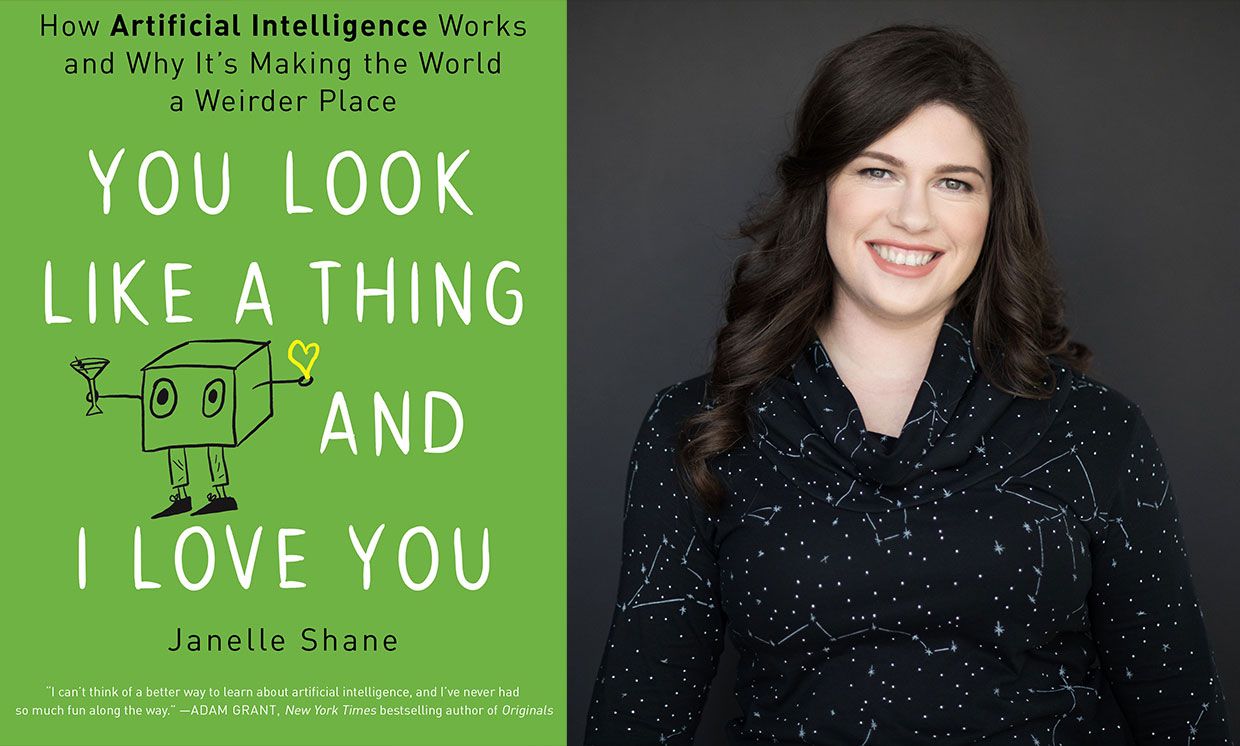
The following are my summary and take-aways from Janelle Shane’s 2019 book named You look like a thing and I love you. Most of the below are excerpts from Janelle’s book, combined, or rewritten by me. For the sake of copyright, just consider everything Janelle’s : )
AI weirdness
You look like a thing and I love you is about AI. More specifically, the book is about what AI can and can not do. And how and why AI often fails in miserably hilareous ways.
Janelle has spend her time foing fun experiments with AI. In this book, she shares those experiments along with many real life examples of AIs in practice. While explaining the technical details behind these AIs in an accesible though technically correct way, she informs the reader where, how, and why AIs fail.
Janelle took AIs out of their comfort zone and it produced some hilareously weird results. She proposes five principles of AI Weirdness:
The danger of AI is not that it’s too smart, but that it’s not smart enough
AI has the approximate brainpower of a worm
AI does not really understand the problem you want it to solve
But: AI will do exactly what you tell it to. Or at least it will try its best.
And AI willt ake the path of the least resistance
Definitions: What is (not) AI?
If it seems like AI is everywhere, it’s partly because Artificial Intelligence means lots of things, depending on whether you’re reading science fiction or selling a new app or doing academic research.
To spot an AI in the wild, it’s important to know the difference between machine learning algorithms (what Janelle calls AI in her book) and traditional, rules-based programs.
To solve a problem with a rules-based program, you have to know every step required to complete the program’s task and how to describe each one of those steps. But a machine learning algorithm figures out the rules for itself via trail and error, gauging its success on goals the programmer has specified. As the AI tries to reach this goal, it can discover rules and correlations that the programmer didn’t even know existed. This is what makes AIs attractive problem solvers and is particularly handy if the rules are really complicated or just plain mysterious.
Sometimes an AI’s brilliant problem-solving rules actually rely on mistaken assumptions. Rules that served it well in training but fail miserably when it encountered the real world. While training errors are common in complex AIs, the consequences of these mistakes can be serious.
It’s often not easy to tell when AIs make mistakes. Since we don’t write the rules, they come up with their own, and they don’t write them down or explain them the way a human would.
The difference between succesful AI problem solving and failure usually has a lot to do with the suitability of the task for an AI solution. And there are plenty of tasks for which AI solutions are more efficient than human solutions. But there are also plenty of cases where things go miserably wrong.
Janelle proposes four signs of “AI Doom”, contexts where machine learning will not produce the desired results:
The problem is too hard, broad, or complex
The problem is not what we thought it was
There are sneaky shortcuts to solving the problem
The AI tried to solve the problem learning from flawed data
Programming an AI is almost more like teaching a child than programming a computer.
Explaining how AI works
In her book, Janelle takes us through many example problems which she or others tried to solve using AIs. These example problems are increasingly hilareous, but I assure you that they are technically and didactically sound:
Playing tic-tac-toe
Managing a cockroach farm
Riding a bicycle
Rating sandwich deliciousness
Tossing a sandwich into a wall
Guiding people through a hallway
Answering questions regarding photo’s
Categorizing doodles
Categorizing fish
Tossing pancakes
Autonomous walking
Autonomous driving
Playing Pacman
The amazing thing is these ridiculous example problems actually serve a purpose. They are used to explain different algorithms and their applications, strengths, and limitations! Janelle covers a wide variety of algorithms in such a way that anyone new to machine learning would understand, while people with some experience will still be amused.
Janelle talks about artificial neural networks, random forests, and markov chains. Moreover, she explains how activation functions, recurrancy and long short-term memory, evolutionary algorithms and gradient descent work. And all in understandable though technically correct language.
Janelle herself seems particularly fond of generative algorithms. She’s elaborates on having deployed recurrent neural nets, generative adversial networks, and markov chains for a wide variety of generative tasks. In the book, Jabekke explains what went well and went wrong when coming up with new and original…
Janelle’s book is lingered with examples of failing AI. As a matter of fact, the whole book seems like an ode to how machine learning can and will inevitably fail. Particularly in the latter chapters, Janelle covers many limitations of and issues with AI in much detail:
I have yet to come across a book that explain AI in this much detail and in a manner as accessible and entertaining as Janelle Shane does in You look like a thing and I love you. Janelle makes machine learning and AI understandable for a wide public without passing on the deeper technical details. Taking a critical stance, she provides a good overview of the strenghts and weaknesses of AI, and a realistic outlook for the future to come. This book is not looking for sensation or hype, although reading it will be a most amusing experience for the more technical as well as the lay reader.
I highly recommend you reward yourself with a copy!
Robert Bosch is a professor of Natural Science at the department of Mathematics of Oberlin College and has found a creative way to elevate the travelling salesman problem to an art form.
For those who aren’t familiar with the travelling salesman problem (wiki), it is a classic algorithmic problem in the field of computer science and operations research. Basically, we want are looking for a mathematical solution that is cheapest, shortest, or fastest for a given problem. Most commonly, it is seen as a graph (network) describing the locations of a set of nodes (elements in that network). Wikipedia has a description I can’t improve on:
The Travelling Salesman Problem describes a salesman who must travel between N cities. The order in which he does so is something he does not care about, as long as he visits each once during his trip, and finishes where he was at first. Each city is connected to other close by cities, or nodes, by airplanes, or by road or railway. Each of those links between the cities has one or more weights (or the cost) attached. The cost describes how “difficult” it is to traverse this edge on the graph, and may be given, for example, by the cost of an airplane ticket or train ticket, or perhaps by the length of the edge, or time required to complete the traversal. The salesman wants to keep both the travel costs, as well as the distance he travels as low as possible.
Here’s a visual representation of the problem and some algorithmic approaches to solving it:
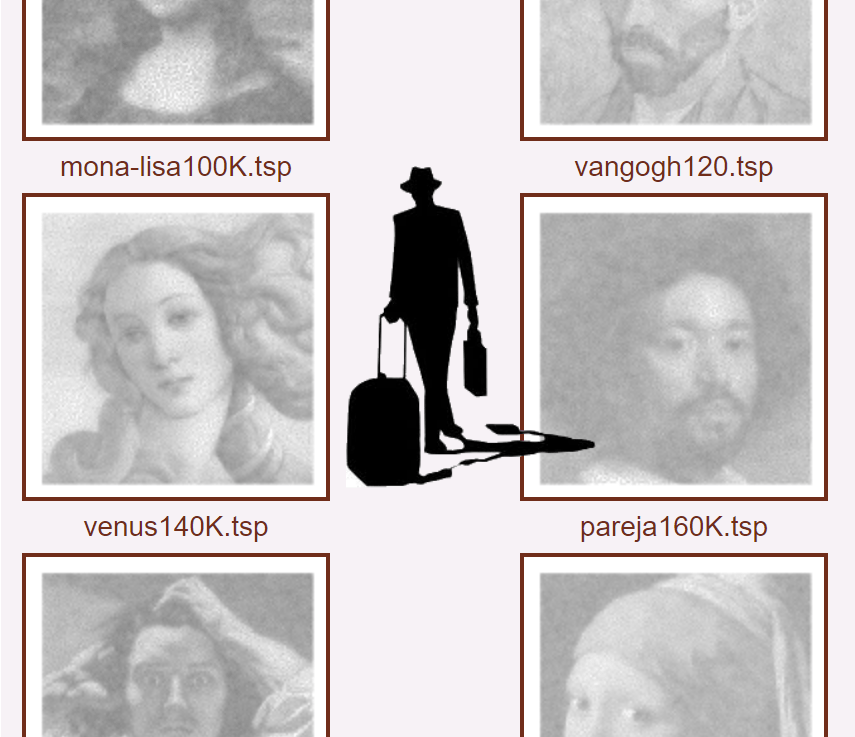
Now, Robert Bosch has applied the traveling salesman problem to well-know art pieces, trying to redraw them by connecting a series of points with one continuous line. Robert even turned it into a challenge so people can test out how well their travelling salesman algorithms perform on, for instance, the Mona Lisa, or Vincent van Gogh.
Just look at the detail on these awesome Dutch classics:
P.S. Why do Brits and Americans have this spelling feud?! As a non-native, I never know what to pick. Should I write modelling or modeling, travelling or traveling, tomato or tomato? I got taught the U.K. style, but the U.S. style pops up whenever I google stuff, so I am constantly confused! Now I subconciously intertwine both styles in a single text…
Reddit is a treasure trove of random stuff. However, every now and then, in the better groups, quite valuable topics pop up. Here’s one I came across on r/statistics:
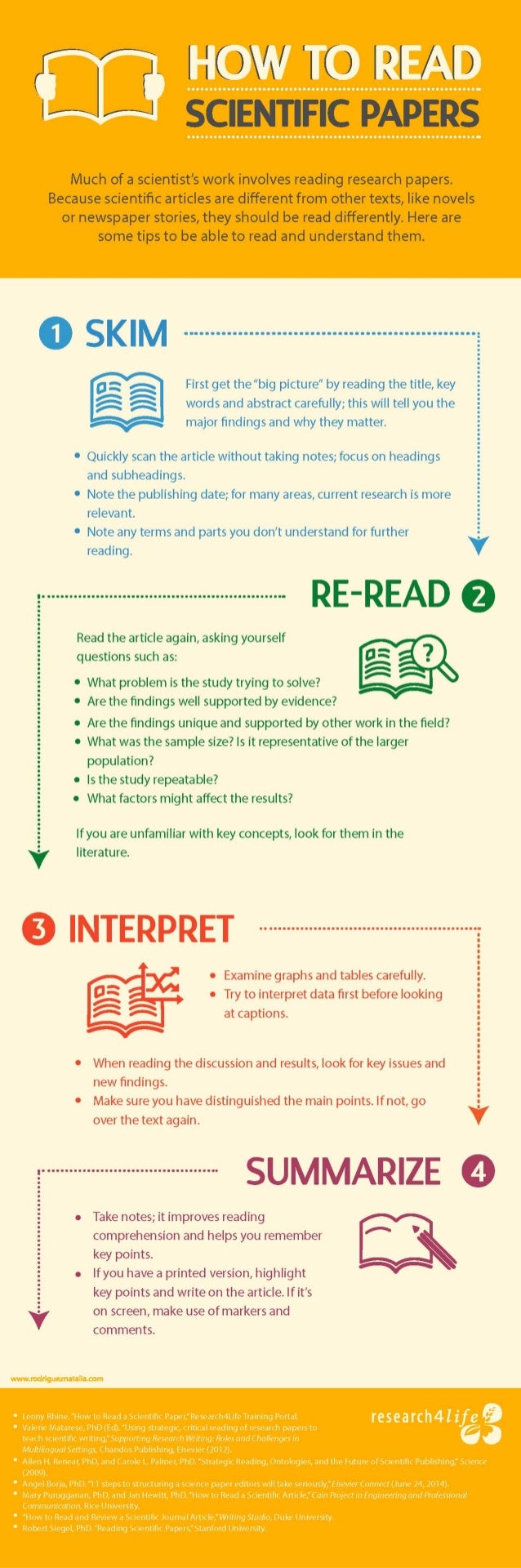
Particularly the advice by grandzooby seemed worth a like, and he linked to several useful resources which I’ve summarized for you below.
An 11-step guide to reading a paper
Jennifer Raff — assistant professor at the University of Kansas — wrote this 3-page guide on how to read papers. It elaborates on 11 main pieces of advice for reading academic papers:
Begin by reading the introduction, skip the abstract.
Identify the general problem: “What problem is this research field trying to solve?”
Try to uncover the reason and need for this specific study.
Identify the specific problem: “What problems is this paper trying to solve?”
Identify what the researchers are going to do to solve that problem
Read & identify the methods: draw the studies in diagrams
Read & identify the results: write down the main findings
Determine whether the results solve the specific problem
Read the conclusions and determine whether you agree
Mary Purugganan and Jan Hewitt of Rice University propose slightly different steps for reading academic papers. Though they seem more general pointers to keep in mind to me:
Skim the article and identify its structure
Distinguish its main points
Generate questions before and during reading
Draw inferences while reading
Take notes while reading
Regarding the note taking Mary and Jan propose the following template which may proof useful:
Citation:
URL:
Keywords:
General subject:
Specific subject:
Hypotheses:
Methodology:
Results:
Key points:
Context (in the broader field/your work):
Significance (to the field/your work):
Important figures/tables (description/page numbers):
References for further reading:
Other comments:
Scholars sharing their experiences
Science Magazine dedicated a long read to how to seriously read scientific papers, in which they asked multiple scholars to share their experiences and tips.
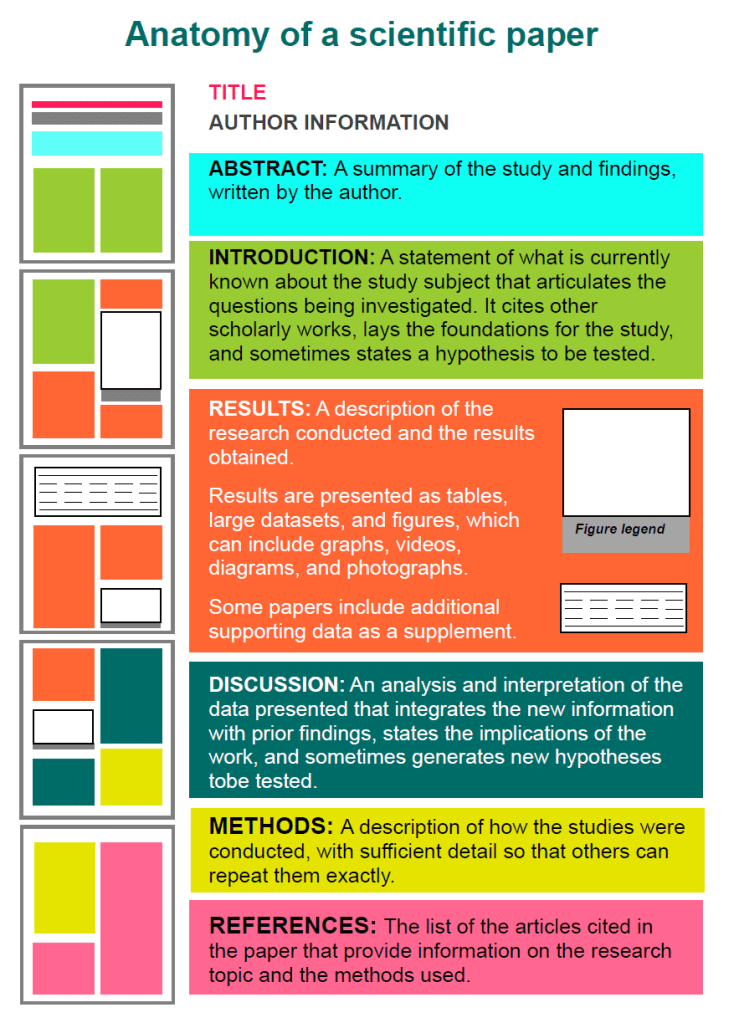
Anatomy of a scientific paper
This 13-page guide by the American Society of Plant Biologists was recommended by some, but I personally don’t find it as useful as the other advices here. Nevertheless, for the laymen, it does include a nice visualization of the anatomy of scientific papers:
This course gives you easy access to the invaluable learning techniques used by experts in art, music, literature, math, science, sports, and many other disciplines. We’ll learn about the how the brain uses two very different learning modes and how it encapsulates (“chunks”) information. We’ll also cover illusions of learning, memory techniques, dealing with procrastination, and best practices shown by research to be most effective in helping you master tough subjects.










 paulvanderlaken.com