Category: programming

“Wie is de Mol?” volgens Twitter: Deel 1 (s17e1)

Dit is een re-post van mijn Linked-In artikel van 10 januari 2017.
Deel 2 vind je hier.

TL;DR // Samenvatting

Om te achterhalen in welke mate kandidaten verdacht worden door het Nederlandse publiek heb ik 10,000+ #WIDM tweets gedownload en geanalyseerd. Hoewel niets is wat het lijkt, komt uit de tweets duidelijk naar voren dat bepaalde kandidaten zich in de ogen van Twitterend Nederland verdachter gedragen dan anderen. Het doel van deze blog(s) is tweedelig. Enerzijds hoop ik de lezer een voorbeeld te geven van hoe Twitter gegevens kunnen worden gebruikt en geanalyseerd. Anderzijds hoop ik te kunnen profiteren van de zogenoemde wisdom-of-the-crowd en op den duur te achterhalen wie er dit jaar aan het mollen is. Een voorproefje:

Introductie

Wie is de Mol?“, of WIDM in het kort, behoeft voor Nederlands publiek eigenlijk geen introductie. De spelshow loopt inmiddels 17 jaar en heeft een fanatieke achterban. Deze zelf-benoemde ‘molloten‘ houden ieder frame van iedere aflevering nauw in de gaten, achterhalen de meeste bizarre patronen en verzinnen de wildste theoriën. Afgelopen jaren zijn er zelfs uitgebreide analyses uitgevoerd op de kandidaten hun persoonlijke social media feeds om te achterhalen wie er mogelijk vervroegd terug in Nederland was. Tevens zijn er meerdere online fora, worden verdenkingen regelmatig gepollt, hebben twee NRC-redacteurs een wekelijkse bespreking en is er zelfs een mobile applicatiezodat je jouw vrienden kunt uitdagen.

‘Waarom dan deze blog?’ vraag je je misschien af. Wel, ik ben al enkele jaren een trouwe volger van de serie, maar mijn eigen verdenkingen zijn vaak verre van goed. Met deze analyses hoop ik inzicht te krijgen welke kandidaten het meest zijn opgevallen bij de kijker thuis. Tevens is programmeren mijn werk en hobby en was dit een goed excuus om een oud R-script weer eens af te stoffen. Deze Nederlandse versie van de blog bevat weinig details over de achterliggende code. Mocht je meer willen weten of het R script willen zien, lees dan vooral de Engelse versie of stuur een berichtje.

Aflevering 1: “… ZO GEDAAN”

De tweets downloaden

Dit is zeker niet de eerste blog over Twitter data analyse in RAndere blogs laten zien welke stappen je moet volgen om gegevens op een gestructureerde manier van Twitter te downloaden. Na deze stappen zelf te hebben uitgevoerd, heb ik een snelle zoektocht gedaan door de Twitter feeds over WIDM. De hashtag #WIDM werd in de meeste berichten gebruikt en leek dus een goed begin. Maandag 9 januari 2017 om 18:03 heb ik voor het laatst de data van Twitter gedownload. Op dat moment waren er iets minder dan twee dagen verstreken sinds aflevering 1 was uitgezonden. De 10.503 #WIDM tweets waren binnen 3 minuten gedownload waarna ik ze heb opgeschoond met een aantal regular expressions (hierover meer in de Engelse versie).

Analyse en resultaten

Met de data nu onder de knoppen kon het analyseren beginnen

Tijd van posten

Allereerst leek het van belang om te kijken wanneer de #WIDM tweets waren gepost. Aflvering 1 is duidelijk terug te zien in de onderstaande visualisatie, waar een grote piek zich precies bevindt rond de tijd van de uitzending afgelopen zaterdag. Helaas staat Twitter slechts downloads toe van tweets gedurende de afgelopen 9 dagen, dus in 2016 kon ik helaas niet veel zien.

Hashtags

Daarnaast leek het verstandig om na te gaan of ik andere gangbare hashtags over het hoofd had gezien. Zo ja, dan zou ik in vervolg analyses ook de data van andere hashtags kunnen downloaden .

# hashtags frequency
hashtags <- table(tolower(unlist(str_extract_all(tweets.df$text,'#\\S+\\b'))))
head(sort(hashtags,T),20)

           #widm         #moltalk        #widmtips      #wieisdemol        #widm2017 
           10272             1722             1248              360               91 
#etherdiscipline             #app            #npo1             #mol          #widm17 
              56               55               50               47               45 
          #promo             #dtv         #vincent          #oregon           #zinin 
              30               27               27               24               23 
           #2017     #chriszegers        #portland     #tunnelvisie       #ellielust 
              21               20               20               19               18

Naast de door mij gebruikte hashtag (#WIDM) werden #moltaks, #widmtips en #wieisdemol ook veelvuldig gebruikt. Ook Ellie Lust en Chris Zegers zijn nog steeds populair zo te zien.

Kandidaat vermeldingen

Het uiteindelijke doel dat ik voor ogen had was om een soort van thermometer of meetinstrument te programmeren waarmee ik in een oogopslag kon zien wie van de kandidaten het meest verdacht werd door Twitterend Nederland. Sommige tweets in de dataset bevatten inderdaad verdenkingen van bepaalde kandidaten en andere waren kort door de bocht mollen aan het benoemen. (Wat doet Jan Dino daar?)

head(tweets.text.clean[grepl('ik verdenk [A-Z]',tweets.text.clean)])
[1] " widm ik verdenk Sigrid omdat bij de executie  haar reactie erg geacteerd leek"
[2] "Oké  ik verdenk Jochem heel erg  widm" 

head(tweets.text.clean[grepl('[A-Z][a-z]+ is de mol',tweets.text.clean)],4)
[1] "Jeroen is de mol  widm"                                       
[2] "  Ik weet het zeker    Jandino is de mol  amoz  widm  moltalk"
[3] "Ik weet het zeker    Jandino is de mol  amoz  widm  moltalk"  
[4] "Net  widm teruggekeken  Ik zeg Sigrid is de mol  

Echter, er zijn veel verschillende manieren om met woorden te zeggen in hoeverre je iemand verdenkt. Daarnaast kunnen zinnen ontkenningen of zelf dubbele ontkenningen bevatten. Hoewel dit alles te programmeren valt, besloot ik om een simpelere route te bewandelen. Mijn theorie is dat kandidaten die zich meer verdacht gedragen tijdens de uitzendingen en kandidaten waarnaar meer hints verwijzen automatisch meer besproken worden op het internet. Indien deze theorie klopt, dan zou een relatief simpele telling van het aantal keer dat kandidaten worden genoemd in tweets voldoende zijn.Deze theorie is kort door de bocht, en ik ben zeker van plan om uitgebreidere analyses te draaien, maar voor nu heiligt het doel de middelen.

Zodoende heb ik mijn laptop met verschillende for-loops en if-statements opgedragen om ieder van de 10.000+ tweets te bekijken en te tellen hoe vaak ieder van de kandidaten in deze tweets werd genoemd. Handmatig zou dit dagen duren, maar de laptop bliepte triomfantelijk na enkele seconden. Zo beschikte ik over onder andere de volgende twee datasets:

> named
                Contestant Total Original BeforeEp DuringEp AfterEp
1           Diederik Jekel   358      201       16      128     214
2         Imanuelle Grives    96       65        5       43      48
3  Jeroen Kijk in de Vegte   517      335       12      218     287
4        Jochem van Gelder   157      124       15       73      69
5           Roos Schlikker   203      154        7       88     108
6    Sanne Wallis de Vries   255      194        3      106     146
7         Sigrid Ten Napel   135      102        7       65      63
8          Thomas Cammaert    97       69        5       45      47
9           Vincent Vianen   406      354       19      285     102
10      Yvonne Coldeweijer   148      109       16       66      66

> named.overtime
          Day Contestant Count Cumulative
       <date>      <chr> <chr>      <dbl>
1  2016-12-31   Diederik     0          0
2  2016-12-31  Imanuelle     0          0
3  2016-12-31     Jeroen     0          0
4  2016-12-31     Jochem     0          0
5  2016-12-31       Roos     1          1
6  2016-12-31      Sanne     0          0
7  2016-12-31     Sigrid     0          0
8  2016-12-31     Thomas     0          0
9  2016-12-31    Vincent     0          0
10 2016-12-31     Yvonne     0          0
# ... with 90 more rows

Alle tweets samengevoegd werd kandidaat Jeroen Kijk in de Vegte het meeste genoemd gedurende 9 dagen tweet-historie. Vincent Vianen werd echter vaker genoemd als men alleen de orginele tweets zou meerekenen.

Als we uitsplitsen naar het moment dat de tweets werden gepost wordt al snel zichtbaar dat Vincent vooral werd genoemd tijdens de aflevering.

Voor diegene die WIDM niet volgen: Vincent viel af deze eerste aflevering. Dit zou kunnen verklaren waarom hij zo veel Twitter-aandacht heeft gekregen gedurende de aflevering. Ook lijkt de WIDM productie de laatste jaren extra veel zendtijd te besteden aan de kandidaat die af gaat vallen. Als om de kijker op de verkeerde voet te zetten worden alle mogelijke molacties en rare opmerkingen van de toekomstige afvaller benadrukt tijdens de aflevering. Lang verhaal kort, wellicht is het interessant om de tweets gedurende de aflevering per minuut te volgen:

Het lijkt er op dat Vincent niet meer of minder werd besproken dan de andere kandidaten tot aan het laatste kwartier van de uitzending. Dit duidt erop dat hij wellicht niet zozeer als verdacht werd gezien door twitteraars, maar dat het weggeven van zijn vrijstelling in het laatste half uur (die toch al zou worden afgepakt) en zijn aankomende vertrek uit de serie, de tweets hebben veroorzaakt. Ook Roos lijkt een eindspurt te hebben genomen in het laatste kwartier van de uitzending, en Sanne pakt nog een snelle boost in de laatste paar minuten.

Tijdens de uitzending werd er stevig over Jeroen getweet, en dit zette zich door na de aflevering waar zijn naam wederom het meeste werd genoemd. Wellicht heb ik een verdachte handeling gemist die Twitterend Nederland wel is opgevallen? De wilde theorie over zijn verstandskiezen heb ik in ieder geval zeker gemist. Naast Jeroen werden Diederik en Sanne ook veelvuldig besproken na het slot van de aflevering. Thomas en Imanuelle, daarentegen, kregen erg weinig aandacht in het algemeen. Alle tweets bij elkaar opgeteld komen ze maar net aan de 100 vermeldingen de helft waarvan na de aflevering.

Vergeleken met een van de populaire WIDM polls, doen de resultaten van onze Twitter analyse het redelijk goed. De vier meest verdachte kandidaten volgens de poll vallen mooi samen met de vermeldingen op Twitter (nadat bekend was dat Vincent afviel). Het grootste verschil is dat Sanne Wallis de Vriesde nummer een verdachte is in de pol maar bij onze resultaten op de derde plek uitkomt.

Laten we de eerdere staafdiagrammen nog eens bekijken maar nu in een grafiek waarin we de individuele kandidaten volgen over de loop van de tijd. Onderstaande grafiek geeft de opgetelde vermeldingen voor, tijdens en na de eerste aflevering weer. Vincent heeft een stippellijn gekregen omdat hij is afgevallen deze aflevering. Blijkbaar was het publiek ook meteen een deel van haar interesse in hem kwijt want zijn vermeldingen kelderen sterk meteen na afloop van de aflevering. Jeroen is de sterkste stijger, met Didierik als achtervolger. Roos en Sanne worden ook steeds regelmatiger genoemd, maar toch een stuk minder dan hun voorgangers. De rest van de groep lijkt nauwelijks te worden opgemerkt door de twitteraars.

Mocht deze blog een vervolg krijgen, dan denk ik dat de focus ligt op het volgen van kandidaat populariteit over een langere periode. Een beginnetje hier van kun je hieronder vinden in de laatste twee grafieken. Mocht ik de tijd vrij kunnen maken, dan hoop ik een dagelijkse tracker te kunnen maken, wellicht in Shiny zodat lezers zelf interactief met de achterliggende data kunnen spelen. Anderzijds zou het interessant zijn om diepgaandere text en sentiment analyses uit te voeren, bijvoorbeeld door te kijken naar welke termen worden gebruikt om kandidaten te omschrijven, welke gevoelens en emoties verstopt gaan in de tweets, of wat mensen ertoe zet een bericht te retweeten. Daarnaast zou het inzichtelijk kunnen zijn om netwerkanalyses uit te voeren, bijvoorbeeld om te achterhalen of er subgroepen bestaan onder de twitterende ‘Molloten‘.

Ik hoop dat jij net zo genoten hebt van deze blog als ik! Schroom niet om de inhoud te delen of anderwijs te gebruiken. Laat ook vooral een reactie achter onder dit bericht of stuur een persoonlijk berichtje. Wellicht kun jij als lezer bedenken wat voor informatie we nog meer uit de data kunenn trekken, of hoe we de gegevens wellicht inzichtelijker kunnen weer-/vormgeven. Ik ben in ieder geval benieuwd naar jullie reacties!

Link naar de Engels versie van deze blog (inclusief code)

Link naar deel 2 (NL)

tidyverse 101: Simplifying life for useRs

tidyverse 101: Simplifying life for useRs

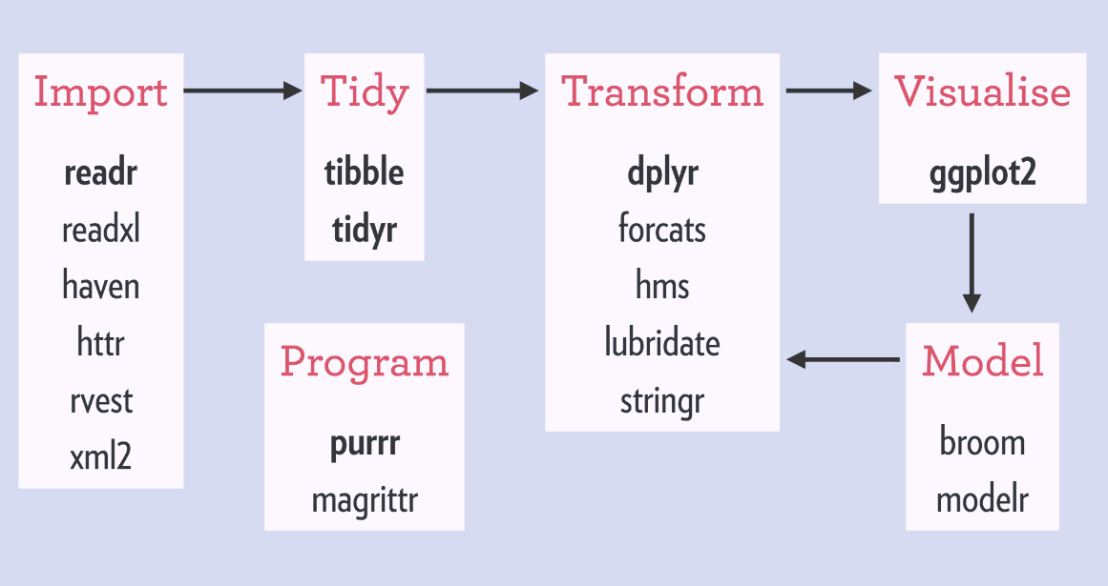
Hadley Wickham‘s tidyverse has improved the workflow of analysts / data scientists, makes coding errors less likely and code more transparent. You’ve got to love the figure below, representing a simplified workflow of the average analysis project.

A simplified, standard cycle of data analysis

The tidyverse provides assistance in each of the stages. Various packages provide functionality to perform analytical tasks more effectively, in fewer lines, with fewer errors, and moreover in more transparent code. As a first step, the analyst will need to import (load) the data to his/her working environment (e.g., Excel, SPSS, R, RStudio, Spyder, Jupyter). In order to guarantee that the data are correct, a next step will be to clean up and tidy the data before continuing to the analysis part. In this early stage, the analyst can handle the explicit errors in the dataset, such as missing and nonsensical data points or records. After these preparatory steps, the main process starts. This consists of three interrelated tasks. (1) The analyst will need to transform the data in order to retrieve statistics, descriptives, and/or new features. (2) The analyst will need to visualize statistics, relations, and results. This is essential for storytelling and effective interpretation and communication of the results. (3) The analyst will try out different models to fit, explain, and predict the data. Finally, the results of this main process (leading to “understanding” of the data and the underlying processing) can be communicated to others.


I will run through each of these stages in separate posts, explaining the various packages, their inner workings, and demonstrating how they affect the process of data analysis in R:

  • Importing data (work in progress)
  • Tidying data (work in progress)
  • Transforming data (work in progress)
  • Visualizing data (work in progress)
  • Modeling data (work in progress)
  • Efficient programming (work in progress)
tidyverse1
Overview of the tidyverse packages that belong to each of the stages.

General tutorials:


R learning: Neural Networks

R learning: Neural Networks

Artificial neural networks (ANNs) are computing systems inspired by the human brain. They can teach themselves to do tasks, simply by considering examples of the tasks’ outcome. For example, they can learn to identify images that contain cats by analyzing example images that have been tagged “cat” or “no cat”. When given enough examples, the neural network can autonomously determine whether “untagged” images include cats or not (Wikipedia). If you want to learn more and have 20 minutes to spare, I can recommend this YouTube video by Brandon Rohrer.

Neural networks are commonly used for those machine learning problems where there is a vast amount of (complex) data available. Some toy examples include fingerprint recognition, language translation, car steering behaviours, object detection, text generation, and doodle recognition (by Google). Chances are pretty high that any system that makes complex recommendations these days (e.g., “Is this John in the picture?”, “Did you mean “South End Taco’s” instead of “Sout En dTacos”?”) has a neural net running in the background.

http://www.r-exercises.com designs tutorials for beginning programmers in R. On their website they host a learning series on neural networks, consisting of three sets of exercises: Part 1Part 2, and Part 3. Afterwards, you can check your performance with the solutions: Solutions 1Solutions 2, and Solutions 3.

Keep on learning!

P.S. afterwards you might want to check out this package and API for deep learning in R and Python.

tidyverse: Example: Trump Approval Rate

tidyverse: Example: Trump Approval Rate

For those of you unfamiliar with the tidyverse, it is a collection of R packages that share common philosophies and are designed to work together. Most if not all, are created by R-god Hadley Wickham, one of the leads at RStudio. I was introduced to the tidyverse-packages such as ggplot2 and dplyr in my second R-course, and they have cleaned and sped up my workflow tremendously ever since.

Although I don’t want to mix in the political debate, I came across such a wonderful example of how the tidyverse has simplified coding in R. On the downside, those unfamiliar with the syntax have trouble understanding what happens in the code the author uses.

Running the following R-code will install the core packages of the tidyverse:

install.packages(‘tidyverse’)

These consist among others of the following:

  • ggplot2: a more potent way of visualization
  • tibble: an upgrade to the standard data.frame
  • dplyr: adds great new functionality for manipulating data frames
  • tidyr: adds even more new functions for wrangling data frames
  • magrittr: adds piping functionality to improve code readability and workflow
  • readr: provides easier functions to load in data
  • purr: adds new functional programming functionality

There are several other packages included (e.g, stringr), but the above are the ones you are most likely to use in everyday projects.

Now, how about dissecting the code in the post. The author (1) loads some functionality in R,  (2) scrapes data on approval rates from the web, (3) cleans it up, and creates a wonderful visualization. S/He does this all in only 35 lines of code! Better even, 2 of these code lines are blank, 3 are setup, 6 have aesthetic purposes, and many others could be combined being only several characters long. Due to the tidyverse syntax, the code is easy to read, transparent, and reproducible (it only consists of two chained code blocks, after loading the packages), and takes only 7 seconds to run!

   user  system elapsed 
   5.67    0.85    6.53

In the rest of this article, I walk you through the code of this post to explain what’s happening:

  • hrbrthemes includes additional ggplot2 themes (plot colors, etc.)
  • rvest includes functionalities for web scraping
  • tidyverse we discussed earlier
library(hrbrthemes) 
library(rvest)
library(tidyverse)

Below, the author then creates a list containing the links to the online data to scrape and run it through a magrittr pipe (%>%) to apply the next bit of code to it.

map_df() comes from the purrr package and applies the subsequent code to every element in the earlier list:

  • Read in the html files specified earlier in the list %>%
  • Convert them to a table %>%
  • Store the name of the list (this is the name of the president) as .id %>%
  • Store that as a data.frame %>%
  • Select columns (and rename them) %>%
  • Use the earlier stored president id and add it as a column (‘who’) %>%
  • Save the output as a dataframe called ratings.
list(
  Obama="http://m.rasmussenreports.com/public_content/politics/obama_administration/obama_approval_index_history",
  Trump="http://m.rasmussenreports.com/public_content/politics/trump_administration/trump_approval_index_history"
) %>% 
map_df(~{
    read_html(.x) %>%
      html_table() %>%
      .[[1]] %>%
      tbl_df() %>%
      select(date=Date, approve=`Total Approve`, disapprove=`Total Disapprove`)
  }, .id="who") -> ratings

Below, the author then starts a new chained code block. S/He first changes (mutate()), from the ratings dataframe, the approval & disapproval data with a custom function (get rid of the % sign and divide by 100), which is then piped through:

  • Mutate dates to a data format (lubridate is yet another tidyverse package) %>%
  • Filter out any missing values %>%
  • Group by the ‘who’-column (President name) %>%
  • Sort the data file by earlier specified date %>%
  • Give every line an id number, from 1 up to the number of records (n() returns the sample size per President due to the earlier group_by()) %>%
  • Ungroup the data %>%

For readability, I split the code here, but it actually still continues as depicted by the %>% at the end.

mutate_at(ratings, c("approve", "disapprove"), function(x) as.numeric(gsub("%", "", x, fixed=TRUE))/100) %>%
  mutate(date = lubridate::dmy(date)) %>%
  filter(!is.na(approve)) %>%
  group_by(who) %>%
  arrange(date) %>%
  mutate(dnum = 1:n()) %>%
  ungroup() %>%

The output is now entered into the ggplot2 visualization function below:

  • ggplot() creates a layered plot, where the aes(thetics) (parameters) are defined as
    • x = the id number,
    • y = the approval rate,
    • and the color = the President name

Layers and details to this plot are specified/added using +

  • The first (bottom) layer of the plot is geom_hline() which creates a horizontal line at [x = 0; y = 0.5] with a size = 0.5. +
  • The 2nd layer is a scatterplot as geom_point() adds points with size = 0.25 on the x & y predefined in ggplot(aes()) +
  • Next the limits of the Y-axis are set to run from 0 to 1 +
  • A custom/manual color scheme is set +
  • Custom titles and labels are applied to the axis +
  • A predefined theme for the plot is used, drawn from hrbrthemes-package loading in at the start +
  • The direction of the legend is set +
  • The position of the legend is set
  ggplot(aes(dnum, approve, color=who)) +
  geom_hline(yintercept = 0.5, size=0.5) +
  geom_point(size=0.25) +
  scale_y_percent(limits=c(0,1)) +
  scale_color_manual(name=NULL, values=c("Obama"="#313695", "Trump"="#a50026")) +
  labs(x="Day in office", y="Approval Rating",
       title="Presidential approval ratings from day 1 in office",
       subtitle="For fairness, data was taken solely from Trump's favorite polling site (Ramussen)",
       caption="Data Source: \nCode: ") +
  theme_ipsum_rc(grid="XY", base_size = 16) +
  theme(legend.direction = "horizontal") +
  theme(legend.position=c(0.8, 1.05))

Theggplot()command at the start automatically prints the plot when it is finished (when no more + is found). The result is just wonderful, isn’t it? With only 35 lines, 2 chained commands, and 7 seconds runtime.

Rplot

Found on https://www.r-bloggers.com.

Animated GIFs in R

Sometimes, it can be of interest to examine how two variables correlate over time. For example, how people in a social network (e.g., an organization) behave or move over the course of time. However, it can be hard to display multi-dimensional data in a single plot. Instead of including time as an additional dimension and providing stakeholders with complicated 3-D plots, ggplot2 now has a support package called gganimate, which allows you to create custom GIFs. Particularly helpful when you seek to demonstrate trends over time.

See this recent post by Analytics Vidhya for a tutorial on the implementation.


Light GBM vs. XGBOOST in Python & R

XGBOOST stands for eXtreme Gradient Boosting. A big brother of the earlier AdaBoost, XGB is a supervised learning algorithm that uses an ensemble of adaptively boosted decision trees. For those unfamiliar with adaptive boosting algorithms, here’s a 2-minute explanation video and a written tutorial. Although XGBOOST often performs well in predictive tasks, the training process can be quite time-consuming (similar to other bagging/boosting algorithms (e.g., random forest)).

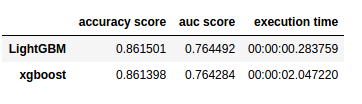
In a recent blog, Analytics Vidhya compares the inner workings as well as the predictive accuracy of the XGBOOST algorithm to an upcoming boosting algorithm: Light GBM. The blog demonstrates a stepwise implementation of both algorithms in Python. The table below reflects the main conclusion of the comparison: Although the algorithms are comparable in terms of their predictive performance, light GBM is much faster to train. With continuously increasing data volumes, light GBM, therefore, seems the way forward.

Laurae also benchmarked lightGBM against xgboost on a Bosch dataset and her results show that, on average, LightGBM (binning) is between 11x to 15x faster than xgboost (without binning):

View interactively online: https://plot.ly/~Laurae/9/

However, the differences get smaller as more threads are used due to thread inefficiencies (idle-time increases because threads are not scheduled a next task fast enough).

Light GBM is also available in R:

devtools::install_github("Microsoft/LightGBM", subdir = "R-package")

Neil Schneider tested the three algorithms for gradient boosting in R (GBM, xgboost, and lightGBM) and sums up their (dis)advantages:

  • GBM has no specific advantages but its disadvantages include no early stopping, slower training and decreased accuracy,
  • xgboost has demonstrated successful on kaggle and though traditionally slower than lightGBM, tree_method = 'hist' (histogram binning) provides a significant improvement.
  • lightGBM has the advantages of training efficiency, low memory usage, high accuracy, parallel learning, corporate support, and scale-ability. However, its’ newness is its main disadvantage because there is little community support.