Tag: tidyverse

Harry Plotter: Part 2 – Hogwarts Houses and their Stereotypes

Harry Plotter: Part 2 – Hogwarts Houses and their Stereotypes

Two weeks ago, I started the Harry Plotter project to celebrate the 20th anniversary of the first Harry Potter book. I could not have imagined that the first blog would be so well received. It reached over 4000 views in a matter of days thanks to the lovely people in the data science and #rstats community that were kind enough to share it (special thanks to MaraAverick and DataCamp). The response from the Harry Potter community, for instance on reddit, was also just overwhelming

Part 2: Hogwarts Houses

All in all, I could not resist a sequel and in this second post we will explore the four houses of Hogwarts: GryffindorHufflepuffRavenclaw, and Slytherin. At the end of today’s post we will end up with visualizations like this:

treemap_house_word_ratio

Various stereotypes exist regarding these houses and a textual analysis seemed a perfect way to uncover their origins. More specifically, we will try to identify which words are most unique, informative, important or otherwise characteristic for each house by means of ratio and tf-idf statistics. Additionally, we will try to estime a personality profile for each house using these characteristic words and the emotions they relate to. Again, we rely strongly on ggplot2 for our visualizations, but we will also be using the treemaps of treemapify. Moreover, I have a special surprise this second post, as I found the orginal Harry Potter font, which will definately make the visualizations feel more authentic. Of course, we will conduct all analyses in a tidy manner using tidytext and the tidyverse.

I hope you will enjoy this blog and that you’ll be back for more. To be the first to receive new content, please subscribe to my website www.paulvanderlaken.com, follow me on Twitter, or add me on LinkedIn. Additionally, if you would like to contribute to, collaborate on, or need assistance with a data science project or venture, please feel free to reach out.

R Setup

All analysis were performed in RStudio, and knit using rmarkdown so that you can follow my steps.

In term of setup, we will be needing some of the same packages as last time. Bradley Boehmke gathered the text of the Harry Potter books in his harrypotter package. We need devtools to install that package the first time, but from then on can load it in as usual. We need plyr for ldply(). We load in most other tidyverse packages in a single bundle and add tidytext. Finally, I load the Harry Potter font and set some default plotting options.

# SETUP ####
# LOAD IN PACKAGES
# library(devtools)
# devtools::install_github("bradleyboehmke/harrypotter")
library(harrypotter)
library(plyr)
library(tidyverse)
library(tidytext)

# VIZUALIZATION SETTINGS
# custom Harry Potter font
# http://www.fontspace.com/category/harry%20potter
library(extrafont)
font_import(paste0(getwd(),"/fontomen_harry-potter"), prompt = F) # load in custom Harry Potter font
windowsFonts(HP = windowsFont("Harry Potter"))
theme_set(theme_light(base_family = "HP")) # set default ggplot theme to light
default_title = "Harry Plotter: References to the Hogwarts houses" # set default title
default_caption = "www.paulvanderlaken.com" # set default caption
dpi = 600 # set default dpi

Importing and Transforming Data

Before we import and transform the data in one large piping chunk, I need to specify some variables.

First, I tell R the house names, which we are likely to need often, so standardization will help prevent errors. Next, my girlfriend was kind enough to help me (colorblind) select the primary and secondary colors for the four houses. Here, the ggplot2 color guide in my R resources list helped a lot! Finally, I specify the regular expression (tutorials) which we will use a couple of times in order to identify whether text includes either of the four house names.

# DATA PREPARATION ####
houses <- c('gryffindor', 'ravenclaw', 'hufflepuff', 'slytherin') # define house names
houses_colors1 <- c("red3", "yellow2", "blue4", "#006400") # specify primary colors
houses_colors2 <- c("#FFD700", "black", "#B87333", "#BCC6CC") # specify secondary colors
regex_houses <- paste(houses, collapse = "|") # regular expression

Import Data and Tidy

Ok, let’s import the data now. You may recognize pieces of the code below from last time, but this version runs slightly smoother after some optimalization. Have a look at the current data format.

# LOAD IN BOOK TEXT 
houses_sentences <- list(
  `Philosophers Stone` = philosophers_stone,
  `Chamber of Secrets` = chamber_of_secrets,
  `Prisoner of Azkaban` = prisoner_of_azkaban,
  `Goblet of Fire` = goblet_of_fire,
  `Order of the Phoenix` = order_of_the_phoenix,
  `Half Blood Prince` = half_blood_prince,
  `Deathly Hallows` = deathly_hallows
) %>% 
  # TRANSFORM TO TOKENIZED DATASET
  ldply(cbind) %>% # bind all chapters to dataframe
  mutate(.id = factor(.id, levels = unique(.id), ordered = T)) %>% # identify associated book
  unnest_tokens(sentence, `1`, token = 'sentences') %>% # seperate sentences
  filter(grepl(regex_houses, sentence)) %>% # exclude sentences without house reference
  cbind(sapply(houses, function(x) grepl(x, .$sentence)))# identify references
# examine
max.char = 30 # define max sentence length
houses_sentences %>%
  mutate(sentence = ifelse(nchar(sentence) > max.char, # cut off long sentences
                           paste0(substring(sentence, 1, max.char), "..."),
                           sentence)) %>% 
  head(5)
##                  .id                          sentence gryffindor
## 1 Philosophers Stone "well, no one really knows unt...      FALSE
## 2 Philosophers Stone "and what are slytherin and hu...      FALSE
## 3 Philosophers Stone everyone says hufflepuff are a...      FALSE
## 4 Philosophers Stone "better hufflepuff than slythe...      FALSE
## 5 Philosophers Stone "there's not a single witch or...      FALSE
##   ravenclaw hufflepuff slytherin
## 1     FALSE       TRUE      TRUE
## 2     FALSE       TRUE      TRUE
## 3     FALSE       TRUE     FALSE
## 4     FALSE       TRUE      TRUE
## 5     FALSE      FALSE      TRUE

Transform to Long Format

Ok, looking great, but not tidy yet. We need gather the columns and put them in a long dataframe. Thinking ahead, it would be nice to already capitalize the house names for which I wrote a custom Capitalize() function.

# custom capitalization function
Capitalize = function(text){ 
  paste0(substring(text,1,1) %>% toupper(),
         substring(text,2))
}

# TO LONG FORMAT
houses_long <- houses_sentences %>%
  gather(key = house, value = test, -sentence, -.id) %>% 
  mutate(house = Capitalize(house)) %>% # capitalize names
  filter(test) %>% select(-test) # delete rows where house not referenced
# examine
houses_long %>%
  mutate(sentence = ifelse(nchar(sentence) > max.char, # cut off long sentences
                           paste0(substring(sentence, 1, max.char), "..."),
                           sentence)) %>% 
  head(20)
##                   .id                          sentence      house
## 1  Philosophers Stone i've been asking around, and i... Gryffindor
## 2  Philosophers Stone           "gryffindor," said ron. Gryffindor
## 3  Philosophers Stone "the four houses are called gr... Gryffindor
## 4  Philosophers Stone you might belong in gryffindor... Gryffindor
## 5  Philosophers Stone " brocklehurst, mandy" went to... Gryffindor
## 6  Philosophers Stone "finnigan, seamus," the sandy-... Gryffindor
## 7  Philosophers Stone                     "gryffindor!" Gryffindor
## 8  Philosophers Stone when it finally shouted, "gryf... Gryffindor
## 9  Philosophers Stone well, if you're sure -- better... Gryffindor
## 10 Philosophers Stone he took off the hat and walked... Gryffindor
## 11 Philosophers Stone "thomas, dean," a black boy ev... Gryffindor
## 12 Philosophers Stone harry crossed his fingers unde... Gryffindor
## 13 Philosophers Stone resident ghost of gryffindor t... Gryffindor
## 14 Philosophers Stone looking pleased at the stunned... Gryffindor
## 15 Philosophers Stone gryffindors have never gone so... Gryffindor
## 16 Philosophers Stone the gryffindor first years fol... Gryffindor
## 17 Philosophers Stone they all scrambled through it ... Gryffindor
## 18 Philosophers Stone nearly headless nick was alway... Gryffindor
## 19 Philosophers Stone professor mcgonagall was head ... Gryffindor
## 20 Philosophers Stone over the noise, snape said, "a... Gryffindor

Visualize House References

Woohoo, so tidy! Now comes the fun part: visualization. The following plots how often houses are mentioned overall, and in each book seperately.

# set plot width & height
w = 10; h = 6  

# PLOT REFERENCE FREQUENCY
houses_long %>%
  group_by(house) %>%
  summarize(n = n()) %>% # count sentences per house
  ggplot(aes(x = desc(house), y = n)) +
  geom_bar(aes(fill = house), stat = 'identity') +
  geom_text(aes(y = n / 2, label = house, col = house),  # center text
            size = 8, family = 'HP') +
  scale_fill_manual(values = houses_colors1) +
  scale_color_manual(values = houses_colors2) +
  theme(axis.text.y = element_blank(),
        axis.ticks.y = element_blank(),
        legend.position = 'none') +
  labs(title = default_title,
       subtitle = "Combined references in all Harry Potter books",
       caption = default_caption,
       x = '', y = 'Name occurence') + 
  coord_flip()

barplot_house_occurance.png

# PLOT REFERENCE FREQUENCY OVER TIME 
houses_long %>%
  group_by(.id, house) %>%
  summarize(n = n()) %>% # count sentences per house per book
  ggplot(aes(x = .id, y = n, group = house)) +
  geom_line(aes(col = house), size = 2) +
  scale_color_manual(values = houses_colors1) +
  theme(legend.position = 'bottom',
        axis.text.x = element_text(angle = 15, hjust = 0.5, vjust = 0.5)) + # rotate x axis text
  labs(title = default_title, 
       subtitle = "References throughout the Harry Potter books",
       caption = default_caption,
       x = NULL, y = 'Name occurence', color = 'House') 

house_occurance_overtime.png

The Harry Potter font looks wonderful, right?

In terms of the data, Gryffindor and Slytherin definitely play a larger role in the Harry Potter stories. However, as the storyline progresses, Slytherin as a house seems to lose its importance. Their downward trend since the Chamber of Secrets results in Ravenclaw being mentioned more often in the final book (Edit – this is likely due to the diadem horcrux, as you will see later on).

I can’t but feel sorry for house Hufflepuff, which never really gets to involved throughout the saga.

Retrieve Reference Words & Data

Let’s dive into the specific words used in combination with each house. The following code retrieves and counts the single words used in the sentences where houses are mentioned.

# IDENTIFY WORDS USED IN COMBINATION WITH HOUSES
words_by_houses <- houses_long %>% 
  unnest_tokens(word, sentence, token = 'words') %>% # retrieve words
  mutate(word = gsub("'s", "", word)) %>% # remove possesive determiners
  group_by(house, word) %>% 
  summarize(word_n = n()) # count words per house
# examine
words_by_houses %>% head()
## # A tibble: 6 x 3
## # Groups:   house [1]
##        house        word word_n
##        <chr>       <chr>  <int>
## 1 Gryffindor         104      1
## 2 Gryffindor        22nd      1
## 3 Gryffindor           a    251
## 4 Gryffindor   abandoned      1
## 5 Gryffindor  abandoning      1
## 6 Gryffindor abercrombie      1

Visualize Word-House Combinations

Now we can visualize which words relate to each of the houses. Because facet_wrap() has trouble reordering the axes (because words may related to multiple houses in different frequencies), I needed some custom functionality, which I happily recycled from dgrtwo’s github. With these reorder_within() and scale_x_reordered() we can now make an ordered barplot of the top-20 most frequent words per house.

# custom functions for reordering facet plots
# https://github.com/dgrtwo/drlib/blob/master/R/reorder_within.R
reorder_within <- function(x, by, within, fun = mean, sep = "___", ...) {
  new_x <- paste(x, within, sep = sep)
  reorder(new_x, by, FUN = fun)
}

scale_x_reordered <- function(..., sep = "___") {
  reg <- paste0(sep, ".+$")
  ggplot2::scale_x_discrete(labels = function(x) gsub(reg, "", x), ...)
}

# set plot width & height
w = 10; h = 7; 

# PLOT MOST FREQUENT WORDS PER HOUSE
words_per_house = 20 # set number of top words
words_by_houses %>%
  group_by(house) %>%
  arrange(house, desc(word_n)) %>%
  mutate(top = row_number()) %>% # count word top position
  filter(top <= words_per_house) %>% # retain specified top number
  ggplot(aes(reorder_within(word, -top, house), # reorder by minus top number
             word_n, fill = house)) +
  geom_col(show.legend = F) +
  scale_x_reordered() + # rectify x axis labels 
  scale_fill_manual(values = houses_colors1) +
  scale_color_manual(values = houses_colors2) + 
  facet_wrap(~ house, scales = "free_y") + # facet wrap and free y axis
  coord_flip() +
  labs(title = default_title, 
       subtitle = "Words most commonly used together with houses",
       caption = default_caption,
       x = NULL, y = 'Word Frequency')

barplot_house_word_frequency2.png

Unsurprisingly, several stop words occur most frequently in the data. Intuitively, we would rerun the code but use dplyr::anti_join() on tidytext::stop_words to remove stop words.

# PLOT MOST FREQUENT WORDS PER HOUSE
# EXCLUDING STOPWORDS
words_by_houses %>%
  anti_join(stop_words, 'word') %>% # remove stop words
  group_by(house) %>% 
  arrange(house, desc(word_n)) %>%
  mutate(top = row_number()) %>% # count word top position
  filter(top <= words_per_house) %>% # retain specified top number
  ggplot(aes(reorder_within(word, -top, house), # reorder by minus top number
             word_n, fill = house)) +
  geom_col(show.legend = F) +
  scale_x_reordered() + # rectify x axis labels
  scale_fill_manual(values = houses_colors1) +
  scale_color_manual(values = houses_colors2) + 
  facet_wrap(~ house, scales = "free") + # facet wrap and free scales
  coord_flip() +
  labs(title = default_title, 
       subtitle = "Words most commonly used together with houses, excluding stop words",
       caption = default_caption,
       x = NULL, y = 'Word Frequency')

barplot_house_word_frequency_nostopwords2.png

However, some stop words have a different meaning in the Harry Potter universe. points are for instance quite informative to the Hogwarts houses but included in stop_words.

Moreover, many of the most frequent words above occur in relation to multiple or all houses. Take, for instance, Harry and Ron, which are in the top-10 of each house, or words like tablehouse, and professor.

We are more interested in words that describe one house, but not another. Similarly, we only want to exclude stop words which are really irrelevant. To this end, we compute a ratio-statistic below. This statistic displays how frequently a word occurs in combination with one house rather than with the others. However, we need to adjust this ratio for how often houses occur in the text as more text (and thus words) is used in reference to house Gryffindor than, for instance, Ravenclaw.

words_by_houses <- words_by_houses %>%
  group_by(word) %>% mutate(word_sum = sum(word_n)) %>% # counts words overall
  group_by(house) %>% mutate(house_n = n()) %>%
  ungroup() %>%
    # compute ratio of usage in combination with house as opposed to overall
  # adjusted for house references frequency as opposed to overall frequency
  mutate(ratio = (word_n / (word_sum - word_n + 1) / (house_n / n()))) 
# examine
words_by_houses %>% select(-word_sum, -house_n) %>% arrange(desc(word_n)) %>% head()
## # A tibble: 6 x 4
##        house       word word_n     ratio
##        <chr>      <chr>  <int>     <dbl>
## 1 Gryffindor        the   1057  2.373115
## 2  Slytherin        the    675  1.467926
## 3 Gryffindor gryffindor    602 13.076218
## 4 Gryffindor        and    477  2.197259
## 5 Gryffindor         to    428  2.830435
## 6 Gryffindor         of    362  2.213186
# PLOT MOST UNIQUE WORDS PER HOUSE BY RATIO
words_by_houses %>%
  group_by(house) %>%
  arrange(house, desc(ratio)) %>%
  mutate(top = row_number()) %>% # count word top position
  filter(top <= words_per_house) %>% # retain specified top number
  ggplot(aes(reorder_within(word, -top, house), # reorder by minus top number
             ratio, fill = house)) +
  geom_col(show.legend = F) +
  scale_x_reordered() + # rectify x axis labels
  scale_fill_manual(values = houses_colors1) +
  scale_color_manual(values = houses_colors2) + 
  facet_wrap(~ house, scales = "free") +  # facet wrap and free scales
  coord_flip() +
  labs(title = default_title, 
       subtitle = "Most informative words per house, by ratio",
       caption = default_caption,
       x = NULL, y = 'Adjusted Frequency Ratio (house vs. non-house)')

barplot_house_word_ratio.png

# PS. normally I would make a custom ggplot function 
#    when I plot three highly similar graphs

This ratio statistic (x-axis) should be interpreted as follows: night is used 29 times more often in combination with Gryffindor than with the other houses.

Do you think the results make sense:

  • Gryffindors spent dozens of hours during their afternoonsevenings, and nights in the, often emptytower room, apparently playing chess? Nevile Longbottom and Hermione Granger are Gryffindors, obviously, and Sirius Black is also on the list. The sword of Gryffindor is no surprise here either.
  • Hannah AbbotErnie Macmillan and Cedric Diggory are Hufflepuffs. Were they mostly hot curly blondes interested in herbology? Nevertheless, wild and aggresive seem unfitting for Hogwarts most boring house.
  • A lot of names on the list of Helena Ravenclaw’s house. Roger DaviesPadma Patil, Cho Chang, Miss S. FawcettStewart AckerleyTerry Boot, and Penelope Clearwater are indeed Ravenclaws, I believe. Ravenclaw’s Diadem was one of Voldemort horcruxes. AlectoCarrow, Death Eater by profession, was apparently sent on a mission by Voldemort to surprise Harry in Rawenclaw’s common room (source), which explains what she does on this list. Can anybody tell me what buststatue and spot have in relation to Ravenclaw?
  • House Slytherin is best represented by Gregory Goyle, one of the members of Draco Malfoy’s gang along with Vincent CrabbePansy Parkinson also represents house SlytherinSlytherin are famous for speaking Parseltongue and their house’s gem is an emerald. House Gaunt were pure-blood descendants from Salazar Slytherin and apparently Viktor Krum would not have misrepresented the Slytherin values either. Oh, and only the heir of Slytherin could control the monster in the Chamber of Secrets.

Honestly, I was not expecting such good results! However, there is always room for improvement.

We may want to exclude words that only occur once or twice in the book (e.g., Alecto) as well as the house names. Additionally, these barplots are not the optimal visualization if we would like to include more words per house. Fortunately, Hadley Wickham helped me discover treeplots. Let’s draw one using the ggfittext and the treemapify packages.

# set plot width & height
w = 12; h = 8; 

# PACKAGES FOR TREEMAP
# devtools::install_github("wilkox/ggfittext")
# devtools::install_github("wilkox/treemapify")
library(ggfittext)
library(treemapify)


# PLOT MOST UNIQUE WORDS PER HOUSE BY RATIO
words_by_houses %>%
  filter(word_n > 3) %>% # filter words with few occurances
  filter(!grepl(regex_houses, word)) %>% # exclude house names
  group_by(house) %>%
  arrange(house, desc(ratio), desc(word_n)) %>%
  mutate(top = seq_along(ratio)) %>%
  filter(top <= words_per_house) %>% # filter top n words
  ggplot(aes(area = ratio, label = word, subgroup = house, fill = house)) +
  geom_treemap() + # create treemap
  geom_treemap_text(aes(col = house), family = "HP", place = 'center') + # add text
  geom_treemap_subgroup_text(aes(col = house), # add house names
                             family = "HP", place = 'center', alpha = 0.3, grow = T) +
  geom_treemap_subgroup_border(colour = 'black') +
  scale_fill_manual(values = houses_colors1) +
  scale_color_manual(values = houses_colors2) + 
  theme(legend.position = 'none') +
  labs(title = default_title, 
       subtitle = "Most informative words per house, by ratio",
       caption = default_caption)

treemap_house_word_ratio

A treemap can display more words for each of the houses and displays their relative proportions better. New words regarding the houses include the following, but do you see any others?

  • Slytherin girls laugh out loud whereas Ravenclaw had a few little, pretty girls?
  • Gryffindors, at least Harry and his friends, got in trouble often, that is a fact.
  • Yellow is the color of house Hufflepuff whereas Slytherin is green indeed.
  • Zacherias Smith joined Hufflepuff and Luna Lovegood Ravenclaw.
  • Why is Voldemort in camp Ravenclaw?!

In the earlier code, we specified a minimum number of occurances for words to be included, which is a bit hacky but necessary to make the ratio statistic work as intended. Foruntately, there are other ways to estimate how unique or informative words are to houses that do not require such hacks.

TF-IDF

tf-idf similarly estimates how unique / informative words are for a body of text (for more info: Wikipedia). We can calculate a tf-idf score for each word within each document (in our case house texts) by taking the product of two statistics:

  • TF or term frequency, meaning the number of times the word occurs in a document.
  • IDF or inverse document frequency, specifically the logarithm of the inverse number of documents the word occurs in.

A high tf-idf score means that a word occurs relatively often in a specific document and not often in other documents. Different weighting schemes can be used to td-idf’s performance in different settings but we used the simple default of tidytext::bind_tf_idf().

An advantage of tf-idf over the earlier ratio statistic is that we no longer need to specify a minimum frequency: low frequency words will have low tf and thus low tf-idf. A disadvantage is that tf-idf will automatically disregard words occur together with each house, be it only once: these words have zero idf (log(4/4)) so zero tf-idf.

Let’s run the treemap gain, but not on the computed tf-idf scores.

words_by_houses <- words_by_houses %>%
  # compute term frequency and inverse document frequency
  bind_tf_idf(word, house, word_n)
# examine
words_by_houses %>% select(-house_n) %>% head()
## # A tibble: 6 x 8
##        house        word word_n word_sum    ratio           tf       idf
##        <chr>       <chr>  <int>    <int>    <dbl>        <dbl>     <dbl>
## 1 Gryffindor         104      1        1 2.671719 6.488872e-05 1.3862944
## 2 Gryffindor        22nd      1        1 2.671719 6.488872e-05 1.3862944
## 3 Gryffindor           a    251      628 1.774078 1.628707e-02 0.0000000
## 4 Gryffindor   abandoned      1        1 2.671719 6.488872e-05 1.3862944
## 5 Gryffindor  abandoning      1        2 1.335860 6.488872e-05 0.6931472
## 6 Gryffindor abercrombie      1        1 2.671719 6.488872e-05 1.3862944
## # ... with 1 more variables: tf_idf <dbl>
# PLOT MOST UNIQUE WORDS PER HOUSE BY TF_IDF
words_per_house = 30
words_by_houses %>%
  filter(tf_idf > 0) %>% # filter for zero tf_idf
  group_by(house) %>%
  arrange(house, desc(tf_idf), desc(word_n)) %>%
  mutate(top = seq_along(tf_idf)) %>%
  filter(top <= words_per_house) %>%
  ggplot(aes(area = tf_idf, label = word, subgroup = house, fill = house)) +
  geom_treemap() + # create treemap
  geom_treemap_text(aes(col = house), family = "HP", place = 'center') + # add text
  geom_treemap_subgroup_text(aes(col = house), # add house names
                             family = "HP", place = 'center', alpha = 0.3, grow = T) +
  geom_treemap_subgroup_border(colour = 'black') +
  scale_fill_manual(values = houses_colors1) +
  scale_color_manual(values = houses_colors2) + 
  theme(legend.position = 'none') +
  labs(title = default_title, 
       subtitle = "Most informative words per house, by tf-idf",
       caption = default_caption)

treemap_house_word_tfidf.png

This plot looks quite different from its predecessor. For instance, Marcus Flint and Adrian Pucey are added to house Slytherin and Hufflepuff’s main color is indeed not just yellow, but canary yellow. Severus Snape’s dual role is also nicely depicted now, with him in both house Slytherin and house Gryffindor. Do you notice any other important differences? Did we lose any important words because they occured in each of our four documents?

House Personality Profiles (by NRC Sentiment Analysis)

We end this second Harry Plotter blog by examining to what the extent the stereotypes that exist of the Hogwarts Houses can be traced back to the books. To this end, we use the NRC sentiment dictionary, see also the the previous blog, with which we can estimate to what extent the most informative words for houses (we have over a thousand for each house) relate to emotions such as anger, fear, or trust.

The code below retains only the emotion words in our words_by_houses dataset and multiplies their tf-idf scores by their relative frequency, so that we retrieve one score per house per sentiment.

# PLOT SENTIMENT OF INFORMATIVE WORDS (TFIDF)
words_by_houses %>%
  inner_join(get_sentiments("nrc"), by = 'word') %>%
  group_by(house, sentiment) %>%
  summarize(score = sum(word_n / house_n * tf_idf)) %>% # compute emotion score
  ggplot(aes(x = house, y = score, group = house)) +
  geom_col(aes(fill = house)) + # create barplots
  geom_text(aes(y = score / 2, label = substring(house, 1, 1), col = house), 
            family = "HP", vjust = 0.5) + # add house letter in middle
  facet_wrap(~ Capitalize(sentiment), scales = 'free_y') + # facet and free y axis
  scale_fill_manual(values = houses_colors1) +
  scale_color_manual(values = houses_colors2) + 
  theme(legend.position = 'none', # tidy dataviz
        axis.text.y = element_blank(),
        axis.ticks.y = element_blank(),
        axis.text.x = element_blank(),
        axis.ticks.x = element_blank(),
        strip.text.x = element_text(colour = 'black', size = 12)) +
  labs(title = default_title, 
       subtitle = "Sentiment (nrc) related to houses' informative words (tf-idf)",
       caption = default_caption,
       y = "Sentiment score", x = NULL)

barplot_sentiment_house_tfidf.png

The results to a large extent confirm the stereotypes that exist regarding the Hogwarts houses:

  • Gryffindors are full of anticipation and the most positive and trustworthy.
  • Hufflepuffs are the most joyous but not extraordinary on any other front.
  • Ravenclaws are distinguished by their low scores. They are super not-angry and relatively not-anticipating, not-negative, and not-sad.
  • Slytherins are the angriest, the saddest, and the most feared and disgusting. However, they are also relatively joyous (optimistic?) and very surprising (shocking?).

Conclusion and future work

With this we have come to the end of the second part of the Harry Plotter project, in which we used tf-idf and ratio statistics to examine which words were most informative / unique to each of the houses of Hogwarts. The data was retrieved using the harrypotter package and transformed using tidytext and the tidyverse. Visualizations were made with ggplot2 and treemapify, using a Harry Potter font.

I have several ideas for subsequent posts and I’d love to hear your preferences or suggestions:

  • I would like to demonstrate how regular expressions can be used to retrieve (sub)strings that follow a specific format. We could use regex to examine, for instance, when, and by whom, which magical spells are cast.
  • I would like to use network analysis to examine the interactions between the characters. We could retrieve networks from the books and conduct sentiment analysis to establish the nature of relationships. Similarly, we could use unsupervised learning / clustering to explore character groups.
  • I would like to use topic models, such as latent dirichlet allocation, to identify the main topics in the books. We could, for instance, try to summarize each book chapter in single sentence, or examine how topics (e.g., love or death) build or fall over time.
  • Finally, I would like to build an interactive application / dashboard in Shiny (another hobby of mine) so that readers like you can explore patterns in the books yourself. Unfortunately, the free on shinyapps.io only 25 hosting hours per month : (

For now, I hope you enjoyed this blog and that you’ll be back for more. To receive new content first, please subscribe to my website www.paulvanderlaken.com, follow me on Twitter, or add me on LinkedIn.

If you would like to contribute to, collaborate on, or need assistance with a data science project or venture, please feel free to reach out

Scraping RStudio blogs to establish how “pleased” Hadley Wickham is.

Scraping RStudio blogs to establish how “pleased” Hadley Wickham is.

This is reposted from DavisVaughan.com with minor modifications.

Introduction

A while back, I saw a conversation on twitter about how Hadley uses the word “pleased” very often when introducing a new blog post (I couldn’t seem to find this tweet anymore. Can anyone help?). Out of curiosity, and to flex my R web scraping muscles a bit, I’ve decided to analyze the 240+ blog posts that RStudio has put out since 2011. This post will do a few things:

  • Scrape the RStudio blog archive page to construct URL links to each blog post
  • Scrape the blog post text and metadata from each post
  • Use a bit of tidytext for some exploratory analysis
  • Perform a statistical test to compare Hadley’s use of “pleased” to the other blog post authors

Spoiler alert: Hadley uses “pleased” ALOT.

Required packages

library(tidyverse)
library(tidytext)
library(rvest)
library(xml2)

Extract the HTML from the RStudio blog archive

To be able to extract the text from each blog post, we first need to have a link to that blog post. Luckily, RStudio keeps an up to date archive page that we can scrape. Using xml2, we can get the HTML off that page.

archive_page <- "https://blog.rstudio.com/archives/"

archive_html <- read_html(archive_page)

# Doesn't seem very useful...yet
archive_html
## {xml_document}
## <html lang="en-us">
## [1] <head>\n<meta http-equiv="Content-Type" content="text/html; charset= ...
## [2] <body>\n    <nav class="menu"><svg version="1.1" xmlns="http://www.w ...

Now we use a bit of rvest magic combined with the HTML inspector in Chrome to figure out which elements contain the info we need (I also highly recommend SelectorGadget for this kind of work). Looking at the image below, you can see that all of the links are contained within the main tag as a tags (links).

The code below extracts all of the links, and then adds the prefix containing the base URL of the site.

links <- archive_html %>%
  
  # Only the "main" body of the archive
  html_nodes("main") %>%
  
  # Grab any node that is a link
  html_nodes("a") %>%
  
  # Extract the hyperlink reference from those link tags
  # The hyperlink is an attribute as opposed to a node
  html_attr("href") %>%
  
  # Prefix them all with the base URL
  paste0("http://blog.rstudio.com", .)

head(links)
## [1] "http://blog.rstudio.com/2017/08/16/rstudio-preview-connections/"             
## [2] "http://blog.rstudio.com/2017/08/15/contributed-talks-diversity-scholarships/"
## [3] "http://blog.rstudio.com/2017/08/11/rstudio-v1-1-preview-terminal/"           
## [4] "http://blog.rstudio.com/2017/08/10/upcoming-workshops/"                      
## [5] "http://blog.rstudio.com/2017/08/03/rstudio-connect-v1-5-4-plumber/"          
## [6] "http://blog.rstudio.com/2017/07/31/sparklyr-0-6/"

HTML from each blog post

Now that we have every link, we’re ready to extract the HTML from each individual blog post. To make things more manageable, we start by creating a tibble, and then using the mutate + map combination to created a column of XML Nodesets (we will use this combination a lot). Each nodeset contains the HTML for that blog post (exactly like the HTML for the archive page).

blog_data <- tibble(links)

blog_data <- blog_data %>%
  mutate(main = map(
                    # Iterate through every link
                    .x = links, 
                    
                    # For each link, read the HTML for that page, and return the main section 
                    .f = ~read_html(.) %>%
                            html_nodes("main")
                    )
         )

select(blog_data, main)
## # A tibble: 249 x 1
##                 main
##               <list>
##  1 <S3: xml_nodeset>
##  2 <S3: xml_nodeset>
##  3 <S3: xml_nodeset>
##  4 <S3: xml_nodeset>
##  5 <S3: xml_nodeset>
##  6 <S3: xml_nodeset>
##  7 <S3: xml_nodeset>
##  8 <S3: xml_nodeset>
##  9 <S3: xml_nodeset>
## 10 <S3: xml_nodeset>
## # ... with 239 more rows
blog_data$main[1]
## [[1]]
## {xml_nodeset (1)}
## [1] <main><div class="article-meta">\n<h1><span class="title">RStudio 1. ...

Meta information

Before extracting the blog post itself, lets grab the meta information about each post, specifically:

  • Author
  • Title
  • Date
  • Category
  • Tags

In the exploratory analysis, we will use author and title, but the other information might be useful for future analysis.

Looking at the first blog post, the Author, Date, and Title are all HTML class names that we can feed into rvest to extract that information.

In the code below, an example of extracting the author information is shown. To select a HTML class (like “author”) as opposed to a tag (like “main”), we have to put a period in front of the class name. Once the html node we are interested in has been identified, we can extract the text for that node using html_text().

blog_data$main[[1]] %>%
  html_nodes(".author") %>%
  html_text()
## [1] "Jonathan McPherson"

To scale up to grab the author for all posts, we use map_chr() since we want a character of the author’s name returned.

map_chr(.x = blog_data$main,
        .f = ~html_nodes(.x, ".author") %>%
                html_text()) %>%
  head(10)
##  [1] "Jonathan McPherson" "Hadley Wickham"     "Gary Ritchie"      
##  [4] "Roger Oberg"        "Jeff Allen"         "Javier Luraschi"   
##  [7] "Hadley Wickham"     "Roger Oberg"        "Garrett Grolemund" 
## [10] "Hadley Wickham"

Finally, notice that if we switch ".author" with ".title" or ".date" then we can grab that information as well. This kind of thinking means that we should create a function for extracting these pieces of information!

extract_info <- function(html, class_name) {
  map_chr(
          # Given the list of main HTMLs
          .x = html,
          
          # Extract the text we are interested in for each one 
          .f = ~html_nodes(.x, class_name) %>%
                  html_text())
}

# Extract the data
blog_data <- blog_data %>%
  mutate(
     author = extract_info(main, ".author"),
     title  = extract_info(main, ".title"),
     date   = extract_info(main, ".date")
    )

select(blog_data, author, date)
## # A tibble: 249 x 2
##                author       date
##                 <chr>      <chr>
##  1 Jonathan McPherson 2017-08-16
##  2     Hadley Wickham 2017-08-15
##  3       Gary Ritchie 2017-08-11
##  4        Roger Oberg 2017-08-10
##  5         Jeff Allen 2017-08-03
##  6    Javier Luraschi 2017-07-31
##  7     Hadley Wickham 2017-07-13
##  8        Roger Oberg 2017-07-12
##  9  Garrett Grolemund 2017-07-11
## 10     Hadley Wickham 2017-06-27
## # ... with 239 more rows
select(blog_data, title)
## # A tibble: 249 x 1
##                                                                          title
##                                                                          <chr>
##  1                                      RStudio 1.1 Preview - Data Connections
##  2 rstudio::conf(2018): Contributed talks, e-posters, and diversity scholarshi
##  3                                              RStudio v1.1 Preview: Terminal
##  4                                                Building tidy tools workshop
##  5                            RStudio Connect v1.5.4 - Now Supporting Plumber!
##  6                                                                sparklyr 0.6
##  7                                                                 haven 1.1.0
##  8                                   Registration open for rstudio::conf 2018!
##  9                                                          Introducing learnr
## 10                                                                dbplyr 1.1.0
## # ... with 239 more rows

Categories and tags

The other bits of meta data that might be interesting are the categories and tags that the post falls under. This is a little bit more involved, because both the categories and tags fall under the same class, ".terms". To separate them, we need to look into the href to see if the information is either a tag or a category (href = “/categories/” VS href = “/tags/”).

The function below extracts either the categories or the tags, depending on the argument, by:

  • Extracting the ".terms" class, and then all of the links inside of it (a tags).
  • Checking each link to see if the hyperlink reference contains “categories” or “tags” depending on the one that we are interested in. If it does, it returns the text corresponding to that link, otherwise it returns NAs which are then removed.

The final step results in two list columns containing character vectors of varying lengths corresponding to the categories and tags of each post.

extract_tag_or_cat <- function(html, info_name) {
  
  # Extract the links under the terms class
  cats_and_tags <- map(.x = html, 
                       .f = ~html_nodes(.x, ".terms") %>%
                              html_nodes("a"))
  
  # For each link, if the href contains the word categories/tags 
  # return the text corresponding to that link
  map(cats_and_tags, 
    ~if_else(condition = grepl(info_name, html_attr(.x, "href")), 
             true      = html_text(.x), 
             false     = NA_character_) %>%
      .[!is.na(.)])
}

# Apply our new extraction function
blog_data <- blog_data %>%
  mutate(
    categories = extract_tag_or_cat(main, "categories"),
    tags       = extract_tag_or_cat(main, "tags")
  )

select(blog_data, categories, tags)
## # A tibble: 249 x 2
##    categories       tags
##        <list>     <list>
##  1  <chr [1]>  <chr [0]>
##  2  <chr [1]>  <chr [0]>
##  3  <chr [1]>  <chr [3]>
##  4  <chr [3]>  <chr [8]>
##  5  <chr [3]>  <chr [2]>
##  6  <chr [1]>  <chr [3]>
##  7  <chr [2]>  <chr [0]>
##  8  <chr [4]> <chr [13]>
##  9  <chr [2]>  <chr [2]>
## 10  <chr [2]>  <chr [0]>
## # ... with 239 more rows
blog_data$categories[4]
## [[1]]
## [1] "Packages"  "tidyverse" "Training"
blog_data$tags[4]
## [[1]]
## [1] "Advanced R"       "data science"     "ggplot2"         
## [4] "Hadley Wickham"   "R"                "RStudio Workshop"
## [7] "r training"       "tutorial"

The blog post itself

Finally, to extract the blog post itself, we can notice that each piece of text in the post is inside of a paragraph tag (p). Being careful to avoid the ".terms" class that contained the categories and tags, which also happens to be in a paragraph tag, we can extract the full blog posts. To ignore the ".terms" class, use the :not() selector.

blog_data <- blog_data %>%
  mutate(
    text = map_chr(main, ~html_nodes(.x, "p:not(.terms)") %>%
                 html_text() %>%
                 # The text is returned as a character vector. 
                 # Collapse them all into 1 string.
                 paste0(collapse = " "))
  )

select(blog_data, text)
## # A tibble: 249 x 1
##                                                                           text
##                                                                          <chr>
##  1 Today, we’re continuing our blog series on new features in RStudio 1.1. If 
##  2 rstudio::conf, the conference on all things R and RStudio, will take place 
##  3 Today we’re excited to announce availability of our first Preview Release f
##  4 Have you embraced the tidyverse? Do you now want to expand it to meet your 
##  5 We’re thrilled to announce support for hosting Plumber APIs in RStudio Conn
##  6 We’re excited to announce a new release of the sparklyr package, available 
##  7 "I’m pleased to announce the release of haven 1.1.0. Haven is designed to f
##  8 RStudio is very excited to announce that rstudio::conf 2018 is open for reg
##  9 We’re pleased to introduce the learnr package, now available on CRAN. The l
## 10 "I’m pleased to announce the release of the dbplyr package, which now conta
## # ... with 239 more rows

Who writes the most posts?

Now that we have all of this data, what can we do with it? To start with, who writes the most posts?

blog_data %>%
  group_by(author) %>%
  summarise(count = n()) %>%
  mutate(author = reorder(author, count)) %>%
  
  # Create a bar graph of author counts
  ggplot(mapping = aes(x = author, y = count)) + 
  geom_col() +
  coord_flip() +
  labs(title    = "Who writes the most RStudio blog posts?",
       subtitle = "By a huge margin, Hadley!") +
  # Shoutout to Bob Rudis for the always fantastic themes
  hrbrthemes::theme_ipsum(grid = "Y")

Tidytext

I’ve never used tidytext before today, but to get our feet wet, let’s create a tokenized tidy version of our data. By using unnest_tokens() the data will be reshaped to a long format holding 1 word per row, for each blog post. This tidy format lends itself to all manner of analysis, and a number of them are outlined in Julia Silge and David Robinson’s Text Mining with R.

tokenized_blog <- blog_data %>%
  select(title, author, date, text) %>%
  unnest_tokens(output = word, input = text)

select(tokenized_blog, title, word)
## # A tibble: 84,542 x 2
##                                     title       word
##                                     <chr>      <chr>
##  1 RStudio 1.1 Preview - Data Connections      today
##  2 RStudio 1.1 Preview - Data Connections      we’re
##  3 RStudio 1.1 Preview - Data Connections continuing
##  4 RStudio 1.1 Preview - Data Connections        our
##  5 RStudio 1.1 Preview - Data Connections       blog
##  6 RStudio 1.1 Preview - Data Connections     series
##  7 RStudio 1.1 Preview - Data Connections         on
##  8 RStudio 1.1 Preview - Data Connections        new
##  9 RStudio 1.1 Preview - Data Connections   features
## 10 RStudio 1.1 Preview - Data Connections         in
## # ... with 84,532 more rows

Remove stop words

A number of words like “a” or “the” are included in the blog that don’t really add value to a text analysis. These stop words can be removed using an anti_join() with the stop_words dataset that comes with tidytext. After removing stop words, the number of rows was cut in half!

tokenized_blog <- tokenized_blog %>%
  anti_join(stop_words, by = "word") %>%
  arrange(desc(date))

select(tokenized_blog, title, word)
## # A tibble: 39,768 x 2
##                                     title            word
##                                     <chr>           <chr>
##  1 RStudio 1.1 Preview - Data Connections          server
##  2 RStudio 1.1 Preview - Data Connections          here’s
##  3 RStudio 1.1 Preview - Data Connections           isn’t
##  4 RStudio 1.1 Preview - Data Connections straightforward
##  5 RStudio 1.1 Preview - Data Connections             pro
##  6 RStudio 1.1 Preview - Data Connections         command
##  7 RStudio 1.1 Preview - Data Connections         console
##  8 RStudio 1.1 Preview - Data Connections           makes
##  9 RStudio 1.1 Preview - Data Connections           makes
## 10 RStudio 1.1 Preview - Data Connections          you’re
## # ... with 39,758 more rows

Top 15 words overall

Out of pure curiousity, what are the top 15 words for all of the blog posts?

tokenized_blog %>%
  count(word, sort = TRUE) %>%
  slice(1:15) %>%
  mutate(word = reorder(word, n)) %>%
  
  ggplot(aes(word, n)) +
  geom_col() + 
  coord_flip() + 
  labs(title = "Top 15 words overall") +
  hrbrthemes::theme_ipsum(grid = "Y")

Is Hadley more “pleased” than everyone else?

As mentioned at the beginning of the post, Hadley apparently uses the word “pleased” in his blog posts an above average number of times. Can we verify this statistically?

Our null hypothesis is that the proportion of blog posts that use the word “pleased” written by Hadley is less than or equal to the proportion of those written by the rest of the RStudio team.

More simply, our null is that Hadley uses “pleased” less than or the same as the rest of the team.

Let’s check visually to compare the two groups of posts.

pleased <- tokenized_blog %>%
  
  # Group by blog post
  group_by(title) %>%
  
  # If the blog post contains "pleased" put yes, otherwise no
  # Add a column checking if the author was Hadley
  mutate(
    contains_pleased = case_when(
      "pleased" %in% word ~ "Yes",
      TRUE                ~ "No"),
    
    is_hadley = case_when(
      author == "Hadley Wickham" ~ "Hadley",
      TRUE                       ~ "Not Hadley")
    ) %>%
  
  # Remove all duplicates now
  distinct(title, contains_pleased, is_hadley)

pleased %>%
  ggplot(aes(x = contains_pleased)) +
  geom_bar() +
  facet_wrap(~is_hadley, scales = "free_y") +
  labs(title    = "Does this blog post contain 'pleased'?", 
       subtitle = "Nearly half of Hadley's do!",
       x        = "Contains 'pleased'",
       y        = "Count") +
  hrbrthemes::theme_ipsum(grid = "Y")

Is there a statistical difference here?

To check if there is a statistical difference, we will use a test for difference in proportions contained in the R function, prop.test(). First, we need a continency table of the counts. Given the current form of our dataset, this isn’t too hard with the table() function from base R.

contingency_table <- pleased %>%
  ungroup() %>%
  select(is_hadley, contains_pleased) %>%
  # Order the factor so Yes is before No for easy interpretation
  mutate(contains_pleased = factor(contains_pleased, levels = c("Yes", "No"))) %>%
  table()

contingency_table
##             contains_pleased
## is_hadley    Yes  No
##   Hadley      43  45
##   Not Hadley  17 144

From our null hypothesis, we want to perform a one sided test. The alternative to our null is that Hadley uses “pleased” more than the rest of the RStudio team. For this reason, we specify alternative = "greater".

test_prop <- contingency_table %>%
  prop.test(alternative = "greater")

test_prop
## 
##  2-sample test for equality of proportions with continuity
##  correction
## 
## data:  .
## X-squared = 43.575, df = 1, p-value = 2.04e-11
## alternative hypothesis: greater
## 95 percent confidence interval:
##  0.2779818 1.0000000
## sample estimates:
##    prop 1    prop 2 
## 0.4886364 0.1055901

We could also tidy this up with broom if we were inclined to.

broom::tidy(test_prop)
##   estimate1 estimate2 statistic      p.value parameter  conf.low conf.high
## 1 0.4886364 0.1055901  43.57517 2.039913e-11         1 0.2779818         1
##                                                                 method
## 1 2-sample test for equality of proportions with continuity correction
##   alternative
## 1     greater

Test conclusion

  • 48.86% of Hadley’s posts contain “pleased”
  • 10.56% of the rest of the RStudio team’s posts contain “pleased”
  • With a p-value of 2.04e-11, we reject the null that Hadley uses “pleased” less than or the same as the rest of the team. The evidence supports the idea that he has a much higher preference for it!

Hadley uses “pleased” quite a bit!

About the author

Davis Vaughan is a Master’s student studying Mathematical Finance at the University of North Carolina at Charlotte. He is the other half of Business Science. We develop R packages for financial analysis. Additionally, we have a network of data scientists at our disposal to bring together the best team to work on consulting projects. Check out our website to learn more! He is the coauthor of R packages tidyquant and timetk.

Short ggplot2 tutorial by MiniMaxir

Short ggplot2 tutorial by MiniMaxir

The following was reposted from minimaxir.com


QUICK INTRODUCTION TO GGPLOT2

ggplot2 uses a more concise setup toward creating charts as opposed to the more declarative style of Python’s matplotlib and base R. And it also includes a few example datasets for practicing ggplot2 functionality; for example, the mpg dataset is a dataset of the performance of popular models of cars in 1998 and 2008.

Let’s say you want to create a scatter plot. Following a great example from the ggplot2 documentation, let’s plot the highway mileage of the car vs. the volume displacement of the engine. In ggplot2, first you instantiate the chart with the ggplot() function, specifying the source dataset and the core aesthetics you want to plot, such as x, y, color, and fill. In this case, we set the core aesthetics to x = displacement and y = mileage, and add a geom_point() layer to make a scatter plot:

p <- ggplot(mpg, aes(x = displ, y = hwy)) +
            geom_point()

As we can see, there is a negative correlation between the two metrics. I’m sure you’ve seen plots like these around the internet before. But with only a couple of lines of codes, you can make them look more contemporary.

ggplot2 lets you add a well-designed theme with just one line of code. Relatively new to ggplot2 is theme_minimal(), which generates a muted style similar to FiveThirtyEight’s modern data visualizations:

p <- p +
    theme_minimal()

But we can still add color. Setting a color aesthetic on a character/categorical variable will set the colors of the corresponding points, making it easy to differentiate at a glance.

p <- ggplot(mpg, aes(x = displ, y = hwy, color=class)) +
            geom_point() +
            theme_minimal()

Adding the color aesthetic certainly makes things much prettier. ggplot2 automatically adds a legend for the colors as well. However, for this particular visualization, it is difficult to see trends in the points for each class. A easy way around this is to add a least squares regression trendline for each class using geom_smooth() (which normally adds a smoothed line, but since there isn’t a lot of data for each group, we force it to a linear model and do not plot confidence intervals)

p <- p +
    geom_smooth(method = "lm", se = F)

Pretty neat, and now comparative trends are much more apparent! For example, pickups and SUVs have similar efficiency, which makes intuitive sense.

The chart axes should be labeled (always label your charts!). All the typical labels, like titlex-axis, and y-axis can be done with the labs() function. But relatively new to ggplot2 are the subtitle and caption fields, both of do what you expect:

p <- p +
    labs(title="Efficiency of Popular Models of Cars",
         subtitle="By Class of Car",
         x="Engine Displacement (liters)",
         y="Highway Miles per Gallon",
         caption="by Max Woolf — minimaxir.com")

That’s a pretty good start. Now let’s take it to the next level.

HOW TO SAVE A GGPLOT2 CHART FOR WEB

Something surprisingly undiscussed in the field of data visualization is how to save a chart as a high quality image file. For example, with Excel charts, Microsoft officially recommends to copy the chart, paste it as an image back into Excel, then save the pasted image, without having any control over image quality and size in the browser (the real best way to save an Excel/Numbers chart as an image for a webpage is to copy/paste the chart object into a PowerPoint/Keynote slide, and export the slideas an image. This also makes it extremely easy to annotate/brand said chart beforehand in PowerPoint/Keynote).

R IDEs such as RStudio have a chart-saving UI with the typical size/filetype options. But if you save an image from this UI, the shapes and texts of the resulting image will be heavily aliased (R renders images at 72 dpi by default, which is much lower than that of modern HiDPI/Retina displays).

The data visualizations used earlier in this post were generated in-line as a part of an R Notebook, but it is surprisingly difficult to extract the generated chart as a separate file. But ggplot2 also has ggsave(), which saves the image to disk using antialiasing and makes the fonts/shapes in the chart look much better, and assumes a default dpi of 300. Saving charts using ggsave(), and adjusting the sizes of the text and geoms to compensate for the higher dpi, makes the charts look very presentable. A width of 4 and a height of 3 results in a 1200x900px image, which if posted on a blog with a content width of ~600px (like mine), will render at full resolution on HiDPI/Retina displays, or downsample appropriately otherwise. Due to modern PNG compression, the file size/bandwidth cost for using larger images is minimal.

p <- ggplot(mpg, aes(x = displ, y = hwy, color=class)) + 
    geom_smooth(method = "lm", se=F, size=0.5) +
    geom_point(size=0.5) +
    theme_minimal(base_size=9) +
    labs(title="Efficiency of Popular Models of Cars",
         subtitle="By Class of Car",
         x="Engine Displacement (liters)",
         y="Highway Miles per Gallon",
         caption="by Max Woolf — minimaxir.com")

ggsave("tutorial-0.png", p, width=4, height=3)

Compare to the previous non-ggsave chart, which is more blurry around text/shapes:

For posterity, here’s the same chart saved at 1200x900px using the RStudio image-saving UI:

Note that the antialiasing optimizations assume that you are not uploading the final chart to a service like Medium or WordPress.com, which will compress the images and reduce the quality anyways. But if you are uploading it to Reddit or self-hosting your own blog, it’s definitely worth it.

FANCY FONTS

Changing the chart font is another way to add a personal flair. Theme functions like theme_minimal()accept a base_family parameter. With that, you can specify any font family as the default instead of the base sans-serif. (On Windows, you may need to install the extrafont package first). Fonts from Google Fonts are free and work easily with ggplot2 once installed. For example, we can use Roboto, Google’s modern font which has also been getting a lot of usage on Stack Overflow’s great ggplot2 data visualizations.

p <- p +
    theme_minimal(base_size=9, base_family="Roboto")

A general text design guideline is to use fonts of different weights/widths for different hierarchies of content. In this case, we can use a bolder condensed font for the title, and deemphasize the subtitle and caption using lighter colors, all done using the theme() function.

p <- p + 
    theme(plot.subtitle = element_text(color="#666666"),
          plot.title = element_text(family="Roboto Condensed Bold"),
          plot.caption = element_text(color="#AAAAAA", size=6))

It’s worth nothing that data visualizations posted on websites should be easily legible for mobile-device users as well, hence the intentional use of larger fonts relative to charts typically produced in the desktop-oriented Excel.

Additionally, all theming options can be set as a session default at the beginning of a script using theme_set(), saving even more time instead of having to recreate the theme for each chart.

THE “GGPLOT2 COLORS”

The “ggplot2 colors” for categorical variables are infamous for being the primary indicator of a chart being made with ggplot2. But there is a science to it; ggplot2 by default selects colors using the scale_color_hue() function, which selects colors in the HSL space by changing the hue [H] between 0 and 360, keeping saturation [S] and lightness [L] constant. As a result, ggplot2 selects the most distinct colors possible while keeping lightness constant. For example, if you have 2 different categories, ggplot2 chooses the colors with h = 0 and h = 180; if 3 colors, h = 0, h = 120, h = 240, etc.

It’s smart, but does make a given chart lose distinctness when many other ggplot2 charts use the same selection methodology. A quick way to take advantage of this hue dispersion while still making the colors unique is to change the lightness; by default, l = 65, but setting it slightly lower will make the charts look more professional/Bloomberg-esque.

p_color <- p +
        scale_color_hue(l = 40)

RCOLORBREWER

Another coloring option for ggplot2 charts are the ColorBrewer palettes implemented with the RColorBrewer package, which are supported natively in ggplot2 with functions such as scale_color_brewer(). The sequential palettes like “Blues” and “Greens” do what the name implies:

p_color <- p +
        scale_color_brewer(palette="Blues")

A famous diverging palette for visualizations on /r/dataisbeautiful is the “Spectral” palette, which is a lighter rainbow (recommended for dark backgrounds)

However, while the charts look pretty, it’s difficult to tell the categories apart. The qualitative palettes fix this problem, and have more distinct possibilities than the scale_color_hue() approach mentioned earlier.

Here are 3 examples of qualitative palettes, “Set1”, “Set2”, and “Set3,” whichever fit your preference.

VIRIDIS AND ACCESSIBILITY

Let’s mix up the visualization a bit. A rarely-used-but-very-useful ggplot2 geom is geom2d_bin(), which counts the number of points in a given 2d spatial area:

p <- ggplot(mpg, aes(x = displ, y = hwy)) + 
    geom_bin2d(bins=10) +
    [...theming options...]

We see that the largest number of points are centered around (2,30). However, the default ggplot2 color palette for continuous variables is boring. Yes, we can use the RColorBrewer sequential palettes above, but as noted, they aren’t perceptually distinct, and could cause issues for readers who are colorblind.

The viridis R package provides a set of 4 high-contrast palettes which are very colorblind friendly, and works easily with ggplot2 by extending a scale_fill_viridis()/scale_color_viridis() function.

The default “viridis” palette has been increasingly popular on the web lately:

p_color <- p +
        scale_fill_viridis(option="viridis")

“magma” and “inferno” are similar, and give the data visualization a fiery edge:

Lastly, “plasma” is a mix between the 3 palettes above:

If you’ve been following my blog, I like to use R and ggplot2 for data visualization. A lot.

One of my older blog posts, An Introduction on How to Make Beautiful Charts With R and ggplot2, is still one of my most-trafficked posts years later, and even today I see techniques from that particular post incorporated into modern data visualizations on sites such as Reddit’s /r/dataisbeautiful subreddit.

NEXT STEPS

FiveThirtyEight actually uses ggplot2 for their data journalism workflow in an interesting way; they render the base chart using ggplot2, but export it as as a SVG/PDF vector file which can scale to any size, and then the design team annotates/customizes the data visualization in Adobe Illustrator before exporting it as a static PNG for the article (in general, I recommend using an external image editor to add text annotations to a data visualization because doing it manually in ggplot2 is inefficient).

For general use cases, ggplot2 has very strong defaults for beautiful data visualizations. And certainly there is a lot more you can do to make a visualization beautiful than what’s listed in this post, such as using facets and tweaking parameters of geoms for further distinction, but those are more specific to a given data visualization. In general, it takes little additional effort to make something unique with ggplot2, and the effort is well worth it. And prettier charts are more persuasive, which is a good return-on-investment.

Max Woolf (@minimaxir) is a former Apple Software QA Engineer living in San Francisco and a Carnegie Mellon University graduate. In his spare time, Max uses Python to gather data from public APIs and ggplot2 to plot plenty of pretty charts from that data. You can learn more about Max here, view his data analysis portfolio here, or view his coding portfolio here.

Variance Explained: Text Mining Trump’s Twitter – Part 2

Variance Explained: Text Mining Trump’s Twitter – Part 2

Reposted from Variance Explained with minor modifications.
This post follows an earlier post on the same topic.

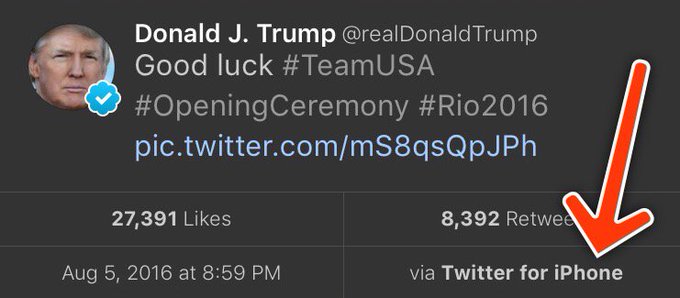
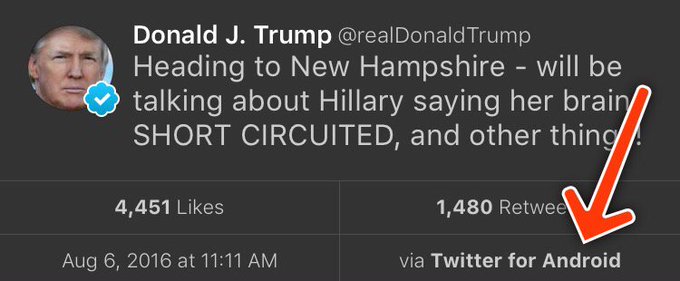
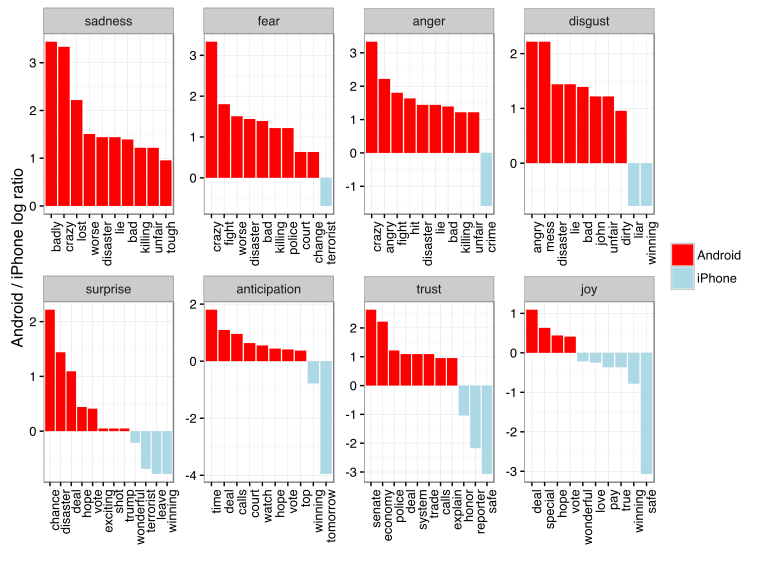
A year ago today, I wrote up a blog post Text analysis of Trump’s tweets confirms he writes only the (angrier) Android half.

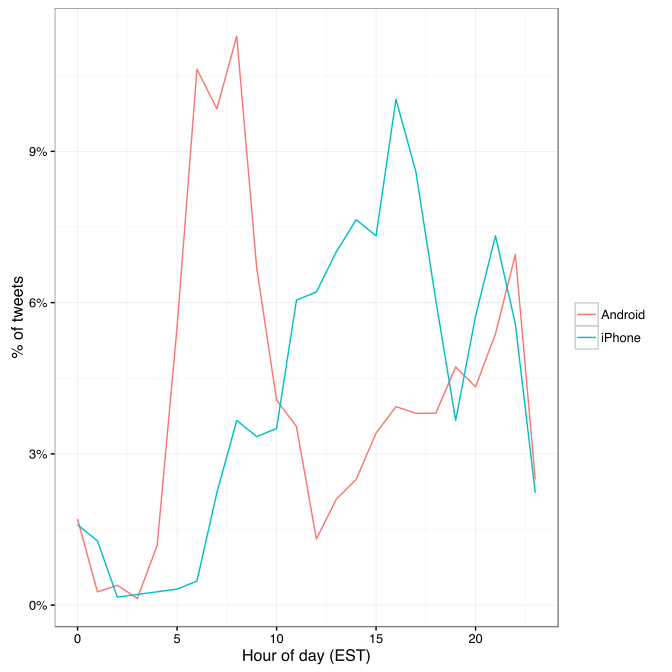
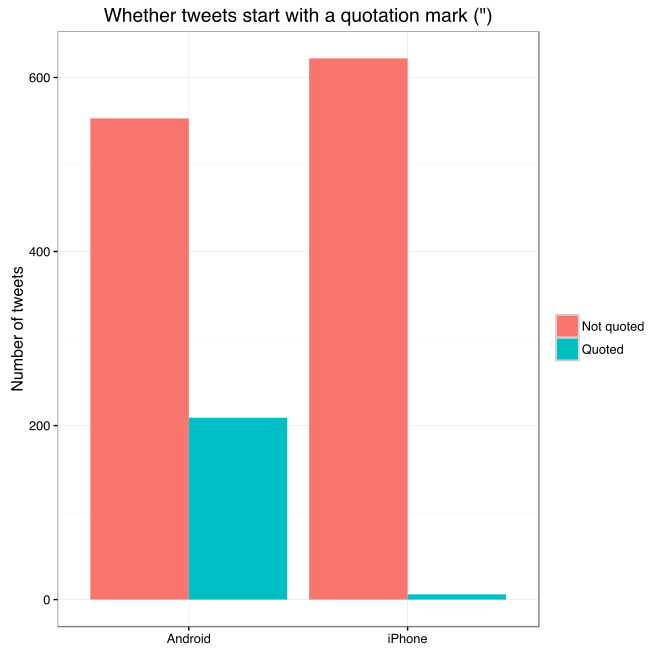
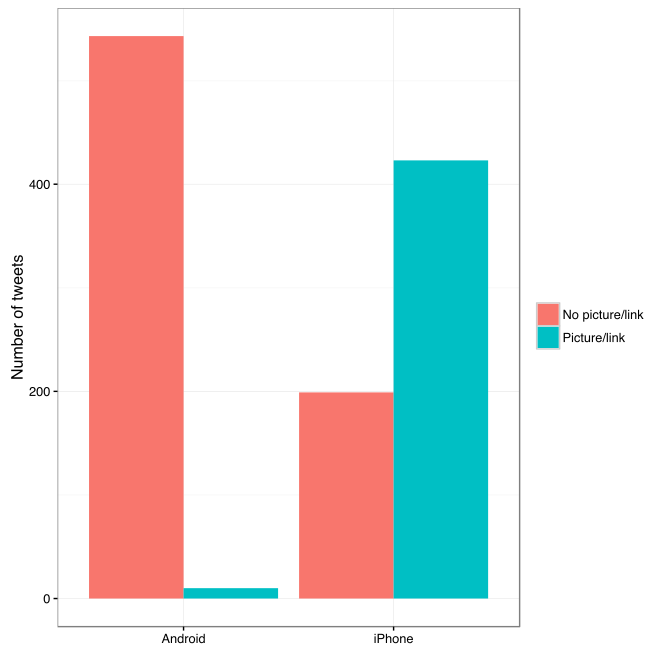
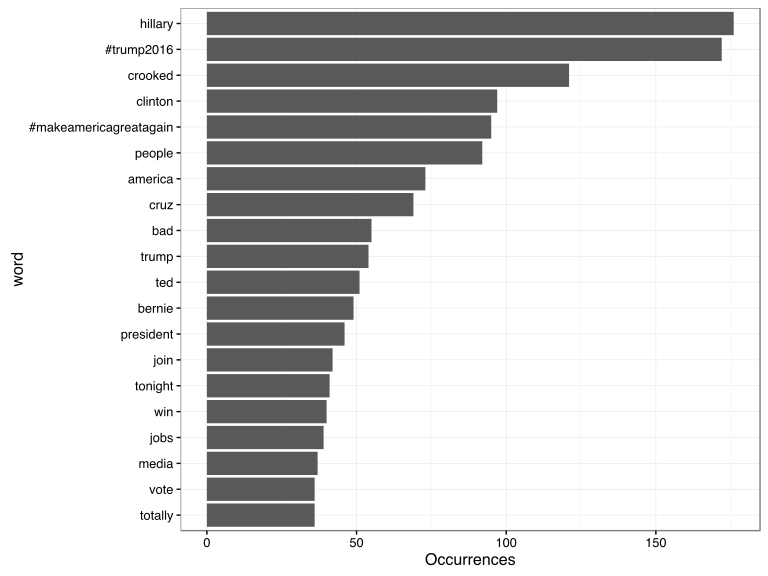
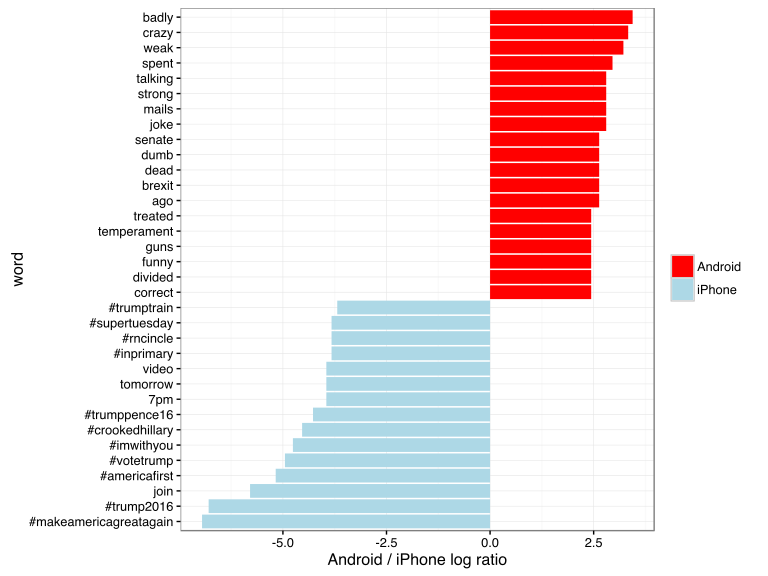
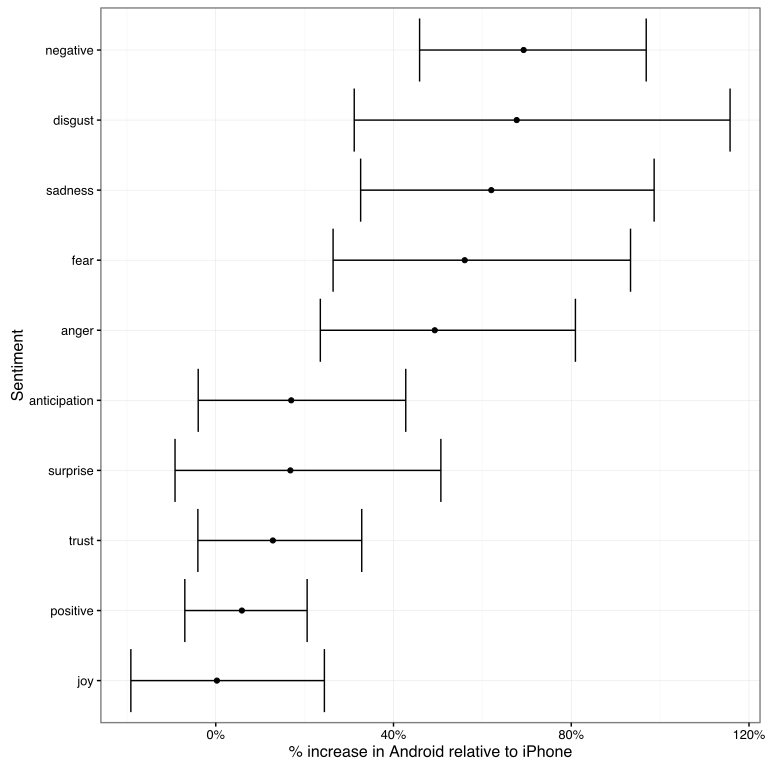
My analysis, shown below, concludes that the Android and iPhone tweets are clearly from different people, posting during different times of day and using hashtags, links, and retweets in distinct ways. What’s more, we can see that the Android tweets are angrier and more negative, while the iPhone tweets tend to be benign announcements and pictures.

Of course, a lot has changed in the last year. Trump was elected and inaugurated, and his Twitter account has become only more newsworthy. So it’s worth revisiting the analysis, for a few reasons:

  • There is a year of new data, with over 2700 more tweets. And quite notably, Trump stopped using the Android in March 2017. This is why machine learning approaches like didtrumptweetit.com are useful since they can still distinguish Trump’s tweets from his campaign’s by training on the kinds of features I used in my original post.
  • I’ve found a better dataset: in my original analysis, I was working quickly and used the twitteR package to query Trump’s tweets. I since learned there’s a bug in the package that caused it to retrieve only about half the tweets that could have been retrieved, and in any case, I was able to go back only to January 2016. I’ve since found the truly excellent Trump Twitter Archive, which contains all of Trump’s tweets going back to 2009. Below I show some R code for querying it.
  • I’ve heard some interesting questions that I wanted to follow up on: These come from the comments on the original post and other conversations I’ve had since. Two questions included what device Trump tended to use before the campaign, and what types of tweets tended to lead to high engagement.

So here I’m following up with a few more analyses of the \@realDonaldTrump account. As I did last year, I’ll show most of my code, especially those that involve text mining with the tidytext package (now a published O’Reilly book!). You can find the remainder of the code here.

Updating the dataset

The first step was to find a more up-to-date dataset of Trump’s tweets. The Trump Twitter Archive, by Brendan Brown, is a brilliant project for tracking them, and is easily retrievable from R.

library(tidyverse)
library(lubridate)

url <- 'http://www.trumptwitterarchive.com/data/realdonaldtrump/%s.json'
all_tweets <- map(2009:2017, ~sprintf(url, .x)) %>%
  map_df(jsonlite::fromJSON, simplifyDataFrame = TRUE) %>%
  mutate(created_at = parse_date_time(created_at, "a b! d! H!:M!:S! z!* Y!")) %>%
  tbl_df()

As of today, it contains 31548, including the text, device, and the number of retweets and favourites. (Also impressively, it updates hourly, and since September 2016 it includes tweets that were afterwards deleted).

Devices over time

My analysis from last summer was useful for journalists interpreting Trump’s tweets since it was able to distinguish Trump’s tweets from those sent by his staff. But it stopped being true in March 2017, when Trump switched to using an iPhone.

Let’s dive into at the history of all the devices used to tweet from the account, since the first tweets in 2009.

library(forcats)

all_tweets %>%
  mutate(source = fct_lump(source, 5)) %>%
  count(month = round_date(created_at, "month"), source) %>%
  complete(month, source, fill = list(n = 0)) %>%
  mutate(source = reorder(source, -n, sum)) %>%
  group_by(month) %>%
  mutate(percent = n / sum(n),
         maximum = cumsum(percent),
         minimum = lag(maximum, 1, 0)) %>%
  ggplot(aes(month, ymin = minimum, ymax = maximum, fill = source)) +
  geom_ribbon() +
  scale_y_continuous(labels = percent_format()) +
  labs(x = "Time",
       y = "% of Trump's tweets",
       fill = "Source",
       title = "Source of @realDonaldTrump tweets over time",
       subtitle = "Summarized by month")

center

A number of different people have clearly tweeted for the \@realDonaldTrump account over time, forming a sort of geological strata. I’d divide it into basically five acts:

  • Early days: All of Trump’s tweets until late 2011 came from the Web Client.
  • Other platforms: There was then a burst of tweets from TweetDeck and TwitLonger Beta, but these disappeared. Some exploration (shown later) indicate these may have been used by publicists promoting his book, though some (like this one from TweetDeck) clearly either came from him or were dictated.
  • Starting the Android: Trump’s first tweet from the Android was in February 2013, and it quickly became his main device.
  • Campaign: The iPhone was introduced only when Trump announced his campaign by 2015. It was clearly used by one or more of his staff, because by the end of the campaign it made up a majority of the tweets coming from the account. (There was also an iPad used occasionally, which was lumped with several other platforms into the “Other” category). The iPhone reduced its activity after the election and before the inauguration.
  • Trump’s switch to iPhone: Trump’s last Android tweet was on March 25th, 2017, and a few days later Trump’s staff confirmed he’d switched to using an iPhone.

Which devices did Trump use himself, and which did other people use to tweet for him? To answer this, we could consider that Trump almost never uses hashtags, pictures or links in his tweets. Thus, the percentage of tweets containing one of those features is a proxy for how much others are tweeting for him.

library(stringr)

all_tweets %>%
  mutate(source = fct_lump(source, 5)) %>%
  filter(!str_detect(text, "^(\"|RT)")) %>%
  group_by(source, year = year(created_at)) %>%
  summarize(tweets = n(),
            hashtag = sum(str_detect(str_to_lower(text), "#[a-z]|http"))) %>%
  ungroup() %>%
  mutate(source = reorder(source, -tweets, sum)) %>%
  filter(tweets >= 20) %>%
  ggplot(aes(year, hashtag / tweets, color = source)) +
  geom_line() +
  geom_point() +
  scale_x_continuous(breaks = seq(2009, 2017, 2)) +
  scale_y_continuous(labels = percent_format()) +
  facet_wrap(~ source) +
  labs(x = "Time",
       y = "% of Trump's tweets with a hashtag, picture or link",
       title = "Tweets with a hashtag, picture or link by device",
       subtitle = "Not including retweets; only years with at least 20 tweets from a device.")

center

This suggests that each of the devices may have a mix (TwitLonger Beta was certainly entirely staff, as was the mix of “Other” platforms during the campaign), but that only Trump ever tweeted from an Android.

When did Trump start talking about Barack Obama?

Now that we have data going back to 2009, we can take a look at how Trump used to tweet, and when his interest turned political.

In the early days of the account, it was pretty clear that a publicist was writing Trump’s tweets for him. In fact, his first-ever tweet refers to him in the third person:

Be sure to tune in and watch Donald Trump on Late Night with David Letterman as he presents the Top Ten List tonight!

The first hundred or so tweets follow a similar pattern (interspersed with a few cases where he tweets for himself and signs it). But this changed alongside his views of the Obama administration. Trump’s first-ever mention of Obama was entirely benign:

Staff Sgt. Salvatore A. Giunta received the Medal of Honor from Pres. Obama this month. It was a great honor to have him visit me today.

But his next were a different story. This article shows how Trump’s opinion of the administration turned from praise to criticism at the end of 2010 and in early 2011 when he started spreading a conspiracy theory about Obama’s country of origin. His second and third tweets about the president both came in July 2011, followed by many more.

Trump's first seven tweets mentioning Obama

What changed? Well, it was two months after the infamous 2011 White House Correspondents Dinner, where Obama mocked Trump for his conspiracy theories, causing Trump to leave in a rage. Trump has denied that the dinner pushed him towards politics… but there certainly was a reaction at the time.

all_tweets %>%
  filter(!str_detect(text, "^(\"|RT)")) %>%
  group_by(month = round_date(created_at, "month")) %>%
  summarize(tweets = n(),
            hashtag = sum(str_detect(str_to_lower(text), "obama")),
            percent = hashtag / tweets) %>%
  ungroup() %>%
  filter(tweets >= 10) %>%
  ggplot(aes(as.Date(month), percent)) +
  geom_line() +
  geom_point() +
  geom_vline(xintercept = as.integer(as.Date("2011-04-30")), color = "red", lty = 2) +
  geom_vline(xintercept = as.integer(as.Date("2012-11-06")), color = "blue", lty = 2) +
  scale_y_continuous(labels = percent_format()) +
  labs(x = "Time",
       y = "% of Trump's tweets that mention Obama",
       subtitle = paste0("Summarized by month; only months containing at least 10 tweets.\n",
                         "Red line is White House Correspondent's Dinner, blue is 2012 election."),
       title = "Trump's tweets mentioning Obama")

center

between <- all_tweets %>%
  filter(created_at >= "2011-04-30", created_at < "2012-11-07") %>%
  mutate(obama = str_detect(str_to_lower(text), "obama"))

percent_mentioned <- mean(between$obama)

Between July 2011 and November 2012 (Obama’s re-election), a full 32.3%% of Trump’s tweets mentioned Obama by name (and that’s not counting the ones that mentioned him or the election implicitly, like this). Of course, this is old news, but it’s an interesting insight into what Trump’s Twitter was up to when it didn’t draw as much attention as it does now.

Trump’s opinion of Obama is well known enough that this may be the most redundant sentiment analysis I’ve ever done, but it’s worth noting that this was the time period where Trump’s tweets first turned negative. This requires tokenizing the tweets into words. I do so with the tidytext package created by me and Julia Silge.

library(tidytext)

all_tweet_words <- all_tweets %>%
  mutate(text = str_replace_all(text, "https?://t.co/[A-Za-z\\d]+|&amp;", "")) %>%
  filter(!str_detect(text, "^(\"|RT)")) %>%
  unnest_tokens(word, text, token = "regex", pattern = reg) %>%
  filter(!word %in% stop_words$word, str_detect(word, "[a-z]"))
all_tweet_words %>%
  inner_join(get_sentiments("afinn")) %>%
  group_by(month = round_date(created_at, "month")) %>%
  summarize(average_sentiment = mean(score), words = n()) %>%
  filter(words >= 10) %>%
  ggplot(aes(month, average_sentiment)) +
  geom_line() +
  geom_hline(color = "red", lty = 2, yintercept = 0) +
  labs(x = "Time",
       y = "Average AFINN sentiment score",
       title = "@realDonaldTrump sentiment over time",
       subtitle = "Dashed line represents a 'neutral' sentiment average. Only months with at least 10 words present in the AFINN lexicon")

center

(Did I mention you can learn more about using R for sentiment analysis in our new book?)

Changes in words since the election

My original analysis was on tweets in early 2016, and I’ve often been asked how and if Trump’s tweeting habits have changed since the election. The remainder of the analyses will look only at tweets since Trump launched his campaign (June 16, 2015), and disregards retweets.

library(stringr)

campaign_tweets <- all_tweets %>%
  filter(created_at >= "2015-06-16") %>%
  mutate(source = str_replace(source, "Twitter for ", "")) %>%
  filter(!str_detect(text, "^(\"|RT)"))

tweet_words <- all_tweet_words %>%
  filter(created_at >= "2015-06-16")

We can compare words used before the election to ones used after.

ratios <- tweet_words %>%
  mutate(phase = ifelse(created_at >= "2016-11-09", "after", "before")) %>%
  count(word, phase) %>%
  spread(phase, n, fill = 0) %>%
  mutate(total = before + after) %>%
  mutate_at(vars(before, after), funs((. + 1) / sum(. + 1))) %>%
  mutate(ratio = after / before) %>%
  arrange(desc(ratio))

What words were used more before or after the election?

center

Some of the words used mostly before the election included “Hillary” and “Clinton” (along with “Crooked”), though he does still mention her. He no longer talks about his competitors in the primary, including (and the account no longer has need of the #trump2016 hashtag).

Of course, there’s one word with a far greater shift than others: “fake”, as in “fake news”. Trump started using the term only in January, claiming it after some articles had suggested fake news articles were partly to blame for Trump’s election.

center

As of early August Trump is using the phrase more than ever, with about 9% of his tweets mentioning it. As we’ll see in a moment, this was a savvy social media move.

What words lead to retweets?

One of the most common follow-up questions I’ve gotten is what terms tend to lead to Trump’s engagement.

word_summary <- tweet_words %>%
  group_by(word) %>%
  summarize(total = n(),
            median_retweets = median(retweet_count))

What words tended to lead to unusually many retweets, or unusually few?

word_summary %>%
  filter(total >= 25) %>%
  arrange(desc(median_retweets)) %>%
  slice(c(1:20, seq(n() - 19, n()))) %>%
  mutate(type = rep(c("Most retweets", "Fewest retweets"), each = 20)) %>%
  mutate(word = reorder(word, median_retweets)) %>%
  ggplot(aes(word, median_retweets)) +
  geom_col() +
  labs(x = "",
       y = "Median # of retweets for tweets containing this word",
       title = "Words that led to many or few retweets") +
  coord_flip() +
  facet_wrap(~ type, ncol = 1, scales = "free_y")

center

Some of Trump’s most retweeted topics include RussiaNorth Korea, the FBI (often about Clinton), and, most notably, “fake news”.

Of course, Trump’s tweets have gotten more engagement over time as well (which partially confounds this analysis: worth looking into more!) His typical number of retweets skyrocketed when he announced his campaign, grew throughout, and peaked around his inauguration (though it’s stayed pretty high since).

all_tweets %>%
  group_by(month = round_date(created_at, "month")) %>%
  summarize(median_retweets = median(retweet_count), number = n()) %>%
  filter(number >= 10) %>%
  ggplot(aes(month, median_retweets)) +
  geom_line() +
  scale_y_continuous(labels = comma_format()) +
  labs(x = "Time",
       y = "Median # of retweets")

center

Also worth noticing: before the campaign, the only patch where he had a notable increase in retweets was his year of tweeting about Obama. Trump’s foray into politics has had many consequences, but it was certainly an effective social media strategy.

Conclusion: I wish this hadn’t aged well

Until today, last year’s Trump post was the only blog post that analyzed politics, and (not unrelatedly!) the highest amount of attention any of my posts have received. I got to write up an article for the Washington Post, and was interviewed on Sky NewsCTV, and NPR. People have built great tools and analyses on top of my work, with some of my favorites including didtrumptweetit.com and the Atlantic’s analysis. And I got the chance to engage with, well, different points of view.

The post has certainly had some professional value. But it disappoints me that the analysis is as relevant as it is today. At the time I enjoyed my 15 minutes of fame, but I also hoped it would end. (“Hey, remember when that Twitter account seemed important?” “Can you imagine what Trump would tweet about this North Korea thing if we were president?”) But of course, Trump’s Twitter account is more relevant than ever.

I remember when my Android/iPhone analysis came out last year, people asked “Who cares what Trump tweets?”

😬https://twitter.com/mlcalderone/status/890287732559314944 

I don’t love analysing political data; I prefer writing about baseballbiologyR education, and programming languages. But as you might imagine, that’s the least of the reasons I wish this particular chapter of my work had faded into obscurity.

About the author:

David Robinson is a Data Scientist at Stack Overflow. In May 2015, he received his PhD in Quantitative and Computational Biology from Princeton University, where he worked with Professor John Storey. His interests include statistics, data analysis, genomics, education, and programming in R.

Follow this link to the 2016 prequel to this article.

Variance Explained: Text Mining Trump’s Twitter – Part 1: Trump is Angrier on Android

Variance Explained: Text Mining Trump’s Twitter – Part 1: Trump is Angrier on Android

Reposted from Variance Explained with minor modifications.
Note this post was written in 2016, a follow-up was posted in 2017.

This weekend I saw a hypothesis about Donald Trump’s twitter account that simply begged to be investigated with data:

View image on TwitterView image on Twitter

Every non-hyperbolic tweet is from iPhone (his staff).

Every hyperbolic tweet is from Android (from him).

When Trump wishes the Olympic team good luck, he’s tweeting from his iPhone. When he’s insulting a rival, he’s usually tweeting from an Android. Is this an artefact showing which tweets are Trump’s own and which are by some handler?

Others have explored Trump’s timeline and noticed this tends to hold up- and Trump himself does indeed tweet from a Samsung Galaxy. But how could we examine it quantitatively? I’ve been writing about text mining and sentiment analysis recently, particularly during my development of the tidytext R package with Julia Silge, and this is a great opportunity to apply it again.

My analysis, shown below, concludes that the Android and iPhone tweets are clearly from different people, posting during different times of day and using hashtags, links, and retweets in distinct ways. What’s more, we can see that the Android tweets are angrier and more negative, while the iPhone tweets tend to be benign announcements and pictures. Overall I’d agree with @tvaziri’s analysis: this lets us tell the difference between the campaign’s tweets (iPhone) and Trump’s own (Android).

The dataset

First, we’ll retrieve the content of Donald Trump’s timeline using the userTimelinefunction in the twitteR package:1

library(dplyr)
library(purrr)
library(twitteR)
# You'd need to set global options with an authenticated app
setup_twitter_oauth(getOption("twitter_consumer_key"),
                    getOption("twitter_consumer_secret"),
                    getOption("twitter_access_token"),
                    getOption("twitter_access_token_secret"))

# We can request only 3200 tweets at a time; it will return fewer
# depending on the API
trump_tweets <- userTimeline("realDonaldTrump", n = 3200)
trump_tweets_df <- tbl_df(map_df(trump_tweets, as.data.frame))
# if you want to follow along without setting up Twitter authentication,
# just use my dataset:
load(url("http://varianceexplained.org/files/trump_tweets_df.rda"))

We clean this data a bit, extracting the source application. (We’re looking only at the iPhone and Android tweets- a much smaller number are from the web client or iPad).

library(tidyr)

tweets <- trump_tweets_df %>%
  select(id, statusSource, text, created) %>%
  extract(statusSource, "source", "Twitter for (.*?)<") %>%
  filter(source %in% c("iPhone", "Android"))

Overall, this includes 628 tweets from iPhone, and 762 tweets from Android.

One consideration is what time of day the tweets occur, which we’d expect to be a “signature” of their user. Here we can certainly spot a difference:

library(lubridate)
library(scales)

tweets %>%
  count(source, hour = hour(with_tz(created, "EST"))) %>%
  mutate(percent = n / sum(n)) %>%
  ggplot(aes(hour, percent, color = source)) +
  geom_line() +
  scale_y_continuous(labels = percent_format()) +
  labs(x = "Hour of day (EST)",
       y = "% of tweets",
       color = "")

center

Trump on the Android does a lot more tweeting in the morning, while the campaign posts from the iPhone more in the afternoon and early evening.

Another place we can spot a difference is in Trump’s anachronistic behavior of “manually retweeting” people by copy-pasting their tweets, then surrounding them with quotation marks:

@trumplican2016@realDonaldTrump @DavidWohl stay the course mr trump your message is resonating with the PEOPLE”

Almost all of these quoted tweets are posted from the Android:

center

In the remaining by-word analyses in this text, I’ll filter these quoted tweets out (since they contain text from followers that may not be representative of Trump’s own tweets).

Somewhere else we can see a difference involves sharing links or pictures in tweets.

tweet_picture_counts <- tweets %>%
  filter(!str_detect(text, '^"')) %>%
  count(source,
        picture = ifelse(str_detect(text, "t.co"),
                         "Picture/link", "No picture/link"))

ggplot(tweet_picture_counts, aes(source, n, fill = picture)) +
  geom_bar(stat = "identity", position = "dodge") +
  labs(x = "", y = "Number of tweets", fill = "")

center

It turns out tweets from the iPhone were 38 times as likely to contain either a picture or a link. This also makes sense with our narrative: the iPhone (presumably run by the campaign) tends to write “announcement” tweets about events, like this:

While Android (Trump himself) tends to write picture-less tweets like:

The media is going crazy. They totally distort so many things on purpose. Crimea, nuclear, “the baby” and so much more. Very dishonest!

Comparison of words

Now that we’re sure there’s a difference between these two accounts, what can we say about the difference in the content? We’ll use the tidytext package that Julia Silge and I developed.

We start by dividing into individual words using the unnest_tokens function (see this vignette for more), and removing some common “stopwords”2:

library(tidytext)

reg <- "([^A-Za-z\\d#@']|'(?![A-Za-z\\d#@]))"
tweet_words <- tweets %>%
  filter(!str_detect(text, '^"')) %>%
  mutate(text = str_replace_all(text, "https://t.co/[A-Za-z\\d]+|&", "")) %>%
  unnest_tokens(word, text, token = "regex", pattern = reg) %>%
  filter(!word %in% stop_words$word,
         str_detect(word, "[a-z]"))

tweet_words
## # A tibble: 8,753 x 4
##                    id source             created                   word
##                                                   
## 1  676494179216805888 iPhone 2015-12-14 20:09:15                 record
## 2  676494179216805888 iPhone 2015-12-14 20:09:15                 health
## 3  676494179216805888 iPhone 2015-12-14 20:09:15 #makeamericagreatagain
## 4  676494179216805888 iPhone 2015-12-14 20:09:15             #trump2016
## 5  676509769562251264 iPhone 2015-12-14 21:11:12               accolade
## 6  676509769562251264 iPhone 2015-12-14 21:11:12             @trumpgolf
## 7  676509769562251264 iPhone 2015-12-14 21:11:12                 highly
## 8  676509769562251264 iPhone 2015-12-14 21:11:12              respected
## 9  676509769562251264 iPhone 2015-12-14 21:11:12                   golf
## 10 676509769562251264 iPhone 2015-12-14 21:11:12                odyssey
## # ... with 8,743 more rows

What were the most common words in Trump’s tweets overall?

center

These should look familiar for anyone who has seen the feed. Now let’s consider which words are most common from the Android relative to the iPhone, and vice versa. We’ll use the simple measure of log odds ratio, calculated for each word as:3

log2⁡(# in Android+1Total Android+1# in iPhone+1Total iPhone+1)”>log2(# in Android 1 / Total Android + log2⁡(# in Android+1Total Android+1# in iPhone+1Total iPhone+1)

“>1 / # in iPhone + 1 / Total iPhone 1)

android_iphone_ratios <- tweet_words %>%
  count(word, source) %>%
  filter(sum(n) >= 5) %>%
  spread(source, n, fill = 0) %>%
  ungroup() %>%
  mutate_each(funs((. + 1) / sum(. + 1)), -word) %>%
  mutate(logratio = log2(Android / iPhone)) %>%
  arrange(desc(logratio))

Which are the words most likely to be from Android and most likely from iPhone?

center

A few observations:

  • Most hashtags come from the iPhone. Indeed, almost no tweets from Trump’s Android contained hashtags, with some rare exceptions like this one. (This is true only because we filtered out the quoted “retweets”, as Trump does sometimes quote tweets like this that contain hashtags).
  • Words like “join” and “tomorrow”, and times like “7pm”, also came only from the iPhone. The iPhone is clearly responsible for event announcements like this one (“Join me in Houston, Texas tomorrow night at 7pm!”)
  • A lot of “emotionally charged” words, like “badly”, “crazy”, “weak”, and “dumb”, were overwhelmingly more common on Android. This supports the original hypothesis that this is the “angrier” or more hyperbolic account.

Sentiment analysis: Trump’s tweets are much more negative than his campaign’s

Since we’ve observed a difference in sentiment between the Android and iPhone tweets, let’s try quantifying it. We’ll work with the NRC Word-Emotion Association lexicon, available from the tidytext package, which associates words with 10 sentiments: positivenegativeangeranticipationdisgustfearjoysadnesssurprise, and trust.

nrc <- sentiments %>%
  filter(lexicon == "nrc") %>%
  dplyr::select(word, sentiment)

nrc
## # A tibble: 13,901 x 2
##           word sentiment
##               
## 1       abacus     trust
## 2      abandon      fear
## 3      abandon  negative
## 4      abandon   sadness
## 5    abandoned     anger
## 6    abandoned      fear
## 7    abandoned  negative
## 8    abandoned   sadness
## 9  abandonment     anger
## 10 abandonment      fear
## # ... with 13,891 more rows

To measure the sentiment of the Android and iPhone tweets, we can count the number of words in each category:

sources <- tweet_words %>%
  group_by(source) %>%
  mutate(total_words = n()) %>%
  ungroup() %>%
  distinct(id, source, total_words)

by_source_sentiment <- tweet_words %>%
  inner_join(nrc, by = "word") %>%
  count(sentiment, id) %>%
  ungroup() %>%
  complete(sentiment, id, fill = list(n = 0)) %>%
  inner_join(sources) %>%
  group_by(source, sentiment, total_words) %>%
  summarize(words = sum(n)) %>%
  ungroup()

head(by_source_sentiment)
## # A tibble: 6 x 4
##    source    sentiment total_words words
##                     
## 1 Android        anger        4901   321
## 2 Android anticipation        4901   256
## 3 Android      disgust        4901   207
## 4 Android         fear        4901   268
## 5 Android          joy        4901   199
## 6 Android     negative        4901   560

(For example, we see that 321 of the 4901 words in the Android tweets were associated with “anger”). We then want to measure how much more likely the Android account is to use an emotionally-charged term relative to the iPhone account. Since this is count data, we can use a Poisson test to measure the difference:

library(broom)

sentiment_differences <- by_source_sentiment %>%
  group_by(sentiment) %>%
  do(tidy(poisson.test(.$words, .$total_words)))

sentiment_differences
## Source: local data frame [10 x 9]
## Groups: sentiment [10]
## 
##       sentiment estimate statistic      p.value parameter  conf.low
##           (chr)    (dbl)     (dbl)        (dbl)     (dbl)     (dbl)
## 1         anger 1.492863       321 2.193242e-05  274.3619 1.2353162
## 2  anticipation 1.169804       256 1.191668e-01  239.6467 0.9604950
## 3       disgust 1.677259       207 1.777434e-05  170.2164 1.3116238
## 4          fear 1.560280       268 1.886129e-05  225.6487 1.2640494
## 5           joy 1.002605       199 1.000000e+00  198.7724 0.8089357
## 6      negative 1.692841       560 7.094486e-13  459.1363 1.4586926
## 7      positive 1.058760       555 3.820571e-01  541.4449 0.9303732
## 8       sadness 1.620044       303 1.150493e-06  251.9650 1.3260252
## 9      surprise 1.167925       159 2.174483e-01  148.9393 0.9083517
## 10        trust 1.128482       369 1.471929e-01  350.5114 0.9597478
## Variables not shown: conf.high (dbl), method (fctr), alternative (fctr)

And we can visualize it with a 95% confidence interval:

center

Thus, Trump’s Android account uses about 40-80% more words related to disgustsadnessfearanger, and other “negative” sentiments than the iPhone account does. (The positive emotions weren’t different to a statistically significant extent).

We’re especially interested in which words drove this different in sentiment. Let’s consider the words with the largest changes within each category:

center

This confirms that lots of words annotated as negative sentiments (with a few exceptions like “crime” and “terrorist”) are more common in Trump’s Android tweets than the campaign’s iPhone tweets.

Conclusion: the ghost in the political machine

I was fascinated by the recent New Yorker article about Tony Schwartz, Trump’s ghostwriter for The Art of the Deal. Of particular interest was how Schwartz imitated Trump’s voice and philosophy:

In his journal, Schwartz describes the process of trying to make Trump’s voice palatable in the book. It was kind of “a trick,” he writes, to mimic Trump’s blunt, staccato, no-apologies delivery while making him seem almost boyishly appealing…. Looking back at the text now, Schwartz says, “I created a character far more winning than Trump actually is.”

Like any journalism, data journalism is ultimately about human interest, and there’s one human I’m interested in: who is writing these iPhone tweets?

The majority of the tweets from the iPhone are fairly benign declarations. But consider cases like these, both posted from an iPhone:

Like the worthless @NYDailyNews, looks like @politico will be going out of business. Bad reporting- no money, no cred!

Failing @NYTimes will always take a good story about me and make it bad. Every article is unfair and biased. Very sad!

These tweets certainly sound like the Trump we all know. Maybe our above analysis isn’t complete: maybe Trump has sometimes, however rarely, tweeted from an iPhone (perhaps dictating, or just using it when his own battery ran out). But what if our hypothesis is right, and these weren’t authored by the candidate- just someone trying their best to sound like him?

Or what about tweets like this (also iPhone), which defend Trump’s slogan- but doesn’t really sound like something he’d write?

Our country does not feel ‘great already’ to the millions of wonderful people living in poverty, violence and despair.

A lot has been written about Trump’s mental state. But I’d really rather get inside the head of this anonymous staffer, whose job is to imitate Trump’s unique cadence (“Very sad!”), or to put a positive spin on it, to millions of followers. Are they a true believer, or just a cog in a political machine, mixing whatever mainstream appeal they can into the @realDonaldTrump concoction? Like Tony Schwartz, will they one day regret their involvement?

  1. To keep the post concise I don’t show all of the code, especially code that generates figures. But you can find the full code here.
  2. We had to use a custom regular expression for Twitter, since typical tokenizers would split the # off of hashtags and @ off of usernames. We also removed links and ampersands (&) from the text.
  3. The “plus ones,” called Laplace smoothing are to avoid dividing by zero and to put more trust in common words.

About the author:

David Robinson is a Data Scientist at Stack Overflow. In May 2015, he received his PhD in Quantitative and Computational Biology from Princeton University, where he worked with Professor John Storey. His interests include statistics, data analysis, genomics, education, and programming in R.

Follow this link to the 2017 sequel to this article.

Networks Among #rstats Twitterers

Networks Among #rstats Twitterers

Reposted from Kasia Kulma’s github with minor modifications.

Have you ever wondered whether the most active/popular R-twitterers are virtual friends? 🙂 And by friends here I simply mean mutual followers on Twitter. In this post, I score and pick top 30 #rstats twitter users and analyse their Twitter network. You’ll see a lot of applications of rtweet and ggraph packages, as well as a very useful twist using purrr library, so let’s begin!


IMPORTING #RSTATS USERS

After loading my precious packages…

library(rtweet)
library(dplyr)
library(purrr)
library(igraph)
library(ggraph)

… I searched for Twitter users that have rstats termin their profile description. It definitely doesn’t include ALL active and popular R – users, but it’s a pretty reliable way of picking R – fans.

r_users <- search_users("#rstats", n = 1000)

It’s important to say, that in rtweet::search_users() even if you specify 1000 users to be extracted, you end up with quite a few duplicates and the actual number of users I got was much smaller: 564

r_users %>% summarise(n_users = n_distinct(screen_name))
##   n_users
## 1     564

Funnily enough, even though my profile description contains #rstats I was not included in the search results (@KKulma), sic! Were you? 🙂

SCORING AND CHOOSING TOP #RSTATS USERS

Now, let’s extract some useful information about those users:

r_users_info <- lookup_users(r_users$screen_name)

You’ll notice, that created data frame holds information about the number of followers, friends (users they follow), lists they belong to, the number of tweets (statuses) or how many times were they marked favourite.

r_users_info %>% select(dplyr::contains("count")) %>% head()
##   followers_count friends_count listed_count favourites_count
## 1            8311           366          580             9325
## 2           44474            11         1298                3
## 3           11106           524          467            18495
## 4           12481           431          542             7222
## 5           15345          1872          680            27971
## 6            5122           700          549             2796
##   statuses_count
## 1          66117
## 2           1700
## 3           8853
## 4           6388
## 5          22194
## 6          10010

And these variables that I used for building my ‘top score’: I simply calculate a percentile for each of those variables and sum it all together for each user. Given that each variable’s percentile will give me a value between 0 and 1, The final score can have a maximum value of 5.

r_users_ranking <- r_users_info %>%
  filter(protected == FALSE) %>% 
  select(screen_name, dplyr::contains("count")) %>% 
  unique() %>% 
  mutate(followers_percentile = ecdf(followers_count)(followers_count),
         friends_percentile = ecdf(friends_count)(friends_count),
         listed_percentile = ecdf(listed_count)(listed_count),
         favourites_percentile = ecdf(favourites_count)(favourites_count),
         statuses_percentile = ecdf(statuses_count)(statuses_count)
         ) %>% 
  group_by(screen_name) %>% 
  summarise(top_score = followers_percentile + friends_percentile + listed_percentile + favourites_percentile + statuses_percentile) %>% 
  ungroup() %>% 
  mutate(ranking = rank(-top_score))

Finally, I picked top 30 users based on the score I calculated. Tada!

top_30 <- r_users_ranking %>% arrange(desc(top_score)) %>% head(30) %>% arrange(desc(top_score))
top_30 
## # A tibble: 30 x 3
##        screen_name top_score ranking
##              <chr>     <dbl>   <dbl>
##  1          hspter  4.877005       1
##  2    RallidaeRule  4.839572       2
##  3         DEJPett  4.771836       3
##  4 modernscientist  4.752228       4
##  5 nicoleradziwill  4.700535       5
##  6      tomhouslay  4.684492       6
##  7    ChetanChawla  4.639929       7
##  8   TheSmartJokes  4.627451       8
##  9   Physical_Prep  4.625668       9
## 10       Cataranea  4.602496      10
## # ... with 20 more rows

I must say I’m incredibly impressed by these scores: @hpster, THE top R – twitterer managed to obtain a score of nearly 4.9 out of 5! WOW!

Anyway! To add some more depth to my list, I tried to identify top users’ gender, to see how many of them are women. I had to do it manually (ekhem!), as the Twitter API’s data doesn’t provide this, AFAIK. Let me know if you spot any mistakes!

top30_lookup <- r_users_info %>%
  filter(screen_name %in% top_30$screen_name) %>% 
  select(screen_name, user_id)

top30_lookup$gender <- c("M", "F", "F", "F", "F",
                         "M", "M", "M", "F", "F", 
                         "F", "M", "M", "M", "F", 
                         "F", "M", "M", "M", "M", 
                         "M", "M", "M", "F", "M",
                         "M", "M", "M", "M", "M")

table(top30_lookup$gender)
## 
##  F  M 
## 10 20

It looks like a third of all top users are women, but in the top 10 users, there are 6 women. Better than I expected, to be honest. So, well done, ladies!

GETTING FRIENDS NETWORK

Now, this was the trickiest part of this project: extracting top users’ friends list and putting it all in one data frame. As you may be aware, Twitter API allows you to download information only on 15 accounts in 15 minutes. So for my list, I had to break it up into 2 steps, 15 users each and then I named each list according to the top user they refer to:

top_30_usernames <- top30_lookup$screen_name

friends_top30a <-   map(top_30_usernames[1:15 ], get_friends)
names(friends_top30a) <- top_30_usernames[1:15]

# 15 minutes later....
friends_top30b <- map(top_30_usernames[16:30], get_friends)

After this I end up with two lists, each containing all friends’ IDs for top and bottom 15 users respectively. So what I need to do now is i) append the two lists, ii) create a variable stating top users’ name in each of those lists and iii) turn lists into data frames. All this can be done in 3 lines of code. And brace yourself: here comes the purrr trick I’ve been going on about! Simply using purrr:::map2_df I can take a single list of lists, create a name variable in each of those lists based on the list name (twitter_top_user) and convert the result into the data frame. BRILLIANT!!

# turning lists into data frames and putting them together
friends_top30 <- append(friends_top30a, friends_top30b)
names(friends_top30) <- top_30_usernames

# purrr - trick I've been banging on about!
friends_top <- map2_df(friends_top30, names(friends_top30), ~ mutate(.x, twitter_top_user = .y)) %>% 
  rename(friend_id = user_id) %>% select(twitter_top_user, friend_id)

Here’s the last bit that I need to correct before we move on to plotting the friends networks: for some reason, using purrr::map() with rtweet:::get_friends() gives me max only 5000 friends, but in case of @TheSmartJokes the true value is over 8000. As it’s the only top user with more than 5000 friends, I’ll download his friends separately…

# getting a full list of friends
SJ1 <- get_friends("TheSmartJokes")
SJ2 <- get_friends("TheSmartJokes", page = next_cursor(SJ1))

# putting the data frames together 
SJ_friends <-rbind(SJ1, SJ2) %>%  
  rename(friend_id = user_id) %>% 
  mutate(twitter_top_user = "TheSmartJokes") %>% 
  select(twitter_top_user, friend_id)

# the final results - over 8000 friends, rather than 5000
str(SJ_friends) 
## 'data.frame':    8611 obs. of  2 variables:
##  $ twitter_top_user: chr  "TheSmartJokes" "TheSmartJokes" "TheSmartJokes" "TheSmartJokes" ...
##  $ friend_id       : chr  "390877754" "6085962" "88540151" "108186743" ...

… and use it to replace those friends that are already in the final friends list.

friends_top30 <- friends_top %>% 
  filter(twitter_top_user != "TheSmartJokes") %>% 
  rbind(SJ_friends) 

Finally, let me do some last data cleaning: filtering out friends that are not among the top 30 R – users, replacing their IDs with twitter names and adding gender for top users and their friends… Tam, tam, tam: here we are! Here’s the final data frame we’ll use for visualising the friend networks!

# select friends that are top30 users
final_friends_top30 <- friends_top  %>% 
  filter(friend_id %in% top30_lookup$user_id)

# add friends' screen_name
final_friends_top30$friend_name <- top30_lookup$screen_name[match(final_friends_top30$friend_id, top30_lookup$user_id)]

# add users' and friends' gender
final_friends_top30$user_gender <- top30_lookup$gender[match(final_friends_top30$twitter_top_user, top30_lookup$screen_name)]
final_friends_top30$friend_gender <- top30_lookup$gender[match(final_friends_top30$friend_name, top30_lookup$screen_name)]

## final product!!!
final <- final_friends_top30 %>% select(-friend_id)

head(final)
##   twitter_top_user     friend_name user_gender friend_gender
## 1         hrbrmstr nicoleradziwill           M             F
## 2         hrbrmstr        kara_woo           M             F
## 3         hrbrmstr      juliasilge           M             F
## 4         hrbrmstr        noamross           M             M
## 5         hrbrmstr      JennyBryan           M             F
## 6         hrbrmstr     thosjleeper           M             M

VISUALIZING FRIENDS NETWORKS

After turning our data frame into something more usable by igraph and ggraph

f1 <- graph_from_data_frame(final, directed = TRUE, vertices = NULL)
V(f1)$Popularity <- degree(f1, mode = 'in')

… let’s have a quick overview of all the connections:

ggraph(f1, layout='kk') + 
  geom_edge_fan(aes(alpha = ..index..), show.legend = FALSE) +
  geom_node_point(aes(size = Popularity)) +
  theme_graph( fg_text_colour = 'black') 

generic_pure

Keep in mind that Popularity – defined as the number of edges that go into the node – determines node size. It’s all very pretty, but I’d like to see how nodes correspond to Twitter users’ names:

ggraph(f1, layout='kk') + 
  geom_edge_fan(aes(alpha = ..index..), show.legend = FALSE) +
  geom_node_point(aes(size = Popularity)) +
  geom_node_text(aes(label = name, fontface='bold'), 
                 color = 'white', size = 3) +
  theme_graph(background = 'dimgray', text_colour = 'white',title_size = 30) 

generic_names

So interesting! You can see the core of the graph consists mainly of female users: @hpster, @JennyBryan, @juliasilge, @karawoo, but also a couple of male R – users: @hrbrmstr and @noamross. Who do they follow? Men or women?

ggraph(f1, layout='kk') + 
  geom_edge_fan(aes(alpha = ..index..), show.legend = FALSE) +
  geom_node_point(aes(size = Popularity)) +
  theme_graph( fg_text_colour = 'black') +
  geom_edge_link(aes(colour = friend_gender)) +
  scale_edge_color_brewer(palette = 'Set1') + 
  labs(title='Top 30 #rstats users and gender of their friends')

generic_with_gender

It’s difficult to say definitely, but superficially I see A LOT of red, suggesting that our top R – users often follow female top twitterers. Let’s have a closer look and split graphs by user gender and see if there’s any difference in the gender of users they follow:

ggraph(f1, layout='kk') + 
  geom_edge_fan(aes(alpha = ..index..), show.legend = FALSE) +
  geom_node_point(aes(size = Popularity)) +
  theme_graph( fg_text_colour = 'black') +
  facet_edges(~user_gender) +
  geom_edge_link(aes(colour = friend_gender)) +
  scale_edge_color_brewer(palette = 'Set1') +
  labs(title='Top 30 #rstats users and gender of their friends', subtitle='Graphs are separated by top user gender, edge colour indicates their friend gender' )

gender_with_gender

Ha! look at this! Obviously, female users’ graph will be less dense as there are fewer of them in the dataset, however, you can see that they tend to follow male users more often than male top users do. Is that impression supported by raw numbers?

final %>% 
  group_by(user_gender, friend_gender) %>% 
  summarize(n = n()) %>% 
  group_by(user_gender) %>% 
  mutate(sum = sum(n),
         percent = round(n/sum, 2)) 
## # A tibble: 4 x 5
## # Groups:   user_gender [2]
##   user_gender friend_gender     n   sum percent
##         <chr>         <chr> <int> <int>   <dbl>
## 1           F             F    26    57    0.46
## 2           F             M    31    57    0.54
## 3           M             F    55   101    0.54
## 4           M             M    46   101    0.46

It seems so, although to the lesser extent than suggested by the network graphs: Female top users follow other female top users 46% of the time, whereas male top users follow female top user 54% of the time. So what do you have to say about that?

About the author:

Kasia Kulma states she’s an overall, enthusiastic science enthusiast. Formally, a doctor in evolutionary biology, professionally, a data scientist, and, privately, a soppy mum and outdoors lover.