Category: r

Anomaly Detection Resources

Anomaly Detection Resources

Carnegie Mellon PhD student Yue Zhao collects this great Github repository of anomaly detection resources: https://github.com/yzhao062/anomaly-detection-resources

The repository consists of tools for multiple languages (R, Python, Matlab, Java) and resources in the form of:

  1. Books & Academic Papers
  2. Online Courses and Videos
  3. Outlier Datasets
  4. Algorithms and Applications
  5. Open-source and Commercial Libraries/Toolkits
  6. Key Conferences & Journals

Outlier Detection (also known as Anomaly Detection) is an exciting yet challenging field, which aims to identify outlying objects that are deviant from the general data distribution. Outlier detection has been proven critical in many fields, such as credit card fraud analytics, network intrusion detection, and mechanical unit defect detection.

https://github.com/yzhao062/anomaly-detection-resources

Quick Access — Table of Contents

Need to save R’s lm() or glm() models? Trim the fat!

Need to save R’s lm() or glm() models? Trim the fat!

I was training a predictive model for work for use in a Shiny App. However, as the training set was quite large (700k+ obs.), the model object to save was also quite large in size (500mb). This slows down your operation significantly!

Basically, all you really need are the coefficients (and a link function, in case of glm()). However, I can imagine that you are not eager to write new custom predictions functions, but that you would rather want to rely on R’s predict.lm and predict.glm. Hence, you’ll need to save some more object information.

Via Google I came to this blog, which provides this great custom R function (below) to decrease the object size of trained generalized linear models considerably! It retains only those object data that are necessary to make R’s predict functions work.

My saved linear model went from taking up half a GB to only 27kb! That’s a 99.995% reduction!

strip_glm = function(cm) {
  cm$y = c()
  cm$model = c()
  
  cm$residuals = c()
  cm$fitted.values = c()
  cm$effects = c()
  cm$qr$qr = c()  
  cm$linear.predictors = c()
  cm$weights = c()
  cm$prior.weights = c()
  cm$data = c()
  
  
  cm$family$variance = c()
  cm$family$dev.resids = c()
  cm$family$aic = c()
  cm$family$validmu = c()
  cm$family$simulate = c()
  attr(cm$terms,".Environment") = c()
  attr(cm$formula,".Environment") = c()
  
  cm
}

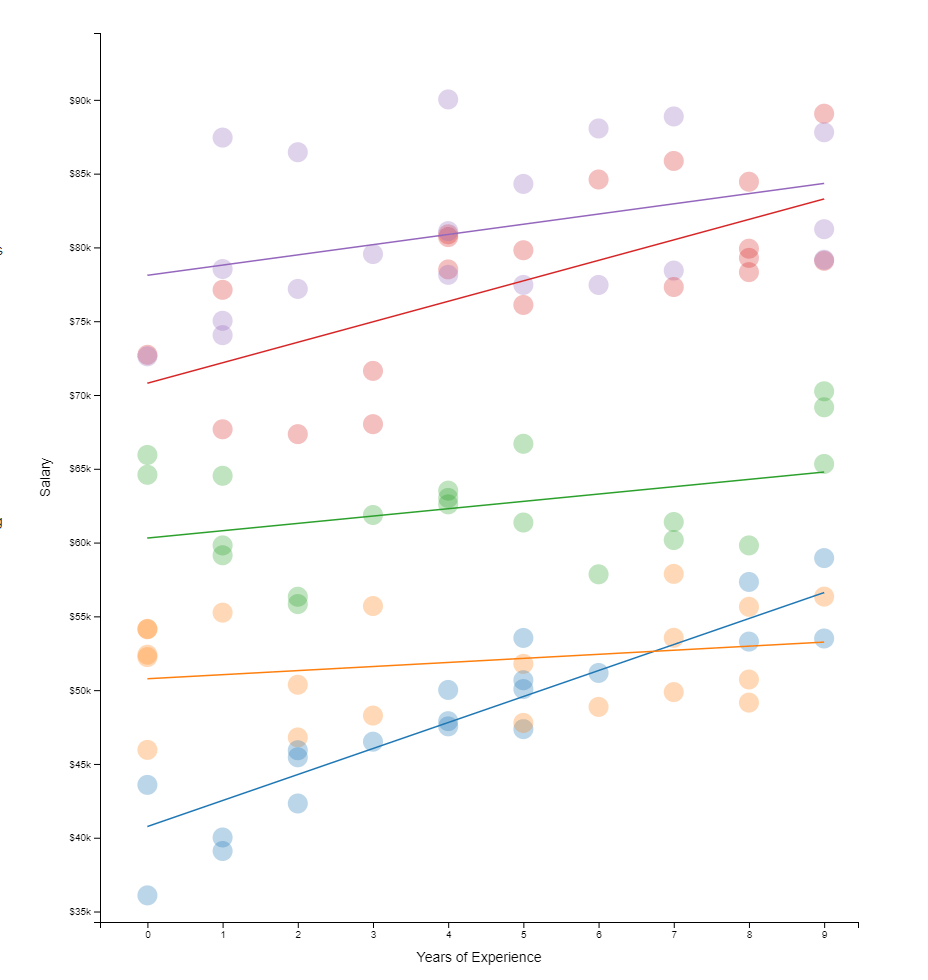
A Visual Introduction to Hierarchical Models, by Michael Freeman

Hierarchical models I have covered before on this blog. These models are super relevant in practice. For instance, in HR, employee data is always nested within teams which are in turn nested within organizational units. Also in my current field of insurances, claims are always nested within policies, which can in turn be nested within product categories. Data is hierachical, and we need to take that into account when we model it.

Hierarchical models do just that. Interested in how they do this? Have a look at this amazing browser application made in React.js!

http://mfviz.com/hierarchical-models

This project was built by Michael Freeman, a faculty member at the University of Washington Information School.

All code for this project is on GitHub, including the script to create the data and run regressions (done inR). Feel free to issue a pull request for improvements, and if you like it, share it on Twitter. Layout inspired by Tony Chu.

About this project
Online Workshop Tidy Data Science in R, by Jake Thompson

Online Workshop Tidy Data Science in R, by Jake Thompson

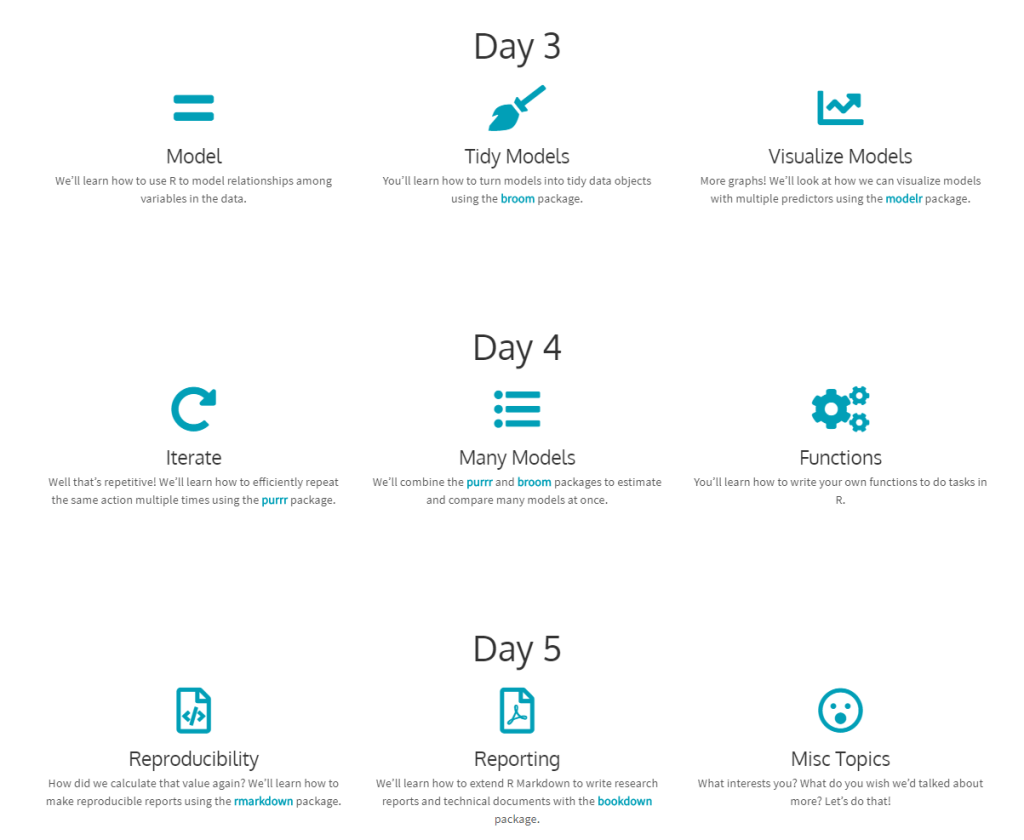
Here’s a website hosting for a five-day hands-on workshop based on the book “R for Data Science”.

The workshop was originally offered as part of the Stats Camp: Summer Statistical Institute in Lawrence, KS and hosted by the Center for Research Methods and Data Analysis and the Achievement and Assessment Instituteat the University of Kansas. It is designed for those who want to learn practical applications of R for data analysis.

You can download the Workshop files, but I suggest you do so via the original workshop webpage.

This workshop is designed for those who want to learn how to use R to analyze data. The material is based on Hadley Wickham and Garrett Grolemund’s R for Data Science. We’ll talk about how to conduct a complete data analysis from data import to final reporting in R using a suite of packages known as the tidyverse. The two goals of this workshop are: 1) learn how to use R to answer questions about our data; and 2) write code that is human readable and reproducible. We will also talk about how to share our code and analyses with others.

You should take this workshop if you are new to R, or to the tidyverse, and want to learn how to take advantage of this ecosystem to do data analysis. You’ll get the most from the workshop if you are primarily interested in applying pre-existing R packages and functions to your own data. We will give minimal tutorials on how to write your own functions; however, the main focus will be on using existing tools, rather than building our own.

About this workshop

=

Comprehensive Introduction to Command Line for R Users

Comprehensive Introduction to Command Line for R Users

Too little time, too many things of interest. Here’s a resource that’s still on my to-do list: A Comprehensive Introduction to Command Line for R Users by rsquaredacademy.com

In this tutorial, you will be introduced to the command line. We have selected a set of commands we think will be useful in general to a wide range of audience. […] after completing this tutorial, readers should be able to use the shell for version control, managing cloud services (like deploying your own shiny server etc.), execute commands in R & RMarkdown and execute R scripts in the shell.

https://blog.rsquaredacademy.com/command-line-basics-for-r-users/

If you want a deeper understanding of using command line for data science, the original authors suggest you read Data Science at the Command Line. Moreover, Software Carpentry has a lesson on shell. More references are listed at the end of the original tutorial. Use the clickable table of contents to quickly browse to the topic of your interest:

How Do I…? R Code Snippets by Sharon Machlis

How Do I…? R Code Snippets by Sharon Machlis

Sharon Machlis is the author of Practical R for Mass Communication and Journalism. In writing this book, she obviously wrote a lot of R code. Now, Sharon has been nice enough to share all 195 tricks and tips she came across during her writing with us, via this handy table.

Sharon’s list contains many neat tricks, some of which less well-known base functions, others features of more niche packages. Here’s the ones I am definitely adding to my R tricks overview and want to highlight here as well:

  • Categorize values into interval cut()
  • Convert numbers that came in as strings with commas to R numbers with readr::parse_number(mydf$mycol)
  • Create a searchable, sortable HTML table in 1 line of code with DT::datatable(mydf, filter = 'top')
  • Display a fraction between 0 and 1 as a percentage with scales::percent(myfraction)
  • Generate a vector of 1:length(myvec) with seq_along(myvec)

And as if one list was not enough, scrolling through her Twitter feed, I found another R tips and tricks list by Sharon: