Author: Paul van der Laken

Job-Switching Behaviors in the USA

Job-Switching Behaviors in the USA

Nathan Yau – the guy behind the wonderful visualizations of FlowingData.com – has been looking into job market data more and more lately. For his latest project, he took data of the Current Population Survey (2011-2016) a survey run by the US Census Bureau and Bureau of Labor Statistics. This survey covers many topics, but Nathan specifically looked into people’s current occupation and what they were doing the year before.

For his first visualization, Nathan examined the percentage of people switching jobs (a statistic he dubs the switching rate). Only occupations with over 100 survey responses are shown:

switchrate.png
Nathan concludes that jobs that come with higher salaries and require more training, education, and experience have lower switching rates. The interactive visualization can be found on FlowingData.com

Next Nathan looked into job moves within job categories, as he hypothesizes that people who decide to switch jobs look for something similar.

switchcategories.png
Nathan concludes that job categories with lower entry boundaries are subjected to more leavers. Original on FlowingData.com

The above results in the main question of the blog: Given you have a certain job, what are the possible jobs to switch to? The following interactive bar charts gives the top 20 jobs people with a specific job switched to. In the original blog you can specify a job to examine or ask for a random suggestion. I searched for “analyst” in the picture below, and apparently HR professional would be a good next challenge.

switchchoices.png
The interactive visualization can be found on FlowingData.com

Nathan got the data here, prepared it in R, and used d3.js for the visualizations. I’d have loved to see this data in a network-kind of flowchart or a Markov-chain. For more of Nathan’s work, please visit his FlowingData website.
Advanced GIFs in R

Advanced GIFs in R

Rafa Irizarry is a biostatistics professor and one of the three people behind SimplyStatistics.org (the others are Jeff LeekRoger Peng). They post ideas that they find interesting and their blog contributes greatly to discussion of science/popular writing.

Rafa is the creator of many data visualization GIFs that have recently trended on the web, and in a recent post he provides all the source code behind the beautiful imagery. I sincerely recommend you check out the orginal blog if you want to find out more, but here are the GIFS:

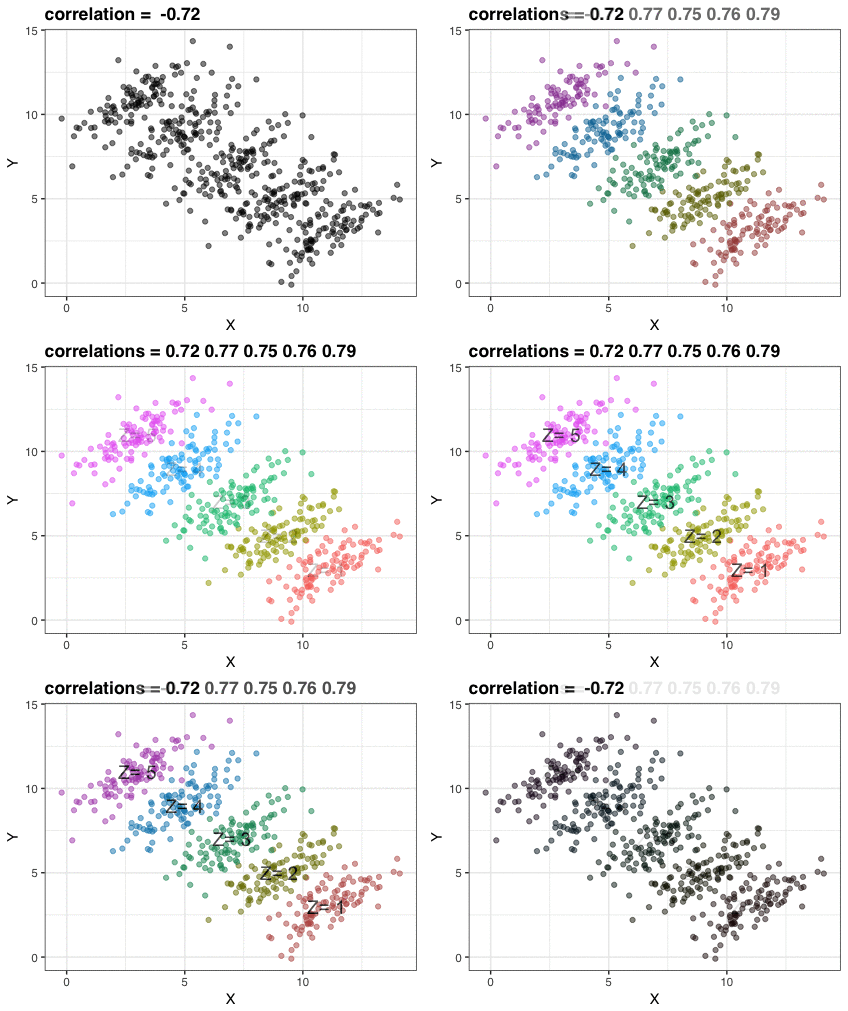
Simpson’s paradox is a statistical phenomenon where an observed relationship within a population reverses within all subgroups that make up that population. Rafa visualized it wonderfully in a GIF that took only twenty-some lines of R code:

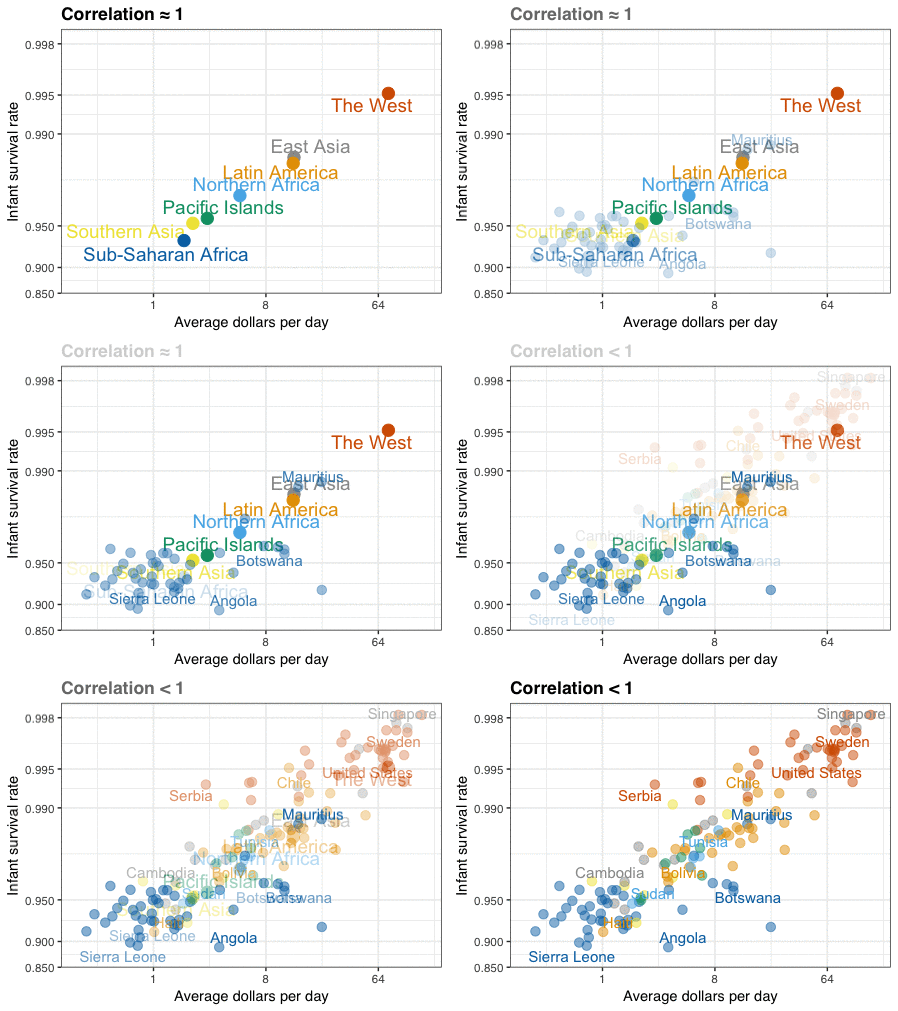
A different statistical phenomenon is discussed at the end of the original blog: namely  the ecological fallacy. It occurs when correlations that occur on the group-level are erroneously extrapolated to the individual-level. Rafa used the gapminder data included in the dslabs package to illustrate the fallacy: there is a very high correlation at the region level and a lower correlation at the individual country level:

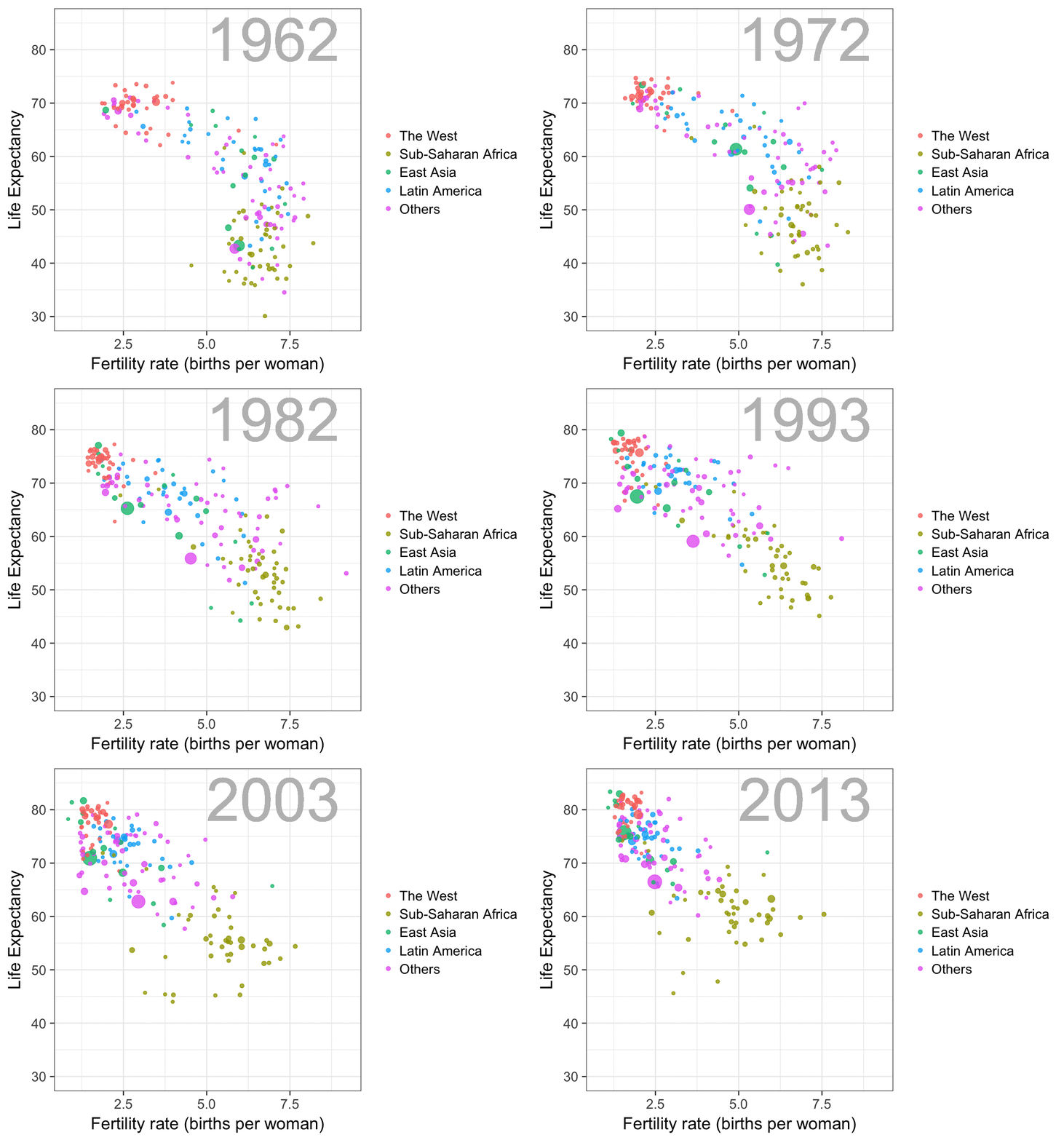
The gapminder data is also used in the next GIF. This mimics Hans Rosling’s famous animation during his talk on New Insights on Poverty, but then made with R and gganimate by Rafa:

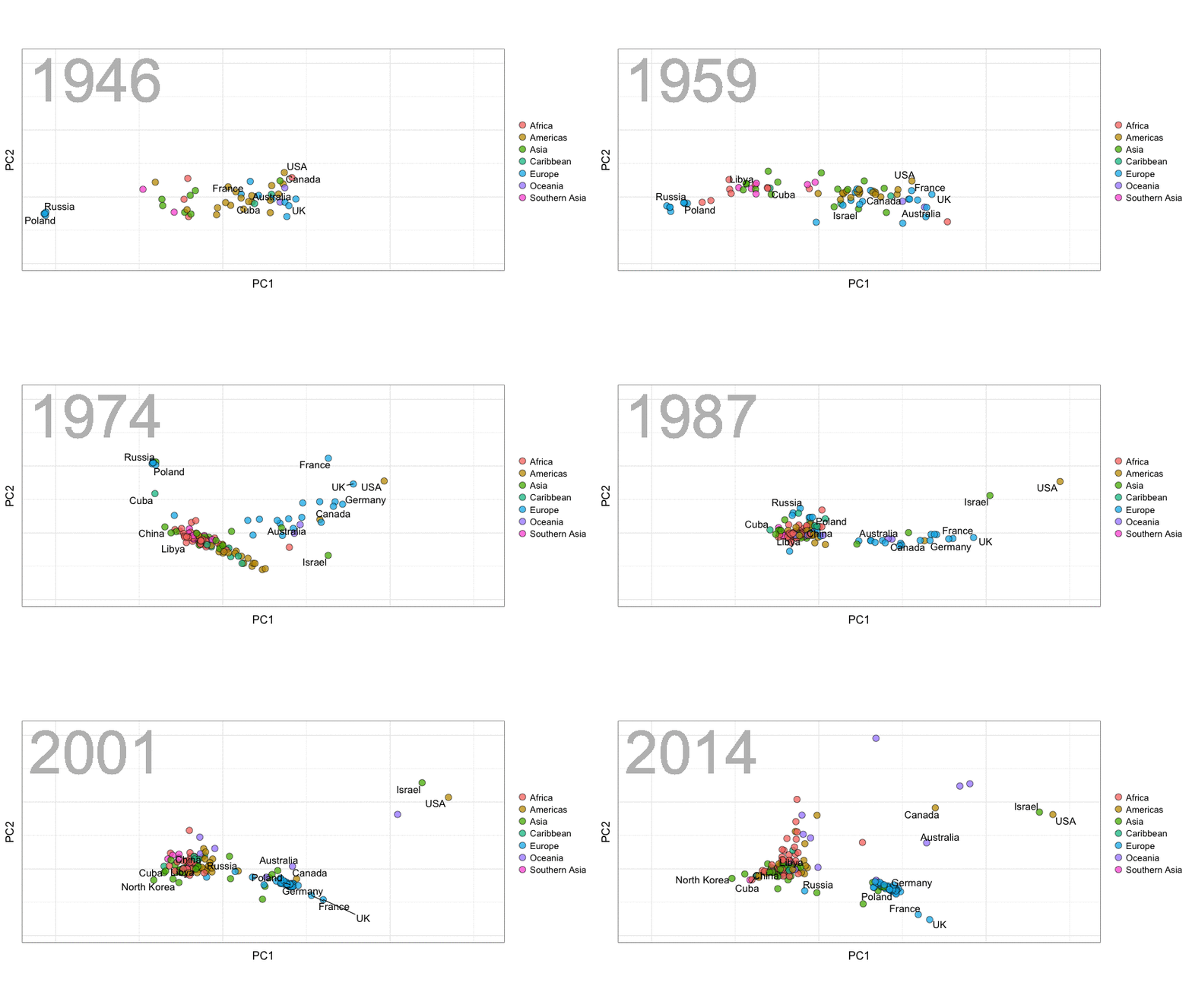
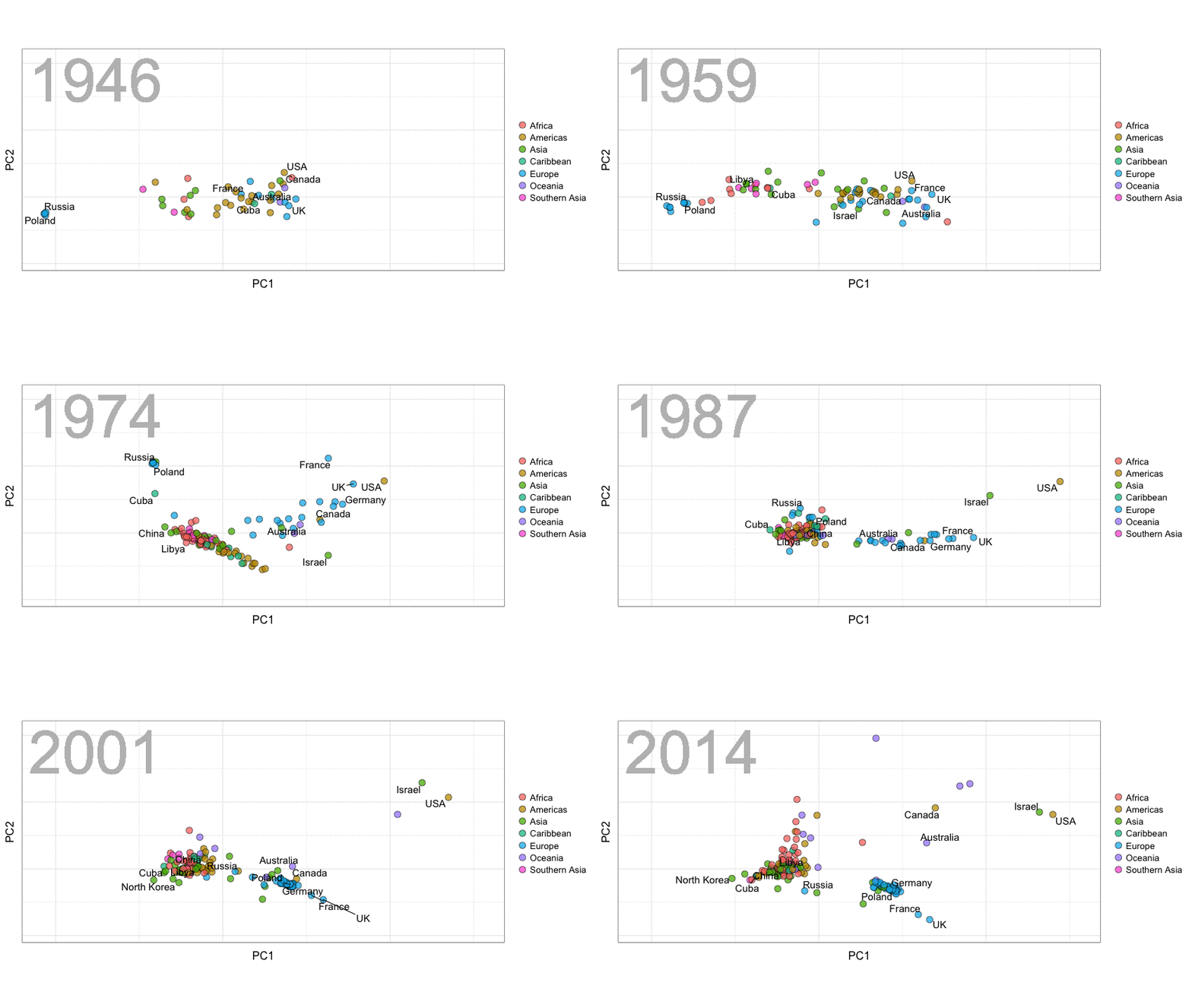
A next visualization demonstrates how the UN voting data (of Erik Voeten and Anton Strezhnev) can be used to examine different voting behaviors. It seems to reduce the voting data to a two-dimensional factor structure, and seemingly there are three distinct groups of voters these days, with particularly the USA and Israel far removed from other members:

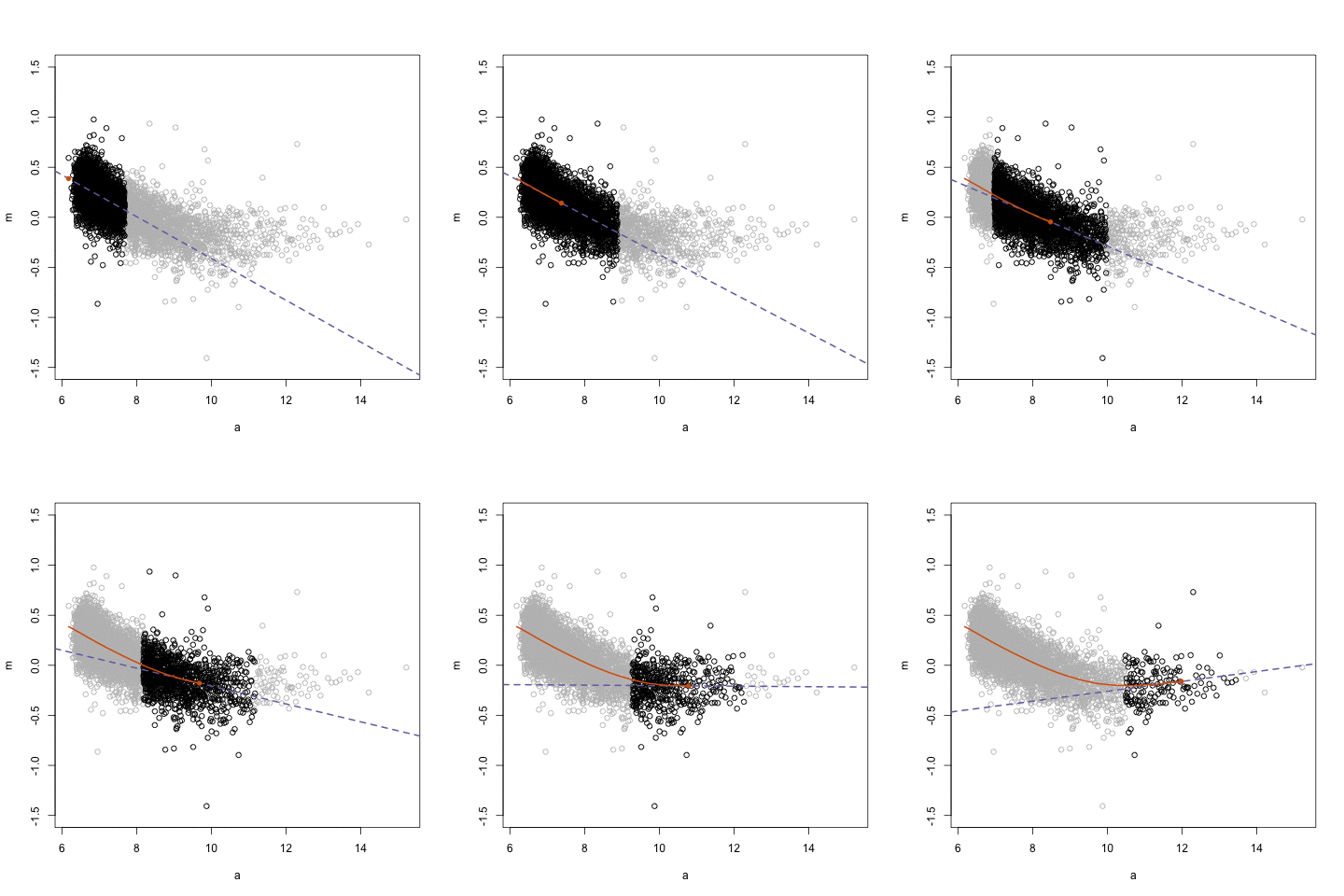
The next GIFs are more statistical. The one below demonstrates how the local regression (LOESS) works. Simply speaking, LOESS determines the relationship for a local subset of the population and when you iteratively repeat this for all local subsets in a population you get a nicely fitting LOESS curve, the red line in Rafa’s GIF:

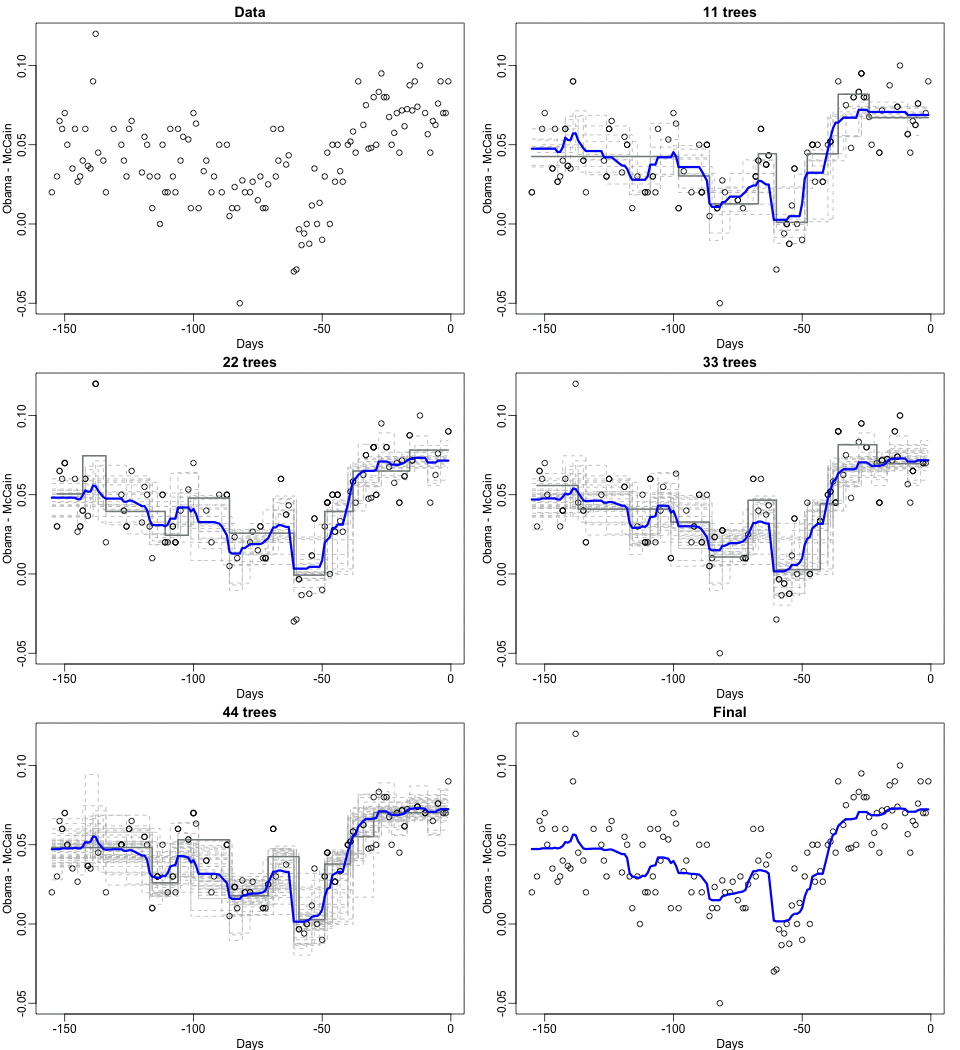
Not quite sure how to interpret the next one, but Rafa explains it visualized a random forest’s predictions using only one predictor variable. I think that different trees would then provide different predictions because they leverage different training samples, and an ensemble of those trees would then improve predictive accuracy?

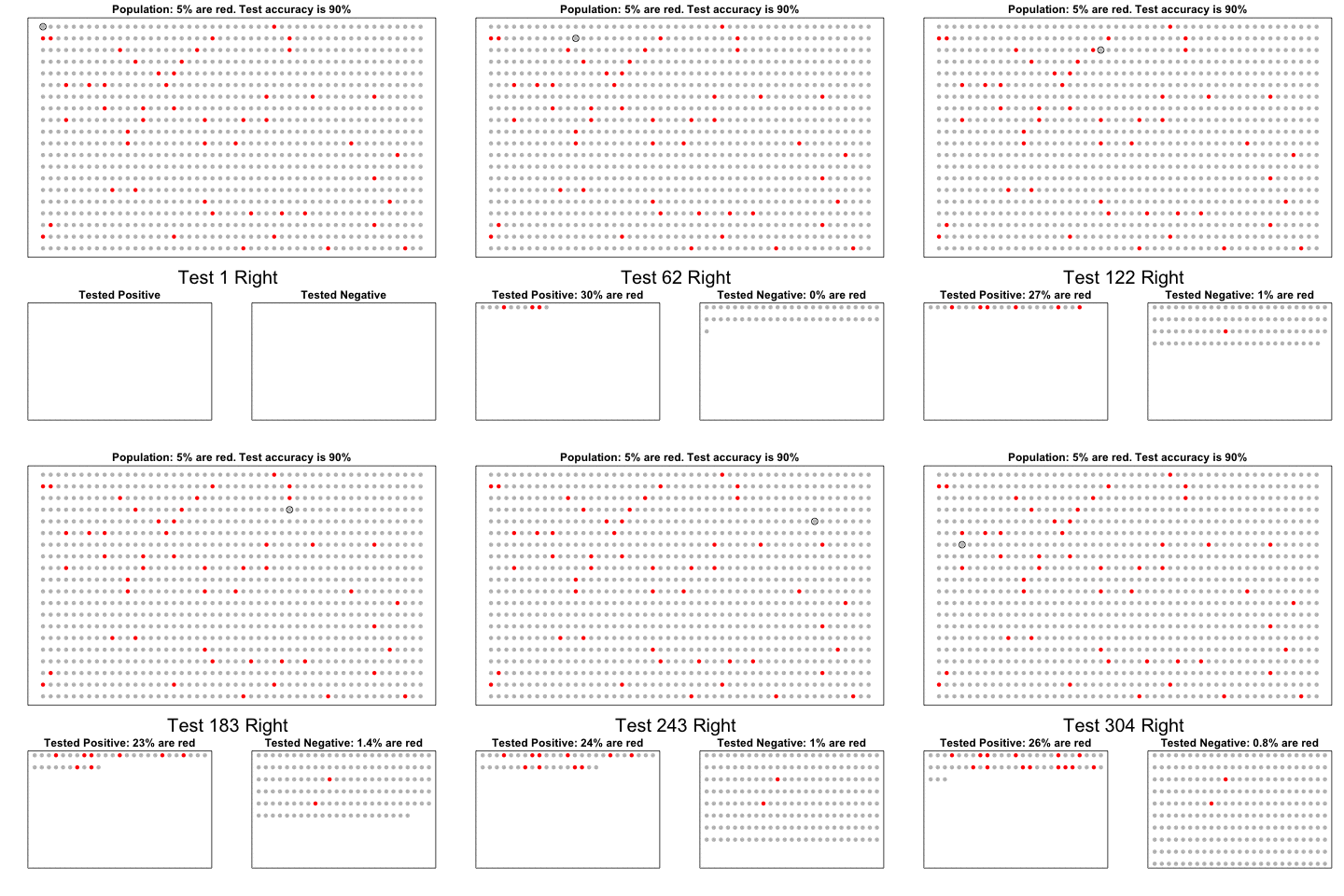
The next one is my favorite I think. This animation illustrates how a highly accurate test would function in a population with low prevalence of true values (e.g., disease, applicant success). More details are in the original blog or here.

The blog ends with a rather funny animation of the only good use of pie charts, according to Rafa:

Libratus: A Texas Hold-Em Poker AI

Libratus: A Texas Hold-Em Poker AI

Four of the best professional poker players in the world – Dong Kim, Jason Les, Jimmy Chou, and Daniel McAulay – recently got beat by Libratus, a poker-playing AI developed at the Pittsburgh Supercomputing Center. During a period of 20 days of continuous play (10h/day), each of these four professionals lost to Libratus heads-up in a whopping total of 120.000 hands of No Limit Texas Hold-em Poker.

A player may face 10 to the power of 160 different situations in Texas Hold-em Poker: more than the number of atoms in the universe. It took extensive machine learning to compute and prioritize the computation of the most rewarding actions in these situations. Libratus works by running extensive simulations, taking into account the way the professionals play, and figuring out the best counter strategy. Although it is not without flaws, any “holes” the players found in Libratus’ strategy could not be exploited for long, as the algorithm would quickly learn and adapt to prevent further exploitation. The experience was completely different from playing a human player, the professionals argue, as Libratus would make both tiny and huge bets and would continuously change its strategy and plays.

The video below provides more detailed information and also shows the million-dollar margin by which Libratus won at the end of the twenty day poker (training) marathon:

Neural Networks play Super Mario Bros & Mario Kart

Neural Networks play Super Mario Bros & Mario Kart

Seth Bling calls himself a video game designer, a hacker and an engineer. You might know him from MarI/O: his neural network that got extremely good to at playing Super Mario Bros. The video below shows the genetic approach Seth used to train this neural network. Seth randomly generated a starting population of neural networks where the inputs – the current frame in the Mario video game – were randomly connected to the outputs – the eight buttons to press (jump, duck, up, down, right, left, etc). By giving the neural nets that made it furthest into the game a larger chance to pass on their genes (their input-output relations) to the next generation with slight mutations, Seth automatically generated neural networks that were more and more proficient in completing the game. In short, by evolution, Seth’s neural network learned the most effective response to the changing video game environment.

After MarI/O, Seth this week posted his newest creation: MariFlow. Here, Seth trained a neural network on 15 hours of training data, consisting of Seth himself playing Super Mario Kart. The neural network thus learned what buttons (output) Seth would most likely push when he encountered a certain Mario Kart parcours piece (input). However, due to random chance, the neural net would often get itself stuck in situations that Seth had not encountered in his training sessions (e.g., reversed, against a wall). The neural net would fail miserably in such situations because it had not learned how to behave. Accordingly, Seth had to generate new training data for these situations and he did so using Human-Computer Interactions in Machine Learning: Seth and the neural net would play alternatively for a while, thus generating training data for situations that Seth would not have encountered on its own. After the neural net was trained with these additional data, it became quite proficient in playing Mario Kart (like Seth) often even winning matches! If you want to know more, you can read the manual here or watch Seth’s video below. If you want to replicate or just play with the data, Seth made everything available here.

Seth has active YouTube, Twitch and Twitter channels and I recommend you check them out!

Vega: The Grammar of Interactive Graphics

Vega: The Grammar of Interactive Graphics

If you have ever programmed in R, you are probably familiar with the Grammar of Graphics due to ggplot2. You can read more about the Grammar of Graphics here, but the general idea behind it is that visualizations can be build up through various layers, each of which have certain characteristics (aesthetics in ggplot2).

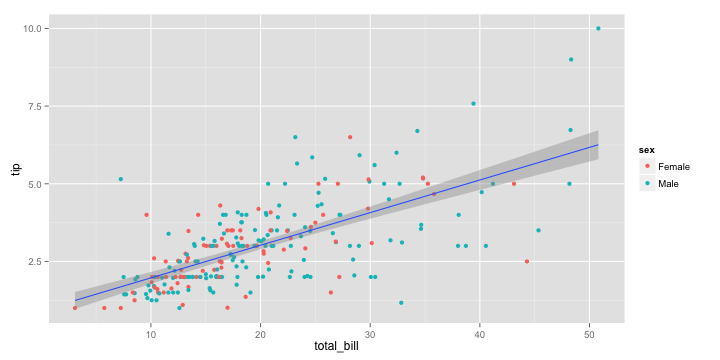
ggplot(tips, aes(x = total_bill, y = tip)) +
  geom_point(aes(color = sex)) +
  geom_smooth(method = 'lm')

plot of chunk layer5

This post is not about ggplot2 nor specifically the Grammar of Graphics, but rather a summary of the official release of Vega-Lite 2, a high-level language for rapidly creating interactive visualizations which you might know from the R-package ggvis.

Vega-Lite has four operators to compose charts: layerfacetconcat and repeat. Layer stacks charts on top of each other in an orderly fashion. Facet divides and charts the data into groups. Concat combines multiple charts into dashboard layouts and, finally, repeat concatenate charts. Most importantly is that these operators can be combined! The example below compares weather data in New York and Seattle, layering data for individual years and averages within a repeated template for different measurements.

A layered and reapeted Vega-Lite graph of weather data

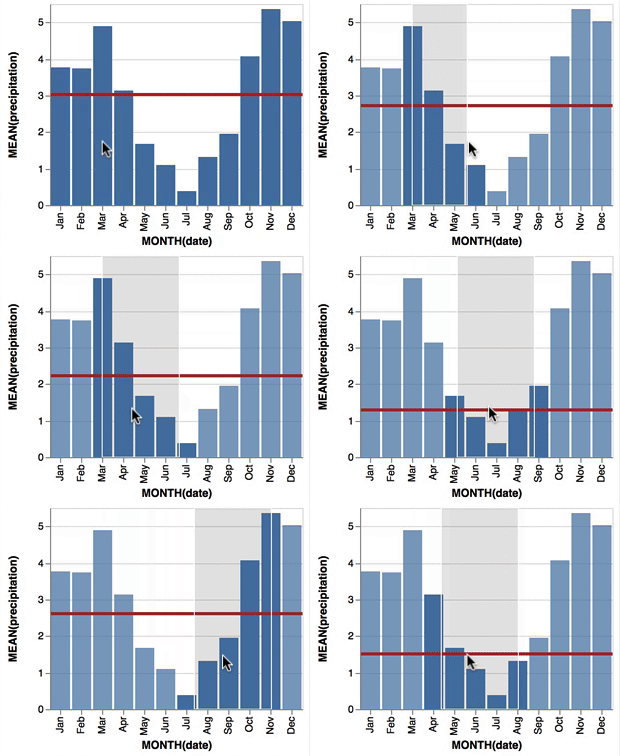
Vega-Lite 2 is especially useful because of the included interaction options. Programmers can specify how users can interactive select the data in their visualizations (e.g., a point or interval selection), along with possible transformations. With these interactions, users can for instance filter data, highlight points, or pan or zoom a plot. The plot below uses an interval selection, which causes the chart to include an interactive brush (shown in grey). The brush selection parameterizes the red guideline, which visualizes the average value within the selected interval.

An interactive moving average in Vega-Lite 2. Try it out!

However, this is not all! When multiple visualizations are combined in a dashboard, interactive selections can apply to all. Below, you see an interval selection being applied over a set of histograms. As a viewer adjusts the selection, they can immediately see how the other distributions change in response.

A crossfilter interaction in Vega-Lite 2. Try it out!

According to the developers Vega and Vega-Lite will be included in Jupyter Lab (the next generation of Jupyter Notebooks). Please find more details about Vega-Lite in the documentation or view the InfoVis 2016 research paper on the Vega-Lite language design. Moreover, check out the example gallery or these Vega-Lite applications. The source code you can find on GitHub. For updates, follow the Vega project on Twitter at @vega_vis. For an overview of the features you may watch the OpenVis Conference Video with the developers.

Hierarchical Linear Models 101

Hierarchical Linear Models 101

Multilevel models (also known as hierarchical linear models, nested data models, mixed models, random coefficient, random-effects models, random parameter models, or split-plot designs) are statistical models of parameters that vary at more than one level (Wikipedia). They are very useful in Social Sciences, where we are often interested in individuals that reside in nations, organizations, teams, or other higher-level units. Next to their individuals characteristics, the characteristics of these units they belong to may also have effects. To take into account effects from variables residing at multiple levels, we can use multilevel or hierarchical models.

Michael Freeman, a faculty member at the University of Washington Information School. made this amazing visual introduction to hierarchical modeling:

hlm

If you want to practice hierarchical modeling in R, I recommend the lesson by Page Paccini (first video) or the more elaborate video series by Statistics of DOOM (second):