Author: Paul van der Laken

Talent Works: Data Science to improve Job Application Chances

Talent Works: Data Science to improve Job Application Chances

Searching and applying to jobs can be a costly activity, requiring many hours upon hours of perfecting your motivation letter and CV. Hence, it can be very frustrating to get ghosted (not receiving a reply) for a job. Luckily, Talent Works is able to give us some general tips when it comes to improving the success of your applications. You might remember them from their Interactive Map of the US Job Market.

Using a sample of about 1600 job applications, Talent Works recently conducted all kinds of statistical analyses to look at the hiring process. For instance, they examined the time it takes to get from the application stage to your first day on the job. Split out for various jobs, it seems Mechanical Engineers spend quite a while in the interview stage whereas Software developers are put to work within three weeks.

estimated.mdf.png
The numbers of days spent in each application stage per job (Talent.Works)

In a different analysis, Talent Works examined how to minimize your risk of getting ghosted on a job application. For instance, they found that during the “Golden Hours” (the first 96 hours after a job gets posted), your chances of getting an invitation for an interview are up to 8 times higher than afterwards.

If you submit a job application in the first 96 hours, you’re up to 8x more likely to get an interview. After that, every day you wait reduces your chances by 28% (Talent.Works)

Based on the above they come to the following three timeframes in the application cycle:

  1. “Golden Hours”: Applications submitted between 2-4 days after a job is posted have the highest chance of getting an interview. Not only is there a difference, there’s a big difference: you have up to an 8x higher chance of getting an interview during this period, even if you’re submitting the same application.
  2. Twilight Zone: Chances quickly decrease from OK to really bad: every day you wait after the “Golden Hours” reduces your chances by 28%. The longer you wait, the higher the risk that employers have already checked their inboxes and setup interviews with candidates that met their “good enough”-bar.
  3. Resume Blackhole: According to Talent.Works it’s nearly not worth applying after 10 days. On average, job applications during this phase have a meager ~1.5% of getting an interview. Put another way, if you send out 50 job applications, you might hear back from one (if you’re lucky).

Next, Talent.Works investigated on a more granular level what would then be the best time to apply for a job.This resulted in the following figure

what-best-time-apply-for-job
The best time to apply for a job is between 6am and 10am. During this time, you have an 13% chance of getting an interview — nearly 5x as if you applied to the same job after work. Whatever you do, don’t apply after 4pm (Talent.Works)

Again, they provide a summary of their conclusions:

  • The best time to apply for a job is between 6am and 10am. During this time, you have an 13% chance of getting an interview.
  • After that morning window, your interview odds start falling by 10% every 30 minutes. If you’re late, you’re going to pay dearly.
  • There’s a brief reprieve during lunchtime, where your odds climb back up to 11% at around 12:30pm but then start falling precipitously again.
  • The single-worst time to apply for a job is after work — if you apply at 7:30pm, you have less than a 3% chance of getting an interview.

If you want to see more, please visit Talent.Works. Here, you can let them process your CV and help you improve your hiring chances (see also this blog post).
Improved Twitter Mining in R

Improved Twitter Mining in R

R users have been using the twitter package by Geoff Jentry to mine tweets for several years now. However, a recent blog suggests a novel package provides a better mining tool: rtweet by Michael Kearney (GitHub).

Both packages use a similar setup and require you to do some prep-work by creating a Twitter “app” (see the package instructions). However, rtweet will save you considerable API-time and post-API munging time. This is demonstrated by the examples below, where Twitter is searched for #rstats-tagged tweets, first using twitteR, then using rtweet.

library(twitteR)

# this relies on you setting up an app in apps.twitter.com
setup_twitter_oauth(
  consumer_key = Sys.getenv("TWITTER_CONSUMER_KEY"), 
  consumer_secret = Sys.getenv("TWITTER_CONSUMER_SECRET")
)

r_folks <- searchTwitter("#rstats", n=300)

str(r_folks, 1)
## List of 300
##  $ :Reference class 'status' [package "twitteR"] with 17 fields
##   ..and 53 methods, of which 39 are  possibly relevant
##  $ :Reference class 'status' [package "twitteR"] with 17 fields
##   ..and 53 methods, of which 39 are  possibly relevant
##  $ :Reference class 'status' [package "twitteR"] with 17 fields
##   ..and 53 methods, of which 39 are  possibly relevant

str(r_folks[1])
## List of 1
##  $ :Reference class 'status' [package "twitteR"] with 17 fields
##   ..$ text         : chr "RT @historying: Wow. This is an enormously helpful tutorial by @vivalosburros for anyone interested in mapping "| __truncated__
##   ..$ favorited    : logi FALSE
##   ..$ favoriteCount: num 0
##   ..$ replyToSN    : chr(0) 
##   ..$ created      : POSIXct[1:1], format: "2017-10-22 17:18:31"
##   ..$ truncated    : logi FALSE
##   ..$ replyToSID   : chr(0) 
##   ..$ id           : chr "922150185916157952"
##   ..$ replyToUID   : chr(0) 
##   ..$ statusSource : chr "Twitter for Android"
##   ..$ screenName   : chr "jasonrhody"
##   ..$ retweetCount : num 3
##   ..$ isRetweet    : logi TRUE
##   ..$ retweeted    : logi FALSE
##   ..$ longitude    : chr(0) 
##   ..$ latitude     : chr(0) 
##   ..$ urls         :'data.frame': 0 obs. of  4 variables:
##   .. ..$ url         : chr(0) 
##   .. ..$ expanded_url: chr(0) 
##   .. ..$ dispaly_url : chr(0) 
##   .. ..$ indices     : num(0) 
##   ..and 53 methods, of which 39 are  possibly relevant:
##   ..  getCreated, getFavoriteCount, getFavorited, getId, getIsRetweet, getLatitude, getLongitude, getReplyToSID,
##   ..  getReplyToSN, getReplyToUID, getRetweetCount, getRetweeted, getRetweeters, getRetweets, getScreenName,
##   ..  getStatusSource, getText, getTruncated, getUrls, initialize, setCreated, setFavoriteCount, setFavorited, setId,
##   ..  setIsRetweet, setLatitude, setLongitude, setReplyToSID, setReplyToSN, setReplyToUID, setRetweetCount,
##   ..  setRetweeted, setScreenName, setStatusSource, setText, setTruncated, setUrls, toDataFrame, toDataFrame#twitterObj

The above operations required only several seconds to completely. The returned data is definitely usable, but not in the most handy format: the package models the Twitter API on to custom R objects. It’s elegant, but also likely overkill for most operations. Here’s the rtweet version:

library(rtweet)

# this relies on you setting up an app in apps.twitter.com
create_token(
  app = Sys.getenv("TWITTER_APP"),
  consumer_key = Sys.getenv("TWITTER_CONSUMER_KEY"), 
  consumer_secret = Sys.getenv("TWITTER_CONSUMER_SECRET")
) -> twitter_token

saveRDS(twitter_token, "~/.rtweet-oauth.rds")

# ideally put this in ~/.Renviron
Sys.setenv(TWITTER_PAT=path.expand("~/.rtweet-oauth.rds"))

rtweet_folks <- search_tweets("#rstats", n=300)

dplyr::glimpse(rtweet_folks)
## Observations: 300
## Variables: 35
## $ screen_name                     "AndySugs", "jsbreker", "__rahulgupta__", "AndySugs", "jasonrhody", "sibanjan...
## $ user_id                         "230403822", "703927710", "752359265394909184", "230403822", "14184263", "863...
## $ created_at                      2017-10-22 17:23:13, 2017-10-22 17:19:48, 2017-10-22 17:19:39, 2017-10-22 17...
## $ status_id                       "922151366767906819", "922150507745079297", "922150470382125057", "9221504090...
## $ text                            "RT:  (Rbloggers)Markets Performance after Election: Day 239  https://t.co/D1...
## $ retweet_count                   0, 0, 9, 0, 3, 1, 1, 57, 57, 103, 10, 10, 0, 0, 0, 34, 0, 0, 642, 34, 1, 1, 1...
## $ favorite_count                  0, 0, 0, 0, 0, 0, 0, 0, 0, 0, 0, 0, 0, 0, 2, 0, 0, 1, 0, 0, 0, 0, 0, 0, 0, 0,...
## $ is_quote_status                 FALSE, FALSE, FALSE, FALSE, FALSE, FALSE, FALSE, FALSE, FALSE, FALSE, FALSE, ...
## $ quote_status_id                 NA, NA, NA, NA, NA, NA, NA, NA, NA, NA, NA, NA, NA, NA, NA, NA, NA, NA, NA, N...
## $ is_retweet                      FALSE, FALSE, TRUE, FALSE, TRUE, TRUE, FALSE, TRUE, TRUE, TRUE, TRUE, TRUE, F...
## $ retweet_status_id               NA, NA, "922085241493360642", NA, "921782329936408576", "922149318550843393",...
## $ in_reply_to_status_status_id    NA, NA, NA, NA, NA, NA, NA, NA, NA, NA, NA, NA, NA, NA, NA, NA, NA, NA, NA, N...
## $ in_reply_to_status_user_id      NA, NA, NA, NA, NA, NA, NA, NA, NA, NA, NA, NA, NA, NA, NA, NA, NA, NA, NA, N...
## $ in_reply_to_status_screen_name  NA, NA, NA, NA, NA, NA, NA, NA, NA, NA, NA, NA, NA, NA, NA, NA, NA, NA, NA, N...
## $ lang                            "en", "en", "en", "en", "en", "en", "en", "en", "en", "en", "en", "en", "ro",...
## $ source                          "IFTTT", "Twitter for iPhone", "GaggleAMP", "IFTTT", "Twitter for Android", "...
## $ media_id                        NA, "922150500237062144", NA, NA, NA, NA, NA, NA, NA, NA, NA, NA, NA, NA, "92...
## $ media_url                       NA, "http://pbs.twimg.com/media/DMwi_oQUMAAdx5A.jpg", NA, NA, NA, NA, NA, NA,...
## $ media_url_expanded              NA, "https://twitter.com/jsbreker/status/922150507745079297/photo/1", NA, NA,...
## $ urls                            NA, NA, NA, NA, NA, NA, NA, NA, NA, NA, NA, NA, NA, NA, NA, NA, NA, NA, NA, N...
## $ urls_display                    "ift.tt/2xe1xrR", NA, NA, "ift.tt/2xe1xrR", NA, "bit.ly/2yAAL0M", "bit.ly/2yA...
## $ urls_expanded                   "http://ift.tt/2xe1xrR", NA, NA, "http://ift.tt/2xe1xrR", NA, "http://bit.ly/...
## $ mentions_screen_name            NA, NA, "DataRobot", NA, "historying vivalosburros", "NoorDinTech ikashnitsky...
## $ mentions_user_id                NA, NA, "622519917", NA, "18521423 304837258", "2511247075 739773414316118017...
## $ symbols                         NA, NA, NA, NA, NA, NA, NA, NA, NA, NA, NA, NA, NA, NA, NA, NA, NA, NA, NA, N...
## $ hashtags                        "rstats DataScience", "Rstats ACSmtg", "rstats", "rstats DataScience", "rstat...
## $ coordinates                     NA, NA, NA, NA, NA, NA, NA, NA, NA, NA, NA, NA, NA, NA, NA, NA, NA, NA, NA, N...
## $ place_id                        NA, NA, NA, NA, NA, NA, NA, NA, NA, NA, NA, NA, NA, NA, NA, NA, NA, NA, NA, N...
## $ place_type                      NA, NA, NA, NA, NA, NA, NA, NA, NA, NA, NA, NA, NA, NA, NA, NA, NA, NA, NA, N...
## $ place_name                      NA, NA, NA, NA, NA, NA, NA, NA, NA, NA, NA, NA, NA, NA, NA, NA, NA, NA, NA, N...
## $ place_full_name                 NA, NA, NA, NA, NA, NA, NA, NA, NA, NA, NA, NA, NA, NA, NA, NA, NA, NA, NA, N...
## $ country_code                    NA, NA, NA, NA, NA, NA, NA, NA, NA, NA, NA, NA, NA, NA, NA, NA, NA, NA, NA, N...
## $ country                         NA, NA, NA, NA, NA, NA, NA, NA, NA, NA, NA, NA, NA, NA, NA, NA, NA, NA, NA, N...
## $ bounding_box_coordinates        NA, NA, NA, NA, NA, NA, NA, NA, NA, NA, NA, NA, NA, NA, NA, NA, NA, NA, NA, N...
## $ bounding_box_type               NA, NA, NA, NA, NA, NA, NA, NA, NA, NA, NA, NA, NA, NA, NA, NA, NA, NA, NA, N...

This operation took equal to less time but provides the data in a tidy, immediately usable structure.

On the rtweet website, you can read about the additional functionalities this new package provides. For instance,ts_plot() provides a quick visual of the frequency of tweets. It’s possible to aggregate by the minute, i.e., by = "mins", or by some value of seconds, e.g.,by = "15 secs".

## Plot time series of all tweets aggregated by second
ts_plot(rt, by = "secs")

stream-ts

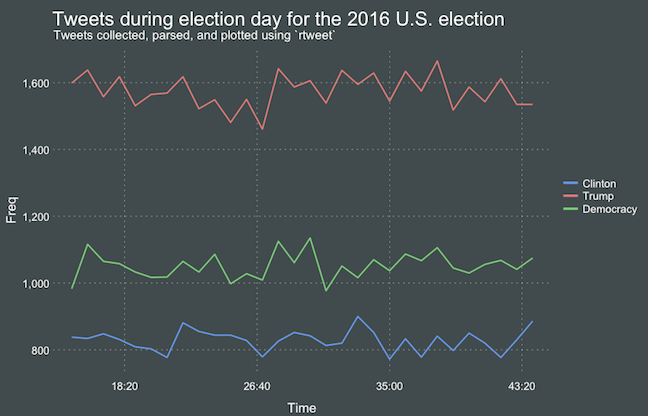
ts_filter() creates a time series-like data structure, which consists of “time” (specific interval of time determined via the by argument), “freq” (the number of observations, or tweets, that fall within the corresponding interval of time), and “filter” (a label representing the filtering rule used to subset the data). If no filter is provided, the returned data object includes a “filter” variable, but all of the entries will be blank "", indicating that no filter filter was used. Otherwise, ts_filter() uses the regular expressions supplied to the filter argument as values for the filter variable. To make the filter labels pretty, users may also provide a character vector using the key parameter.

## plot multiple time series by first filtering the data using
## regular expressions on the tweet "text" variable
rt %>%
  dplyr::group_by(screen_name) %>%
  ## The pipe operator allows you to combine this with ts_plot
  ## without things getting too messy.
  ts_plot() + 
  ggplot2::labs(
    title = "Tweets during election day for the 2016 U.S. election",
    subtitle = "Tweets collected, parsed, and plotted using `rtweet`"
  )

The developer cautions that these plots often resemble frowny faces: the first and last points appear significantly lower than the rest. This is caused by the first and last intervals of time to be artificially shrunken by connection and disconnection processes. To remedy this, users may specify trim = TRUE to drop the first and last observation for each time series.

stream-filter

Give rtweet a try and let me know whether you prefer it over twitter.

Regular Expression Crosswords

Regular Expression Crosswords

A regular expression (regex or regexp for short) is a special text string for describing a search pattern. You can think of regular expressions as wildcards on steroids. You are probably familiar with wildcard notations such as *.txt to find all text files in a file manager. The regex equivalent is .*\.txt$.

Last week I posted a first tutorial on Regular Expressions in R and I am working its sequels. You may find additional resources on Regular Expressions in the learning overviews (RPythonData Science).

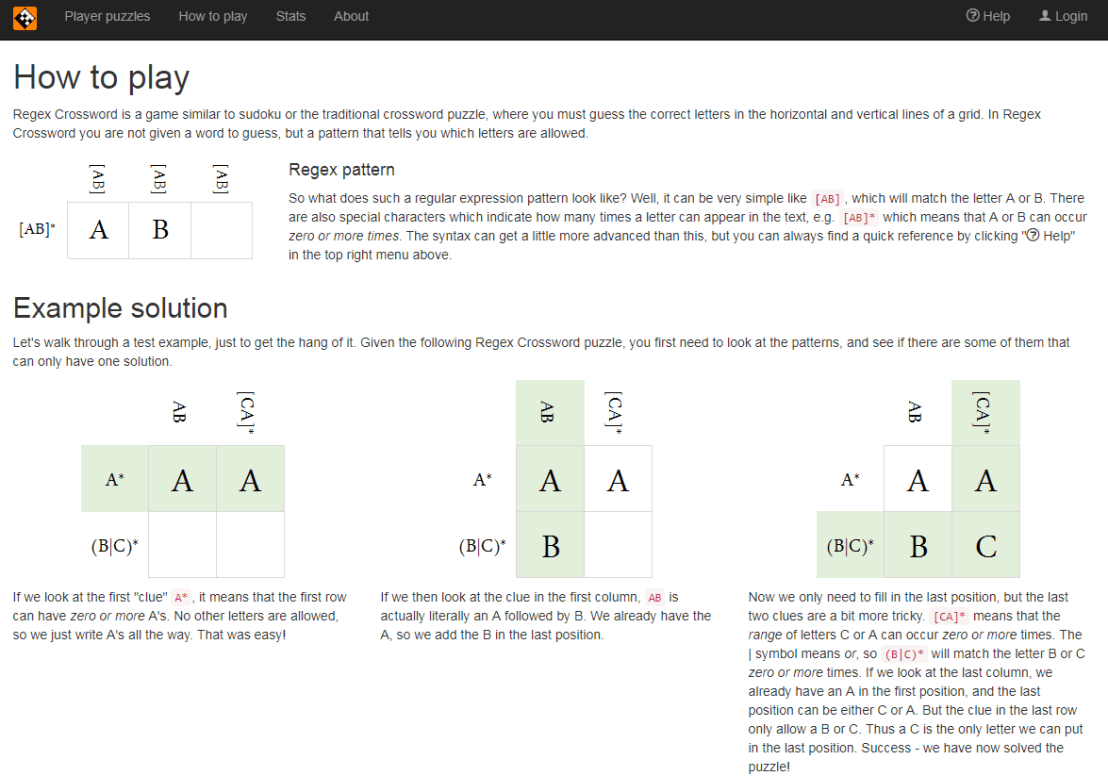
Today I came across this website of Regular Expression Crosswords, which proves a great resource to playfully master regular expression. All puzzles are validated live using the JavaScript regex engine. The figure below explains how it works

crossword

Via the links below you can jump puzzles that matches your expertise level:

Datasets to practice and learn Programming, Machine Learning, and Data Science

Datasets to practice and learn Programming, Machine Learning, and Data Science

Many requests have come in regarding “training datasets” – to practice programming. Fortunately, the internet is full of open-source datasets! I compiled a selected list of datasets and repositories below. If you have any additions, please comment or contact me! For information on programming languages or algorithms, visit the overviews for RPython, SQL, or Data Science, Machine Learning, & Statistics resources.

This list is no longer being maintained. There are other, more frequently updated repositories of useful datasets included in bold below:

LAST UPDATED: 2019-12-23
A Million News Headlines: News headlines published over a period of 14 years.
AggData | Datasets
Aligned Hansards of the 36th Parliament of Canada
Amazon Web Services: Public Datasets
American Community Survey
ArcGIS Hub Open Data
arXiv.org help – arXiv Bulk Data Access – Amazon S3
Asset Macro: Financial & Macroeconomic Historical Data
Awesome JSON Datasets
Awesome Public Datasets
Behavioral Risk Factor Surveillance System
British Oceanographic Data Center
Bureau of Justice
Canada
Causality | Data Repository
CDC Wonder Online Database
Census Bureau Home Page
Center for Disease Control
ChEMBLdb
ChemDB
City of Chicago
Click Dataset | Center for Complex Networks and Systems Research
CommonCrawl 2013 Web Crawl
Consumer Finance: Mortgage Database
CRCNS – Collaborative Research in Computational Neuroscience
Data Download
Data is Plural
Data.gov
Data.gov.au
Data.gov.nz
Data.gov.sg
Data.gov.uk
Data.Seattle.Gov | Seattle’s Data Site
Data.world
Data.World datasets
DataHub
Datasets for Data Mining
DataSF
Dataverse
DELVE datasets
DMOZ open directory (mirror)
DRYAD
Enigma Public
Enron Email Dataset
European Environment Agency (EEA) | Data and maps
Eurostat
Eurostat Database
Eurovision YouTube Comments: YouTube comments on entries from the 2003-2008 Eurovision Song Contests
FAA Data
Face Recognition Homepage – Databases
FAOSTAT Data
FBI Crime Data Explorer
FEMA Data Feeds
Figshare
FiveThirthyEight.com
Flickr personal taxonomies
FlowingData
Fraudulent E-mail Corpus: CLAIR collection of “Nigerian” fraud emails
Freebase (last datadump)
Gapminder.org
Gene Expression Omnibus (GEO) Main page
GeoJSON files for real-time Virginia transportation data.
Golem Dataset
Google Books n-gram dataset
Google Public Data Explorer
Google Research: A Web Research Corpus Annotated with Freebase Concepts
Health Intelligence
Healthcare Cost and Utilization Project
HealthData.gov
Human Fertility Database
Human Mortality Database
ICPRS Social Science Studies 
ICWSM Spinnr Challenge 2011 dataset
IIE.org Open Doors Data Portal
ImageNet
IMDB dataset
IMF Data and Statistics
Informatics Lab Open Data
Inside AirBnB
Internet Archive: Digital Library
IPUMS
Ironic Corpus: 1950 sentences labeled for ironic content
Kaggle Datasets
KAPSARC Energy Data Portal
KDNuggets Datasets
Knoema
Lahman’s Baseball Database
Lending Club Loan Data
Linking Open Data
London Datastore
Makeover Monday
Medical Expenditure Panel Survey
Million Song Dataset | scaling MIR research
MLDATA | Machine Learning Dataset Repository
MLvis Scientific Data Repository
MovieLens Data Sets | GroupLens Research
NASA
NASA Earth Data
National Health and Nutrition Examination Survey
National Hospital Ambulatory Medical Care Survey Data
New York State
NYPD Crash Data Band-Aid
ODI Leeds
OECD Data
OECD.Stat
Office for National Statistics
Old Newspapers: A cleaned subset of HC Corpora newspapers
Open Data Inception Portals
Open Data Nederland
Open Data Network
OpenDataSoft Repository
Our World in Data
Pajek datasets
PermID from Thomson Reuters
Pew Research Center
Plenar.io
PolicyMap
Princeton University Library
Project Gutenberg
Quandl
re3data.org
Reddit Datasets
Registry of Research Data Repositories
Retrosheet.org
Satori OpenData
SCOTUS Opinions Corpus: Lots of Big, Important Words
Sharing PyPi/Maven dependency data « RTFB
SMS Spam Collection
Socrata
St. Louis Federal Reserve
Stanford Large Network Dataset Collection
State of the Nation Corpus (1990 – 2017): Full texts of the South African State of the Nation addresses
Statista
Substance Abuse and Mental Health Services Administration 
Swiss Open Government Data
Tableau Public
The Association of Religious Data Archives
The Economist
The General Social Survey
The Huntington’s Early California Population Project
The World Bank | Data
The World Bank Data Catalog
Toronto Open Data
Translation Task Data
Transport for London
Twitter Data 2010
Ubuntu Dialogue Corpus: 26 million turns from natural two-person dialogues
UC Irvine Knowledge Discovery in Databases Archive
UC Irvine Machine Learning Repository –
UC Irvine Network Data Repository
UN Comtrade Database
UN General Debates:Transcriptions of general debates at the UN from 1970 to 2016
UNdata
Uniform Crime Reporting
UniGene
United States Exam Data
University of Michigan ICPSR
University of Rochester LibGuide “Data-Stats”
US Bureau of Labor Statistics
US Census Bureau Data
US Energy Information Administration
US Government Web Services and XML Data Sources
USA Facts
USENET corpus (2005-2011)
Utah Open Data
Varieties of Democracy.
Western Pennsylvania Regional Data Center
WHO Data Repository
Wikipedia List of Datasets for Machine Learning
WordNet
World Values Survey
World Wealth & Income Database
World Wide Web: 3.5 billion web pages and their relations
Yahoo Data for Researchers
YouTube Network 2007-2008
New to R? Kickstart your learning and career with these 6 steps!

New to R? Kickstart your learning and career with these 6 steps!

For newcomers, R code can look like old Egyptian hieroglyphs with its weird operators (%in%,<-,||, or %/%). The R language has been said to have a steep learning curve and although there are many introductory courses and books (see R Resources), it’s hard to decide where to start.

Fortunately, I am here to help! The below is a six-step guide on how to learning R, using only open access (i.e., free!) materials.

Although oriented at complete newcomers, it will have you writing your own practical scripts and programs in no time: just start at #1 and work your way to coding mastery!

If you already feel comfortable with the basics of R — or don’t like basics — you can start at #5 and jump into practical learning via the tidyverse.

Good luck!!!

Step 1: An R Folder (15 min)

Create a directory for your R learning stuff somewhere on your computer. Download this (very) short introduction to R by Paul Torfs and Claudia Bauer and store it in that folder. Now read the introduction and follow the steps. It will help you install all R software on your own computer and familiarize you with the standard data types.

Step 2: Handy Cheat Sheets (15 min)

Many standard functions exist in R and after a while you will remember them by heart. For now, it’s good to have a dictionary or references close by hand. Download and read the cheat sheets for base R (Mhairi McNeill) and R base functions (Tom Short). Because you’ll be writing most of your R scripts in RStudio, it’s also recommended to have an RStudio cheat sheet as well as an RStudio keyboard shortcuts cheat sheet by hand.

Step 3: swirl Away in RStudio (8h)

Now you’re ready to really start learning and we’re going to accelerate via swirl. Open up your RStudio and enter the two lines of code below in your console window.

install.packages('swirl') #download swirl package 
library(swirl) #load in swirl package

swirl (webpage) will automatically start and after a couple of prompts you will be able to choose the learning course called 1: R Programming: The basics of programming in R (see below). This course consists of 15 modules via which you will master the basics of R in the environment itself. Start with module 1 and complete between one to three modules per day, so that you finish the swirl course in a week.

Starting up swirl in RStudio
swirl’s R 4 learning courses and the 15 modules belonging to the basics of R programming course

Step 4: A Pirate’s Guide to R (10h)

OK, you should now be familiar with the basics of R. However, knowledge is crystallized via repetition. I therefore suggest, you walk through the book YaRrr! The Pirate’s Guide to R (Phillips, 2017) starting in chapter 3. It’s a fun book and will provide you with more knowledge on how to program custom functions, loops, and some basic statistical modelling techniques – the thing R was actually designed for.

Step 5: R for Data Science (16h)

By now, you can say you might say you are an adapt R programmer with statistical modelling experience. However, you have been working with base R functions mostly, knowledge of which is a must-have to really understand the language. In practice, R programmers rely strongly on developed packages nevertheless. A very useful group of packages is commonly referred to as the tidyverse. You will be amazed at how much this set of packages simplifies working in R. The next step therefore, is to work through the book R for Data Science (Grolemund & Wickham, 2017) (hardcopy here).

Step 6: Specialize (∞)

You are now several steps and a couple of weeks further. You possess basic knowledge of the R language, know how to write scripts in RStudio, are capable of programming in base R as well as using the advanced functionality of the tidyverse, and you have even made a start with some basic statistical modelling.

It’s time to set you loose in the wonderful world of the R community. If you had not done this earlier, you should get accounts on Stack Overflow and Cross Validated. You might also want to subscribe to the R Help Mailing ListR Bloggers, and to my website obviously.

Join 385 other subscribers

On Twitter, have a look at #rstats and, on reddit, subscribe to the rstats, rstudio, and statistics threads. At this time, I can’t but advise you to return to the R Resources Overview and to continue broadening your R programming skills. Pick materials in the area that interests you:

Neural Networks 101

Neural Networks 101

Last month, a video by 3Blue1Brown has been trending on YouTube, accumulating already over a quarter of a million views. It only lasts 10 minutes but provides a very good and intuitive explanation of the inner workings of Neural Networks (NN):

The Machine Learning & Deep Learning book I wrote about recently provides a more substantial explanation of the different NNs and their inner workings. Neural nets come in various different flavors and my list of Data Science, Machine Learning, & Statistics Resources includes useful cheatsheets and other information, such as the architecture map below.

If you still haven’t had enough, Daniel Shiffman demonstrates how to code Neural Networks in Processing (Java), and the video displays precisely what happens behind the scenes. Finally, MIT has made their AI course material open-source, and it includes two 45 minute lectures on NNs. The lecturing professor – Patrick Winston – isn’t much of a fan of these “bulldozer” algorithms. He has a stronger preference for “more sophisticated” mathematical learning through, for instance, Support Vector Machines.