The Deep Learning textbook helps students and practitioners enter the field of machine learning in general and deep learning in particular. Its online version is available online for free whereas a hardcover copy can be ordered here on Amazon. You can click on the topics below to be redirected to the book chapter:
Aaron Jackson, Adrian Bulat, Vasileios Argyriou and Georgios Tzimiropoulos
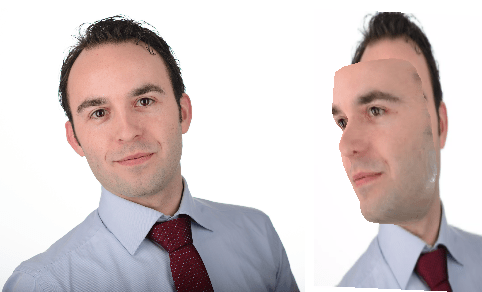
of the Computer Vision Laboratory of the University of Nottingham built a neural network that generates a full 3D image of a single portrait photograph. They turn a photograph like this…
… into an accurately creepy 3D image like this.
You can try it with your own or other photographs here. I found that images with white background get the best results. On their project website you can read more about the underlying convolutional neural network.
Update 21-10-2017: One of my favorite YouTube channels explains how the models were trained and the data used:
Coding Train is a Youtube channel by Daniel Shiffman that covers anything from the basics of programming languages like JavaScript (with p5.js) and Java (with Processing) to generative algorithms like physics simulation, computer vision, and data visualization. In particular, these latter topics, which Shiffman bundles under the label “the Nature of Code”, draw me to the channel.
In a recent series, Daniel draws from his free e-book to create his seven-video playlist where he elaborates on the inner workings of neural networks, visualizing the entire process as he programs the algorithm from scratch in Processing (Java). I recommend the two videos below consisting of the actual programming, especially for beginners who want to get an intuitive sense of how a neural network works.
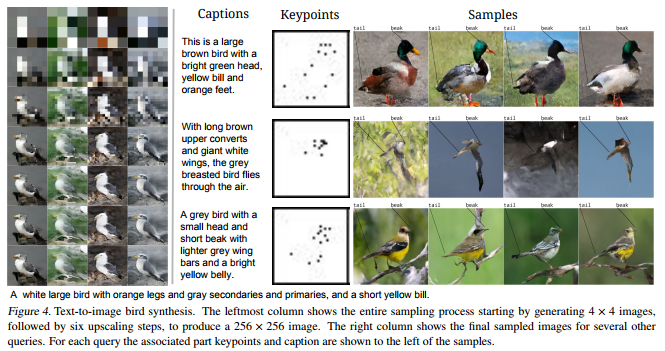
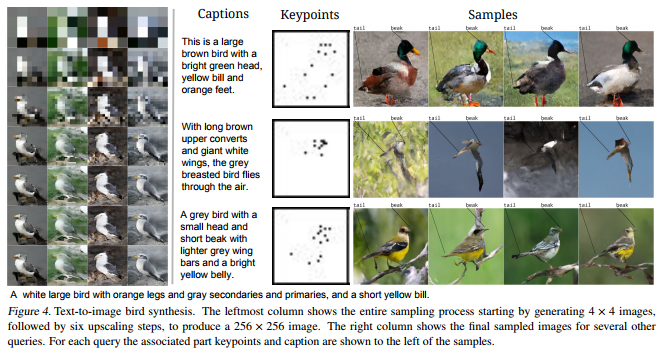
A while ago, I blogged about this new algorithm, pix2code, which takes in pictures of graphical user interfaces and outputs the underlying code. Today, I discovered another fantastic algorithm, by Scott Reed and his colleagues at Google Deepmind. txt2pix would be a catchy name for this algorithm, as it can take in a fairly complex sentence (e.g., “a grey bird with a black head, orange eyes, and a yellow beak“) and generate a completely new and unique image based on its content. In their recently published paper, they elaborate on the algorithms inner workings.
An example of the training and generation process reported in the paper
Scott and his team have been working on this project for quite some time. The early version of the algorithm generated an image one pixel at a time, but it had difficulties generating large or high-quality images. After picking a starting pixel to generate, any consecutively generated pixel the algorithm generates needs to align with its neighbours. For example, if pixel A is the first pixel in the generation of the yellow beak of a bird, any pixels that are created in the neighbourhood of that pixel should take into account that pixel A is trying to visualize a yellow beak, and behave accordingly: either continuing the beak, or ending the beak and starting on another element of the image.
The problem with such an iterative approach (i.e., pixel by pixel) is that it can take a very long time for a computer to generate an image. Considering that a fairly small image, say 256 by 256 pixels, already contains 65.536 pixels, each of which needs to be generated while considering all its neighbours and keeping in mind the bigger picture. In the most recent, updated version of the algorithm, Scott and his team have allowed the generation of multiple unrelated pixels simultaneously at different ‘zones’ of the image. Hence the Parallel in Parallel Multiscale Autoregressive Density Estimation. With this parallel approach, the algorithm can now generate the pixels representing the yellow beak in one area of the image, while simultaneously generating pixels for the bird’s wings and the branch it’s sitting on at different sections of the image. This speeds up the process quite extensively, demanding less computation time, thus allowing for quicker image generation.
If you want to know more details behind the algorithm but do not fancy reading the entire paper, I recommend this short explanation video by Károly Zsolnai-Fehér (what a name!) of Two Minute papers:
Last May, Tony Beltramelli of Ulzard Technologies presented his latest algorithm pix2code at the NIPS conference. Put simply, the algorithm looks at a picture of a graphical user interface (i.e., the layout of an app), and determines via an iterative process what the underlying code likely looks like.
Obviously, this is groundbreaking technology. When further developed, pix2code not only increases the speed with which society is automated/robotized but it also further expands the automation to more complex and highly needed tasks, such as programming and web/app development.
Artificial neural networks (ANNs) are computing systems inspired by the human brain. They can teach themselves to do tasks, simply by considering examples of the tasks’ outcome. For example, they can learn to identify images that contain cats by analyzing example images that have been tagged “cat” or “no cat”. When given enough examples, the neural network can autonomously determine whether “untagged” images include cats or not (Wikipedia). If you want to learn more and have 20 minutes to spare, I can recommend this YouTube video by Brandon Rohrer.
Neural networks are commonly used for those machine learning problems where there is a vast amount of (complex) data available. Some toy examples include fingerprint recognition, language translation, car steering behaviours, object detection, text generation, and doodle recognition (by Google). Chances are pretty high that any system that makes complex recommendations these days (e.g., “Is this John in the picture?”, “Did you mean “South End Taco’s” instead of “Sout En dTacos”?”) has a neural net running in the background.
http://www.r-exercises.com designs tutorials for beginning programmers in R. On their website they host a learning series on neural networks, consisting of three sets of exercises: Part 1, Part 2, and Part 3. Afterwards, you can check your performance with the solutions: Solutions 1, Solutions 2, and Solutions 3.






 paulvanderlaken.com