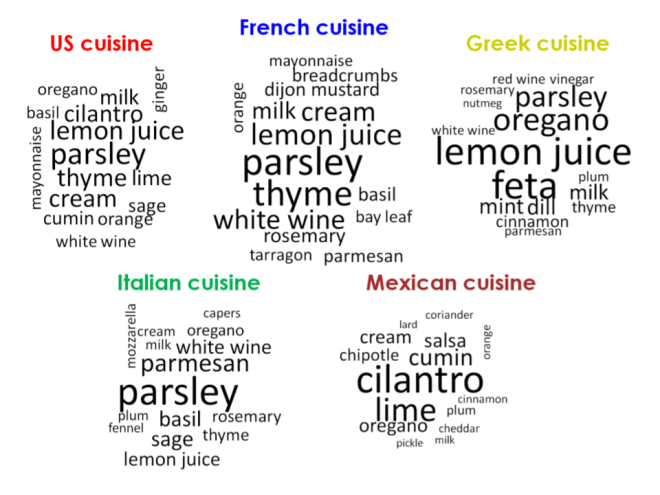
A statistical analysis of 4000 recipes and their ingredients: Quantifying Gastronomy


Disentangling Data Science
Tag: textmining
A statistical analysis of 4000 recipes and their ingredients: Quantifying Gastronomy

Andrew Thompson was interested in what 10 topics a computer would identify in our daily news. He gathered over 140.000 new articles from the archives of 10 different sources, as you can see in the figure below.

In Python, Andrew converted the text of all these articles into a manageable form (tf-idf document term matrix (see also Harry Plotter: Part 2)), reduced these data to 100 dimensions using latent semantic analysis (singular value decomposition), and ran a k-means clustering to retrieve the 10 main clusters. I included his main results below, but I highly suggest you visit the original article on Medium as Andrew used Plotly to generate interactive plots!

The topics structure seems quite nice! Topic 0 involves legal issues, such as immigration, whereas topic 1 seems to be more about politics. Topic 8 is clearly sports whereas 9 is education. Next, Andres inspected which media outlet covers which topics most. Again, visit the original article for interactive plots!

In light of the fake news crisis and the developments in (internet) media, I believe Andrew’s conclusions on these data are quite interesting.
I suppose different people could interpret this data and these graphs differently, but I interpret them as the following: when forced into groups, the publications sort into Reuters and everything else.
[…]
Every publication in this dataset except Reuters shares some common denominators. They’re entirely funded on ads and/or subscriptions (Vox and BuzzFeed also have VC funding, but they’re ad-based models), and their existence relies on clicks. By contrast, Reuters’s news product is merely the public face of a massive information conglomerate. Perhaps more importantly, it’s a news wire whose coverage includes deep reporting on the affairs of our financial universe, and therefore is charged with a different mandate than the others — arguably more than the New York Times, it must cover all the news, without getting trapped in the character driven reality-TV spectacle that every other citizen of the dataset appears to so heavily relish in doing. Of them all, its voice tends to maintain the most moderate indoor volume, and no single global event provokes larger-than-life outrage, if outrage can be provoked from Reuters at all. Perhaps this is the product of belonging to the financial press and analyzing the world macroscopically; the narrative of the non-financial press fails to accord equal weight to a change in the LIBOR rate and to the policy proposals of a madman, even though it arguably should. Every other publication here seems to bear intimations of utopia, and the subtext of their content is often that a perfect world would materialize if we mixed the right ingredients in the recipe book, and that the thing you’re outraged about is actually the thing standing between us and paradise. In my experience as a reader, I’ve never felt anything of the sort emanate from Reuters.
This should not be interpreted as asserting that the New York Times and Breitbart are therefore identical cauldrons of apoplexy. I read a beautifully designed piece today in the Times about just how common bioluminescence is among deep sea creatures. It goes without saying that the prospect of finding a piece like that in Breitbart is nonexistent, which is one of the things I find so god damned sad about that territory of the political spectrum, as well as in its diametrical opponents a la Talking Points Memo. But this is the whole point: show an algorithm the number of stories you write about deep sea creatures and it’ll show you who you are. At a finer resolution, we would probably find a chasm between the Times and Fox News, or between NPR and the New York Post. See that third cluster up there, where all the words are kind of compressed with lower TfIdf values and nothing sticks out? It’s actually a whole jungle of other topics, and you can run the algorithm on just that cluster and get new groups and distinctions — and one of those clusters will also be a compression of different kinds of stories, and you can do this over and over in a fractal of machine learning. The distinction here is not the only one, but it is, from the aerial perspective of data, the first.
It would be really interesting to see whether more high-quality media outlets, like the New York Times, could be easily distinguished from more sensational outlets, such as Buzzfeed, when more clusters were used, or potentially other text analytics methodology, like latent Dirichlet allocation.

Two weeks ago, I started the Harry Plotter project to celebrate the 20th anniversary of the first Harry Potter book. I could not have imagined that the first blog would be so well received. It reached over 4000 views in a matter of days thanks to the lovely people in the data science and #rstats community that were kind enough to share it (special thanks to MaraAverick and DataCamp). The response from the Harry Potter community, for instance on reddit, was also just overwhelming
All in all, I could not resist a sequel and in this second post we will explore the four houses of Hogwarts: Gryffindor, Hufflepuff, Ravenclaw, and Slytherin. At the end of today’s post we will end up with visualizations like this:

Various stereotypes exist regarding these houses and a textual analysis seemed a perfect way to uncover their origins. More specifically, we will try to identify which words are most unique, informative, important or otherwise characteristic for each house by means of ratio and tf-idf statistics. Additionally, we will try to estime a personality profile for each house using these characteristic words and the emotions they relate to. Again, we rely strongly on ggplot2 for our visualizations, but we will also be using the treemaps of treemapify. Moreover, I have a special surprise this second post, as I found the orginal Harry Potter font, which will definately make the visualizations feel more authentic. Of course, we will conduct all analyses in a tidy manner using tidytext and the tidyverse.
I hope you will enjoy this blog and that you’ll be back for more. To be the first to receive new content, please subscribe to my website www.paulvanderlaken.com, follow me on Twitter, or add me on LinkedIn. Additionally, if you would like to contribute to, collaborate on, or need assistance with a data science project or venture, please feel free to reach out.
All analysis were performed in RStudio, and knit using rmarkdown so that you can follow my steps.
In term of setup, we will be needing some of the same packages as last time. Bradley Boehmke gathered the text of the Harry Potter books in his harrypotter package. We need devtools to install that package the first time, but from then on can load it in as usual. We need plyr for ldply(). We load in most other tidyverse packages in a single bundle and add tidytext. Finally, I load the Harry Potter font and set some default plotting options.
# SETUP ####
# LOAD IN PACKAGES
# library(devtools)
# devtools::install_github("bradleyboehmke/harrypotter")
library(harrypotter)
library(plyr)
library(tidyverse)
library(tidytext)

# VIZUALIZATION SETTINGS
# custom Harry Potter font
# http://www.fontspace.com/category/harry%20potter
library(extrafont)
font_import(paste0(getwd(),"/fontomen_harry-potter"), prompt = F) # load in custom Harry Potter font
windowsFonts(HP = windowsFont("Harry Potter"))
theme_set(theme_light(base_family = "HP")) # set default ggplot theme to light
default_title = "Harry Plotter: References to the Hogwarts houses" # set default title
default_caption = "www.paulvanderlaken.com" # set default caption
dpi = 600 # set default dpiBefore we import and transform the data in one large piping chunk, I need to specify some variables.
First, I tell R the house names, which we are likely to need often, so standardization will help prevent errors. Next, my girlfriend was kind enough to help me (colorblind) select the primary and secondary colors for the four houses. Here, the ggplot2 color guide in my R resources list helped a lot! Finally, I specify the regular expression (tutorials) which we will use a couple of times in order to identify whether text includes either of the four house names.
# DATA PREPARATION ####
houses <- c('gryffindor', 'ravenclaw', 'hufflepuff', 'slytherin') # define house names
houses_colors1 <- c("red3", "yellow2", "blue4", "#006400") # specify primary colors
houses_colors2 <- c("#FFD700", "black", "#B87333", "#BCC6CC") # specify secondary colors
regex_houses <- paste(houses, collapse = "|") # regular expressionOk, let’s import the data now. You may recognize pieces of the code below from last time, but this version runs slightly smoother after some optimalization. Have a look at the current data format.
# LOAD IN BOOK TEXT
houses_sentences <- list(
  `Philosophers Stone` = philosophers_stone,
  `Chamber of Secrets` = chamber_of_secrets,
  `Prisoner of Azkaban` = prisoner_of_azkaban,
  `Goblet of Fire` = goblet_of_fire,
  `Order of the Phoenix` = order_of_the_phoenix,
  `Half Blood Prince` = half_blood_prince,
  `Deathly Hallows` = deathly_hallows
) %>%
  # TRANSFORM TO TOKENIZED DATASET
  ldply(cbind) %>% # bind all chapters to dataframe
  mutate(.id = factor(.id, levels = unique(.id), ordered = T)) %>% # identify associated book
  unnest_tokens(sentence, `1`, token = 'sentences') %>% # seperate sentences
  filter(grepl(regex_houses, sentence)) %>% # exclude sentences without house reference
  cbind(sapply(houses, function(x) grepl(x, .$sentence)))# identify references
# examine
max.char = 30 # define max sentence length
houses_sentences %>%
  mutate(sentence = ifelse(nchar(sentence) > max.char, # cut off long sentences
                           paste0(substring(sentence, 1, max.char), "..."),
                           sentence)) %>%
  head(5)
## .id sentence gryffindor
## 1 Philosophers Stone "well, no one really knows unt... FALSE
## 2 Philosophers Stone "and what are slytherin and hu... FALSE
## 3 Philosophers Stone everyone says hufflepuff are a... FALSE
## 4 Philosophers Stone "better hufflepuff than slythe... FALSE
## 5 Philosophers Stone "there's not a single witch or... FALSE
## ravenclaw hufflepuff slytherin
## 1 FALSE TRUE TRUE
## 2 FALSE TRUE TRUE
## 3 FALSE TRUE FALSE
## 4 FALSE TRUE TRUE
## 5 FALSE FALSE TRUEOk, looking great, but not tidy yet. We need gather the columns and put them in a long dataframe. Thinking ahead, it would be nice to already capitalize the house names for which I wrote a custom Capitalize() function.
# custom capitalization function
Capitalize = function(text){
  paste0(substring(text,1,1) %>% toupper(),
         substring(text,2))
}

# TO LONG FORMAT
houses_long <- houses_sentences %>%
  gather(key = house, value = test, -sentence, -.id) %>%
  mutate(house = Capitalize(house)) %>% # capitalize names
  filter(test) %>% select(-test) # delete rows where house not referenced
# examine
houses_long %>%
  mutate(sentence = ifelse(nchar(sentence) > max.char, # cut off long sentences
                           paste0(substring(sentence, 1, max.char), "..."),
                           sentence)) %>%
  head(20)
## .id sentence house
## 1 Philosophers Stone i've been asking around, and i... Gryffindor
## 2 Philosophers Stone "gryffindor," said ron. Gryffindor
## 3 Philosophers Stone "the four houses are called gr... Gryffindor
## 4 Philosophers Stone you might belong in gryffindor... Gryffindor
## 5 Philosophers Stone " brocklehurst, mandy" went to... Gryffindor
## 6 Philosophers Stone "finnigan, seamus," the sandy-... Gryffindor
## 7 Philosophers Stone "gryffindor!" Gryffindor
## 8 Philosophers Stone when it finally shouted, "gryf... Gryffindor
## 9 Philosophers Stone well, if you're sure -- better... Gryffindor
## 10 Philosophers Stone he took off the hat and walked... Gryffindor
## 11 Philosophers Stone "thomas, dean," a black boy ev... Gryffindor
## 12 Philosophers Stone harry crossed his fingers unde... Gryffindor
## 13 Philosophers Stone resident ghost of gryffindor t... Gryffindor
## 14 Philosophers Stone looking pleased at the stunned... Gryffindor
## 15 Philosophers Stone gryffindors have never gone so... Gryffindor
## 16 Philosophers Stone the gryffindor first years fol... Gryffindor
## 17 Philosophers Stone they all scrambled through it ... Gryffindor
## 18 Philosophers Stone nearly headless nick was alway... Gryffindor
## 19 Philosophers Stone professor mcgonagall was head ... Gryffindor
## 20 Philosophers Stone over the noise, snape said, "a... GryffindorWoohoo, so tidy! Now comes the fun part: visualization. The following plots how often houses are mentioned overall, and in each book seperately.
# set plot width & height
w = 10; h = 6

# PLOT REFERENCE FREQUENCY
houses_long %>%
  group_by(house) %>%
  summarize(n = n()) %>% # count sentences per house
  ggplot(aes(x = desc(house), y = n)) +
  geom_bar(aes(fill = house), stat = 'identity') +
  geom_text(aes(y = n / 2, label = house, col = house),  # center text
            size = 8, family = 'HP') +
  scale_fill_manual(values = houses_colors1) +
  scale_color_manual(values = houses_colors2) +
  theme(axis.text.y = element_blank(),
        axis.ticks.y = element_blank(),
        legend.position = 'none') +
  labs(title = default_title,
       subtitle = "Combined references in all Harry Potter books",
       caption = default_caption,
       x = '', y = 'Name occurence') +
  coord_flip()
# PLOT REFERENCE FREQUENCY OVER TIME
houses_long %>%
  group_by(.id, house) %>%
  summarize(n = n()) %>% # count sentences per house per book
  ggplot(aes(x = .id, y = n, group = house)) +
  geom_line(aes(col = house), size = 2) +
  scale_color_manual(values = houses_colors1) +
  theme(legend.position = 'bottom',
        axis.text.x = element_text(angle = 15, hjust = 0.5, vjust = 0.5)) + # rotate x axis text
  labs(title = default_title,
       subtitle = "References throughout the Harry Potter books",
       caption = default_caption,
x = NULL, y = 'Name occurence', color = 'House') 
The Harry Potter font looks wonderful, right?
In terms of the data, Gryffindor and Slytherin definitely play a larger role in the Harry Potter stories. However, as the storyline progresses, Slytherin as a house seems to lose its importance. Their downward trend since the Chamber of Secrets results in Ravenclaw being mentioned more often in the final book (Edit – this is likely due to the diadem horcrux, as you will see later on).
I can’t but feel sorry for house Hufflepuff, which never really gets to involved throughout the saga.
Let’s dive into the specific words used in combination with each house. The following code retrieves and counts the single words used in the sentences where houses are mentioned.
# IDENTIFY WORDS USED IN COMBINATION WITH HOUSES
words_by_houses <- houses_long %>%
  unnest_tokens(word, sentence, token = 'words') %>% # retrieve words
  mutate(word = gsub("'s", "", word)) %>% # remove possesive determiners
  group_by(house, word) %>%
  summarize(word_n = n()) # count words per house
# examine
words_by_houses %>% head()
## # A tibble: 6 x 3
## # Groups: house [1]
## house word word_n
## <chr> <chr> <int>
## 1 Gryffindor 104 1
## 2 Gryffindor 22nd 1
## 3 Gryffindor a 251
## 4 Gryffindor abandoned 1
## 5 Gryffindor abandoning 1
## 6 Gryffindor abercrombie 1Now we can visualize which words relate to each of the houses. Because facet_wrap() has trouble reordering the axes (because words may related to multiple houses in different frequencies), I needed some custom functionality, which I happily recycled from dgrtwo’s github. With these reorder_within() and scale_x_reordered() we can now make an ordered barplot of the top-20 most frequent words per house.
# custom functions for reordering facet plots
# https://github.com/dgrtwo/drlib/blob/master/R/reorder_within.R
reorder_within <- function(x, by, within, fun = mean, sep = "___", ...) {
  new_x <- paste(x, within, sep = sep)
  reorder(new_x, by, FUN = fun)
}

scale_x_reordered <- function(..., sep = "___") {
  reg <- paste0(sep, ".+$")
  ggplot2::scale_x_discrete(labels = function(x) gsub(reg, "", x), ...)
}

# set plot width & height
w = 10; h = 7;

# PLOT MOST FREQUENT WORDS PER HOUSE
words_per_house = 20 # set number of top words
words_by_houses %>%
  group_by(house) %>%
  arrange(house, desc(word_n)) %>%
  mutate(top = row_number()) %>% # count word top position
  filter(top <= words_per_house) %>% # retain specified top number
  ggplot(aes(reorder_within(word, -top, house), # reorder by minus top number
             word_n, fill = house)) +
  geom_col(show.legend = F) +
  scale_x_reordered() + # rectify x axis labels
  scale_fill_manual(values = houses_colors1) +
  scale_color_manual(values = houses_colors2) +
  facet_wrap(~ house, scales = "free_y") + # facet wrap and free y axis
  coord_flip() +
  labs(title = default_title,
       subtitle = "Words most commonly used together with houses",
       caption = default_caption,
       x = NULL, y = 'Word Frequency')
Unsurprisingly, several stop words occur most frequently in the data. Intuitively, we would rerun the code but use dplyr::anti_join() on tidytext::stop_words to remove stop words.
# PLOT MOST FREQUENT WORDS PER HOUSE
# EXCLUDING STOPWORDS
words_by_houses %>%
  anti_join(stop_words, 'word') %>% # remove stop words
  group_by(house) %>%
  arrange(house, desc(word_n)) %>%
  mutate(top = row_number()) %>% # count word top position
  filter(top <= words_per_house) %>% # retain specified top number
  ggplot(aes(reorder_within(word, -top, house), # reorder by minus top number
             word_n, fill = house)) +
  geom_col(show.legend = F) +
  scale_x_reordered() + # rectify x axis labels
  scale_fill_manual(values = houses_colors1) +
  scale_color_manual(values = houses_colors2) +
  facet_wrap(~ house, scales = "free") + # facet wrap and free scales
  coord_flip() +
  labs(title = default_title,
       subtitle = "Words most commonly used together with houses, excluding stop words",
       caption = default_caption,
       x = NULL, y = 'Word Frequency')
However, some stop words have a different meaning in the Harry Potter universe. points are for instance quite informative to the Hogwarts houses but included in stop_words.
Moreover, many of the most frequent words above occur in relation to multiple or all houses. Take, for instance, Harry and Ron, which are in the top-10 of each house, or words like table, house, and professor.
We are more interested in words that describe one house, but not another. Similarly, we only want to exclude stop words which are really irrelevant. To this end, we compute a ratio-statistic below. This statistic displays how frequently a word occurs in combination with one house rather than with the others. However, we need to adjust this ratio for how often houses occur in the text as more text (and thus words) is used in reference to house Gryffindor than, for instance, Ravenclaw.
words_by_houses <- words_by_houses %>%
  group_by(word) %>% mutate(word_sum = sum(word_n)) %>% # counts words overall
  group_by(house) %>% mutate(house_n = n()) %>%
  ungroup() %>%
    # compute ratio of usage in combination with house as opposed to overall
  # adjusted for house references frequency as opposed to overall frequency
  mutate(ratio = (word_n / (word_sum - word_n + 1) / (house_n / n())))
# examine
words_by_houses %>% select(-word_sum, -house_n) %>% arrange(desc(word_n)) %>% head()
## # A tibble: 6 x 4
## house word word_n ratio
## <chr> <chr> <int> <dbl>
## 1 Gryffindor the 1057 2.373115
## 2 Slytherin the 675 1.467926
## 3 Gryffindor gryffindor 602 13.076218
## 4 Gryffindor and 477 2.197259
## 5 Gryffindor to 428 2.830435
## 6 Gryffindor of 362 2.213186# PLOT MOST UNIQUE WORDS PER HOUSE BY RATIO
words_by_houses %>%
group_by(house) %>%
arrange(house, desc(ratio)) %>%
mutate(top = row_number()) %>% # count word top position
filter(top <= words_per_house) %>% # retain specified top number
ggplot(aes(reorder_within(word, -top, house), # reorder by minus top number
ratio, fill = house)) +
geom_col(show.legend = F) +
scale_x_reordered() + # rectify x axis labels
scale_fill_manual(values = houses_colors1) +
scale_color_manual(values = houses_colors2) +
facet_wrap(~ house, scales = "free") + # facet wrap and free scales
coord_flip() +
labs(title = default_title,
subtitle = "Most informative words per house, by ratio",
caption = default_caption,
x = NULL, y = 'Adjusted Frequency Ratio (house vs. non-house)')
# PS. normally I would make a custom ggplot function
#    when I plot three highly similar graphs
This ratio statistic (x-axis) should be interpreted as follows: night is used 29 times more often in combination with Gryffindor than with the other houses.
Do you think the results make sense:
Honestly, I was not expecting such good results! However, there is always room for improvement.
We may want to exclude words that only occur once or twice in the book (e.g., Alecto) as well as the house names. Additionally, these barplots are not the optimal visualization if we would like to include more words per house. Fortunately, Hadley Wickham helped me discover treeplots. Let’s draw one using the ggfittext and the treemapify packages.
# set plot width & height
w = 12; h = 8;

# PACKAGES FOR TREEMAP
# devtools::install_github("wilkox/ggfittext")
# devtools::install_github("wilkox/treemapify")
library(ggfittext)
library(treemapify)


# PLOT MOST UNIQUE WORDS PER HOUSE BY RATIO
words_by_houses %>%
  filter(word_n > 3) %>% # filter words with few occurances
  filter(!grepl(regex_houses, word)) %>% # exclude house names
  group_by(house) %>%
  arrange(house, desc(ratio), desc(word_n)) %>%
  mutate(top = seq_along(ratio)) %>%
  filter(top <= words_per_house) %>% # filter top n words
  ggplot(aes(area = ratio, label = word, subgroup = house, fill = house)) +
  geom_treemap() + # create treemap
  geom_treemap_text(aes(col = house), family = "HP", place = 'center') + # add text
  geom_treemap_subgroup_text(aes(col = house), # add house names
                             family = "HP", place = 'center', alpha = 0.3, grow = T) +
  geom_treemap_subgroup_border(colour = 'black') +
  scale_fill_manual(values = houses_colors1) +
  scale_color_manual(values = houses_colors2) +
  theme(legend.position = 'none') +
  labs(title = default_title,
       subtitle = "Most informative words per house, by ratio",
       caption = default_caption)
A treemap can display more words for each of the houses and displays their relative proportions better. New words regarding the houses include the following, but do you see any others?
In the earlier code, we specified a minimum number of occurances for words to be included, which is a bit hacky but necessary to make the ratio statistic work as intended. Foruntately, there are other ways to estimate how unique or informative words are to houses that do not require such hacks.
tf-idf similarly estimates how unique / informative words are for a body of text (for more info: Wikipedia). We can calculate a tf-idf score for each word within each document (in our case house texts) by taking the product of two statistics:
A high tf-idf score means that a word occurs relatively often in a specific document and not often in other documents. Different weighting schemes can be used to td-idf’s performance in different settings but we used the simple default of tidytext::bind_tf_idf().
An advantage of tf-idf over the earlier ratio statistic is that we no longer need to specify a minimum frequency: low frequency words will have low tf and thus low tf-idf. A disadvantage is that tf-idf will automatically disregard words occur together with each house, be it only once: these words have zero idf (log(4/4)) so zero tf-idf.
Let’s run the treemap gain, but not on the computed tf-idf scores.
words_by_houses <- words_by_houses %>%
  # compute term frequency and inverse document frequency
  bind_tf_idf(word, house, word_n)
# examine
words_by_houses %>% select(-house_n) %>% head()
## # A tibble: 6 x 8
## house word word_n word_sum ratio tf idf
## <chr> <chr> <int> <int> <dbl> <dbl> <dbl>
## 1 Gryffindor 104 1 1 2.671719 6.488872e-05 1.3862944
## 2 Gryffindor 22nd 1 1 2.671719 6.488872e-05 1.3862944
## 3 Gryffindor a 251 628 1.774078 1.628707e-02 0.0000000
## 4 Gryffindor abandoned 1 1 2.671719 6.488872e-05 1.3862944
## 5 Gryffindor abandoning 1 2 1.335860 6.488872e-05 0.6931472
## 6 Gryffindor abercrombie 1 1 2.671719 6.488872e-05 1.3862944
## # ... with 1 more variables: tf_idf <dbl># PLOT MOST UNIQUE WORDS PER HOUSE BY TF_IDF
words_per_house = 30
words_by_houses %>%
filter(tf_idf > 0) %>% # filter for zero tf_idf
group_by(house) %>%
arrange(house, desc(tf_idf), desc(word_n)) %>%
mutate(top = seq_along(tf_idf)) %>%
filter(top <= words_per_house) %>%
ggplot(aes(area = tf_idf, label = word, subgroup = house, fill = house)) +
geom_treemap() + # create treemap
geom_treemap_text(aes(col = house), family = "HP", place = 'center') + # add text
geom_treemap_subgroup_text(aes(col = house), # add house names
family = "HP", place = 'center', alpha = 0.3, grow = T) +
geom_treemap_subgroup_border(colour = 'black') +
scale_fill_manual(values = houses_colors1) +
scale_color_manual(values = houses_colors2) +
theme(legend.position = 'none') +
labs(title = default_title,
subtitle = "Most informative words per house, by tf-idf",
caption = default_caption)
This plot looks quite different from its predecessor. For instance, Marcus Flint and Adrian Pucey are added to house Slytherin and Hufflepuff’s main color is indeed not just yellow, but canary yellow. Severus Snape’s dual role is also nicely depicted now, with him in both house Slytherin and house Gryffindor. Do you notice any other important differences? Did we lose any important words because they occured in each of our four documents?
We end this second Harry Plotter blog by examining to what the extent the stereotypes that exist of the Hogwarts Houses can be traced back to the books. To this end, we use the NRC sentiment dictionary, see also the the previous blog, with which we can estimate to what extent the most informative words for houses (we have over a thousand for each house) relate to emotions such as anger, fear, or trust.
The code below retains only the emotion words in our words_by_houses dataset and multiplies their tf-idf scores by their relative frequency, so that we retrieve one score per house per sentiment.
# PLOT SENTIMENT OF INFORMATIVE WORDS (TFIDF)
words_by_houses %>%
  inner_join(get_sentiments("nrc"), by = 'word') %>%
  group_by(house, sentiment) %>%
  summarize(score = sum(word_n / house_n * tf_idf)) %>% # compute emotion score
  ggplot(aes(x = house, y = score, group = house)) +
  geom_col(aes(fill = house)) + # create barplots
  geom_text(aes(y = score / 2, label = substring(house, 1, 1), col = house),
            family = "HP", vjust = 0.5) + # add house letter in middle
  facet_wrap(~ Capitalize(sentiment), scales = 'free_y') + # facet and free y axis
  scale_fill_manual(values = houses_colors1) +
  scale_color_manual(values = houses_colors2) +
  theme(legend.position = 'none', # tidy dataviz
        axis.text.y = element_blank(),
        axis.ticks.y = element_blank(),
        axis.text.x = element_blank(),
        axis.ticks.x = element_blank(),
        strip.text.x = element_text(colour = 'black', size = 12)) +
  labs(title = default_title,
       subtitle = "Sentiment (nrc) related to houses' informative words (tf-idf)",
       caption = default_caption,
       y = "Sentiment score", x = NULL)
The results to a large extent confirm the stereotypes that exist regarding the Hogwarts houses:
With this we have come to the end of the second part of the Harry Plotter project, in which we used tf-idf and ratio statistics to examine which words were most informative / unique to each of the houses of Hogwarts. The data was retrieved using the harrypotter package and transformed using tidytext and the tidyverse. Visualizations were made with ggplot2 and treemapify, using a Harry Potter font.
I have several ideas for subsequent posts and I’d love to hear your preferences or suggestions:
For now, I hope you enjoyed this blog and that you’ll be back for more. To receive new content first, please subscribe to my website www.paulvanderlaken.com, follow me on Twitter, or add me on LinkedIn.
If you would like to contribute to, collaborate on, or need assistance with a data science project or venture, please feel free to reach out

Max Woolf writes machine learning blogs on his personal blog, minimaxir, and posts open-source code repositories on his GitHub. He is a former Apple Software QA Engineer and graduated from Carnegie Mellon University. I have published his work before, for instance, this short ggplot2 tutorial by MiniMaxir, but his new project really amazed me.
Max developed a Facebook web scaper in Python. This tool gathers all the posts and comments of Facebook Pages (or Open Facebook Groups) and the related metadata, including post message, post links, and counts of each reaction on the post. The data is then exported to a CSV file, which can be imported into any data analysis program like Excel, or R.

Max put his scraper to work and gathered a ton of publicly available Facebook posts and their metadata between 2016 and 2017.

However, this was only the beginning. In a follow-up project, Max trained a recurrent neural network (or RNN) on these 2016-2017 data in order to predict the proportionate reactions (love, wow, haha, sad, angry) to any given text. Now, he has made this neural network publicly available with the Python 2/3 module and R package, reactionrnn, which builds on Keras/TensorFlow (see Keras: Deep Learning in R or Python within 30 seconds & R learning: Neural Networks).

For Python, reactionrnn can be installed from pypi via pip:
python3 -m pip install reactionrnn
You may need to create a venv (python3 -m venv <path>) first.
from reactionrnn import reactionrnn

react = reactionrnn()
react.predict("Happy Mother's Day from the Chicago Cubs!")
[('love', 0.9765), ('wow', 0.0235), ('haha', 0.0), ('sad', 0.0), ('angry', 0.0)]For R, you can install reactionrnn from this GitHub repo with devtools (working on resolving issues to get package on CRAN):
# install.packages('devtools')
devtools::install_github("minimaxir/reactionrnn", subdir="R-package")
library(reactionrnn)
react <- reactionrnn()
react %>% predict("Happy Mother's Day from the Chicago Cubs!")
      love        wow       haha        sad      angry
0.97649449 0.02350551 0.00000000 0.00000000 0.00000000
You can view a demo of common features in this Jupyter Notebook for Python, and this R Notebook for R.

A while back, I saw a conversation on twitter about how Hadley uses the word “pleased” very often when introducing a new blog post (I couldn’t seem to find this tweet anymore. Can anyone help?). Out of curiosity, and to flex my R web scraping muscles a bit, I’ve decided to analyze the 240+ blog posts that RStudio has put out since 2011. This post will do a few things:
tidytext for some exploratory analysisSpoiler alert: Hadley uses “pleased” ALOT.
library(tidyverse)
library(tidytext)
library(rvest)
library(xml2)To be able to extract the text from each blog post, we first need to have a link to that blog post. Luckily, RStudio keeps an up to date archive page that we can scrape. Using xml2, we can get the HTML off that page.
archive_page <- "https://blog.rstudio.com/archives/"

archive_html <- read_html(archive_page)

# Doesn't seem very useful...yet
archive_html
## {xml_document}
## <html lang="en-us">
## [1] <head>\n<meta http-equiv="Content-Type" content="text/html; charset= ...
## [2] <body>\n <nav class="menu"><svg version="1.1" xmlns="http://www.w ...Now we use a bit of rvest magic combined with the HTML inspector in Chrome to figure out which elements contain the info we need (I also highly recommend SelectorGadget for this kind of work). Looking at the image below, you can see that all of the links are contained within the main tag as a tags (links).

The code below extracts all of the links, and then adds the prefix containing the base URL of the site.
links <- archive_html %>%

  # Only the "main" body of the archive
  html_nodes("main") %>%

  # Grab any node that is a link
  html_nodes("a") %>%

  # Extract the hyperlink reference from those link tags
  # The hyperlink is an attribute as opposed to a node
  html_attr("href") %>%

  # Prefix them all with the base URL
  paste0("http://blog.rstudio.com", .)

head(links)
## [1] "http://blog.rstudio.com/2017/08/16/rstudio-preview-connections/"
## [2] "http://blog.rstudio.com/2017/08/15/contributed-talks-diversity-scholarships/"
## [3] "http://blog.rstudio.com/2017/08/11/rstudio-v1-1-preview-terminal/"
## [4] "http://blog.rstudio.com/2017/08/10/upcoming-workshops/"
## [5] "http://blog.rstudio.com/2017/08/03/rstudio-connect-v1-5-4-plumber/"
## [6] "http://blog.rstudio.com/2017/07/31/sparklyr-0-6/"Now that we have every link, we’re ready to extract the HTML from each individual blog post. To make things more manageable, we start by creating a tibble, and then using the mutate + map combination to created a column of XML Nodesets (we will use this combination a lot). Each nodeset contains the HTML for that blog post (exactly like the HTML for the archive page).
blog_data <- tibble(links)

blog_data <- blog_data %>%
  mutate(main = map(
                    # Iterate through every link
                    .x = links,

                    # For each link, read the HTML for that page, and return the main section
                    .f = ~read_html(.) %>%
                            html_nodes("main")
                    )
         )

select(blog_data, main)
## # A tibble: 249 x 1
## main
## <list>
## 1 <S3: xml_nodeset>
## 2 <S3: xml_nodeset>
## 3 <S3: xml_nodeset>
## 4 <S3: xml_nodeset>
## 5 <S3: xml_nodeset>
## 6 <S3: xml_nodeset>
## 7 <S3: xml_nodeset>
## 8 <S3: xml_nodeset>
## 9 <S3: xml_nodeset>
## 10 <S3: xml_nodeset>
## # ... with 239 more rowsblog_data$main[1]## [[1]]
## {xml_nodeset (1)}
## [1] <main><div class="article-meta">\n<h1><span class="title">RStudio 1. ...Before extracting the blog post itself, lets grab the meta information about each post, specifically:
In the exploratory analysis, we will use author and title, but the other information might be useful for future analysis.
Looking at the first blog post, the Author, Date, and Title are all HTML class names that we can feed into rvest to extract that information.

In the code below, an example of extracting the author information is shown. To select a HTML class (like “author”) as opposed to a tag (like “main”), we have to put a period in front of the class name. Once the html node we are interested in has been identified, we can extract the text for that node using html_text().
blog_data$main[[1]] %>%
  html_nodes(".author") %>%
  html_text()
## [1] "Jonathan McPherson"To scale up to grab the author for all posts, we use map_chr() since we want a character of the author’s name returned.
map_chr(.x = blog_data$main,
        .f = ~html_nodes(.x, ".author") %>%
                html_text()) %>%
  head(10)
## [1] "Jonathan McPherson" "Hadley Wickham" "Gary Ritchie"
## [4] "Roger Oberg" "Jeff Allen" "Javier Luraschi"
## [7] "Hadley Wickham" "Roger Oberg" "Garrett Grolemund"
## [10] "Hadley Wickham"Finally, notice that if we switch ".author" with ".title" or ".date" then we can grab that information as well. This kind of thinking means that we should create a function for extracting these pieces of information!
extract_info <- function(html, class_name) {
  map_chr(
          # Given the list of main HTMLs
          .x = html,

          # Extract the text we are interested in for each one
          .f = ~html_nodes(.x, class_name) %>%
                  html_text())
}

# Extract the data
blog_data <- blog_data %>%
  mutate(
     author = extract_info(main, ".author"),
     title  = extract_info(main, ".title"),
     date   = extract_info(main, ".date")
    )

select(blog_data, author, date)
## # A tibble: 249 x 2
## author date
## <chr> <chr>
## 1 Jonathan McPherson 2017-08-16
## 2 Hadley Wickham 2017-08-15
## 3 Gary Ritchie 2017-08-11
## 4 Roger Oberg 2017-08-10
## 5 Jeff Allen 2017-08-03
## 6 Javier Luraschi 2017-07-31
## 7 Hadley Wickham 2017-07-13
## 8 Roger Oberg 2017-07-12
## 9 Garrett Grolemund 2017-07-11
## 10 Hadley Wickham 2017-06-27
## # ... with 239 more rowsselect(blog_data, title)## # A tibble: 249 x 1
## title
## <chr>
## 1 RStudio 1.1 Preview - Data Connections
## 2 rstudio::conf(2018): Contributed talks, e-posters, and diversity scholarshi
## 3 RStudio v1.1 Preview: Terminal
## 4 Building tidy tools workshop
## 5 RStudio Connect v1.5.4 - Now Supporting Plumber!
## 6 sparklyr 0.6
## 7 haven 1.1.0
## 8 Registration open for rstudio::conf 2018!
## 9 Introducing learnr
## 10 dbplyr 1.1.0
## # ... with 239 more rowsThe other bits of meta data that might be interesting are the categories and tags that the post falls under. This is a little bit more involved, because both the categories and tags fall under the same class, ".terms". To separate them, we need to look into the href to see if the information is either a tag or a category (href = “/categories/” VS href = “/tags/”).

The function below extracts either the categories or the tags, depending on the argument, by:
".terms" class, and then all of the links inside of it (a tags).The final step results in two list columns containing character vectors of varying lengths corresponding to the categories and tags of each post.
extract_tag_or_cat <- function(html, info_name) {

  # Extract the links under the terms class
  cats_and_tags <- map(.x = html,
                       .f = ~html_nodes(.x, ".terms") %>%
                              html_nodes("a"))

  # For each link, if the href contains the word categories/tags
  # return the text corresponding to that link
  map(cats_and_tags,
    ~if_else(condition = grepl(info_name, html_attr(.x, "href")),
             true      = html_text(.x),
             false     = NA_character_) %>%
      .[!is.na(.)])
}

# Apply our new extraction function
blog_data <- blog_data %>%
  mutate(
    categories = extract_tag_or_cat(main, "categories"),
    tags       = extract_tag_or_cat(main, "tags")
  )

select(blog_data, categories, tags)
## # A tibble: 249 x 2
## categories tags
## <list> <list>
## 1 <chr [1]> <chr [0]>
## 2 <chr [1]> <chr [0]>
## 3 <chr [1]> <chr [3]>
## 4 <chr [3]> <chr [8]>
## 5 <chr [3]> <chr [2]>
## 6 <chr [1]> <chr [3]>
## 7 <chr [2]> <chr [0]>
## 8 <chr [4]> <chr [13]>
## 9 <chr [2]> <chr [2]>
## 10 <chr [2]> <chr [0]>
## # ... with 239 more rowsblog_data$categories[4]## [[1]]
## [1] "Packages" "tidyverse" "Training"blog_data$tags[4]## [[1]]
## [1] "Advanced R" "data science" "ggplot2"
## [4] "Hadley Wickham" "R" "RStudio Workshop"
## [7] "r training" "tutorial"Finally, to extract the blog post itself, we can notice that each piece of text in the post is inside of a paragraph tag (p). Being careful to avoid the ".terms" class that contained the categories and tags, which also happens to be in a paragraph tag, we can extract the full blog posts. To ignore the ".terms" class, use the :not() selector.
blog_data <- blog_data %>%
  mutate(
    text = map_chr(main, ~html_nodes(.x, "p:not(.terms)") %>%
                 html_text() %>%
                 # The text is returned as a character vector.
                 # Collapse them all into 1 string.
                 paste0(collapse = " "))
  )

select(blog_data, text)
## # A tibble: 249 x 1
## text
## <chr>
## 1 Today, we’re continuing our blog series on new features in RStudio 1.1. If
## 2 rstudio::conf, the conference on all things R and RStudio, will take place
## 3 Today we’re excited to announce availability of our first Preview Release f
## 4 Have you embraced the tidyverse? Do you now want to expand it to meet your
## 5 We’re thrilled to announce support for hosting Plumber APIs in RStudio Conn
## 6 We’re excited to announce a new release of the sparklyr package, available
## 7 "I’m pleased to announce the release of haven 1.1.0. Haven is designed to f
## 8 RStudio is very excited to announce that rstudio::conf 2018 is open for reg
## 9 We’re pleased to introduce the learnr package, now available on CRAN. The l
## 10 "I’m pleased to announce the release of the dbplyr package, which now conta
## # ... with 239 more rowsNow that we have all of this data, what can we do with it? To start with, who writes the most posts?
blog_data %>%
  group_by(author) %>%
  summarise(count = n()) %>%
  mutate(author = reorder(author, count)) %>%

  # Create a bar graph of author counts
  ggplot(mapping = aes(x = author, y = count)) +
  geom_col() +
  coord_flip() +
  labs(title    = "Who writes the most RStudio blog posts?",
       subtitle = "By a huge margin, Hadley!") +
  # Shoutout to Bob Rudis for the always fantastic themes
  hrbrthemes::theme_ipsum(grid = "Y")
I’ve never used tidytext before today, but to get our feet wet, let’s create a tokenized tidy version of our data. By using unnest_tokens() the data will be reshaped to a long format holding 1 word per row, for each blog post. This tidy format lends itself to all manner of analysis, and a number of them are outlined in Julia Silge and David Robinson’s Text Mining with R.
tokenized_blog <- blog_data %>%
  select(title, author, date, text) %>%
  unnest_tokens(output = word, input = text)

select(tokenized_blog, title, word)
## # A tibble: 84,542 x 2
## title word
## <chr> <chr>
## 1 RStudio 1.1 Preview - Data Connections today
## 2 RStudio 1.1 Preview - Data Connections we’re
## 3 RStudio 1.1 Preview - Data Connections continuing
## 4 RStudio 1.1 Preview - Data Connections our
## 5 RStudio 1.1 Preview - Data Connections blog
## 6 RStudio 1.1 Preview - Data Connections series
## 7 RStudio 1.1 Preview - Data Connections on
## 8 RStudio 1.1 Preview - Data Connections new
## 9 RStudio 1.1 Preview - Data Connections features
## 10 RStudio 1.1 Preview - Data Connections in
## # ... with 84,532 more rowsA number of words like “a” or “the” are included in the blog that don’t really add value to a text analysis. These stop words can be removed using an anti_join() with the stop_words dataset that comes with tidytext. After removing stop words, the number of rows was cut in half!
tokenized_blog <- tokenized_blog %>%
  anti_join(stop_words, by = "word") %>%
  arrange(desc(date))

select(tokenized_blog, title, word)
## # A tibble: 39,768 x 2
## title word
## <chr> <chr>
## 1 RStudio 1.1 Preview - Data Connections server
## 2 RStudio 1.1 Preview - Data Connections here’s
## 3 RStudio 1.1 Preview - Data Connections isn’t
## 4 RStudio 1.1 Preview - Data Connections straightforward
## 5 RStudio 1.1 Preview - Data Connections pro
## 6 RStudio 1.1 Preview - Data Connections command
## 7 RStudio 1.1 Preview - Data Connections console
## 8 RStudio 1.1 Preview - Data Connections makes
## 9 RStudio 1.1 Preview - Data Connections makes
## 10 RStudio 1.1 Preview - Data Connections you’re
## # ... with 39,758 more rowsOut of pure curiousity, what are the top 15 words for all of the blog posts?
tokenized_blog %>%
  count(word, sort = TRUE) %>%
  slice(1:15) %>%
  mutate(word = reorder(word, n)) %>%

  ggplot(aes(word, n)) +
  geom_col() +
  coord_flip() +
  labs(title = "Top 15 words overall") +
  hrbrthemes::theme_ipsum(grid = "Y")
As mentioned at the beginning of the post, Hadley apparently uses the word “pleased” in his blog posts an above average number of times. Can we verify this statistically?
Our null hypothesis is that the proportion of blog posts that use the word “pleased” written by Hadley is less than or equal to the proportion of those written by the rest of the RStudio team.
More simply, our null is that Hadley uses “pleased” less than or the same as the rest of the team.
Let’s check visually to compare the two groups of posts.
pleased <- tokenized_blog %>%

  # Group by blog post
  group_by(title) %>%

  # If the blog post contains "pleased" put yes, otherwise no
  # Add a column checking if the author was Hadley
  mutate(
    contains_pleased = case_when(
      "pleased" %in% word ~ "Yes",
      TRUE                ~ "No"),

    is_hadley = case_when(
      author == "Hadley Wickham" ~ "Hadley",
      TRUE                       ~ "Not Hadley")
    ) %>%

  # Remove all duplicates now
  distinct(title, contains_pleased, is_hadley)

pleased %>%
  ggplot(aes(x = contains_pleased)) +
  geom_bar() +
  facet_wrap(~is_hadley, scales = "free_y") +
  labs(title    = "Does this blog post contain 'pleased'?",
       subtitle = "Nearly half of Hadley's do!",
       x        = "Contains 'pleased'",
       y        = "Count") +
  hrbrthemes::theme_ipsum(grid = "Y")
To check if there is a statistical difference, we will use a test for difference in proportions contained in the R function, prop.test(). First, we need a continency table of the counts. Given the current form of our dataset, this isn’t too hard with the table() function from base R.
contingency_table <- pleased %>%
  ungroup() %>%
  select(is_hadley, contains_pleased) %>%
  # Order the factor so Yes is before No for easy interpretation
  mutate(contains_pleased = factor(contains_pleased, levels = c("Yes", "No"))) %>%
  table()

contingency_table
## contains_pleased
## is_hadley Yes No
## Hadley 43 45
## Not Hadley 17 144From our null hypothesis, we want to perform a one sided test. The alternative to our null is that Hadley uses “pleased” more than the rest of the RStudio team. For this reason, we specify alternative = "greater".
test_prop <- contingency_table %>%
  prop.test(alternative = "greater")

test_prop
##
## 2-sample test for equality of proportions with continuity
## correction
##
## data: .
## X-squared = 43.575, df = 1, p-value = 2.04e-11
## alternative hypothesis: greater
## 95 percent confidence interval:
## 0.2779818 1.0000000
## sample estimates:
## prop 1 prop 2
## 0.4886364 0.1055901We could also tidy this up with broom if we were inclined to.
broom::tidy(test_prop)## estimate1 estimate2 statistic p.value parameter conf.low conf.high
## 1 0.4886364 0.1055901 43.57517 2.039913e-11 1 0.2779818 1
## method
## 1 2-sample test for equality of proportions with continuity correction
## alternative
## 1 greaterHadley uses “pleased” quite a bit!
Davis Vaughan is a Master’s student studying Mathematical Finance at the University of North Carolina at Charlotte. He is the other half of Business Science. We develop R packages for financial analysis. Additionally, we have a network of data scientists at our disposal to bring together the best team to work on consulting projects. Check out our website to learn more! He is the coauthor of R packages tidyquant and timetk.

This weekend I saw a hypothesis about Donald Trump’s twitter account that simply begged to be investigated with data:
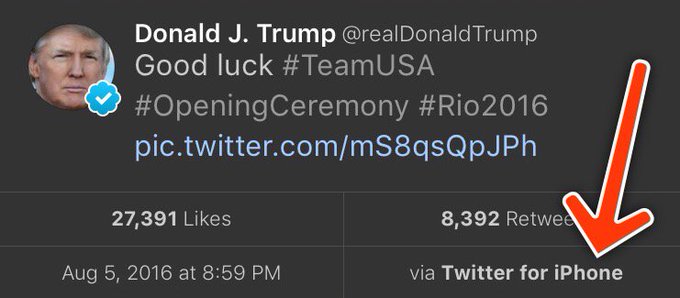
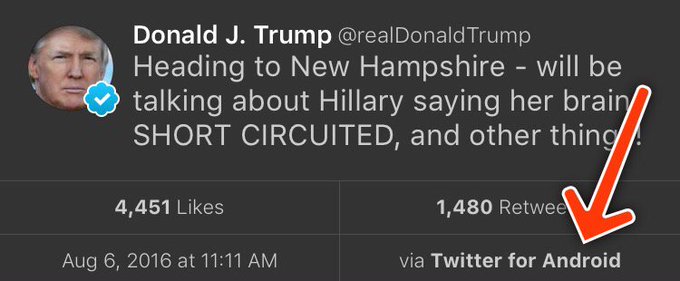
Every non-hyperbolic tweet is from iPhone (his staff).
Every hyperbolic tweet is from Android (from him).
When Trump wishes the Olympic team good luck, he’s tweeting from his iPhone. When he’s insulting a rival, he’s usually tweeting from an Android. Is this an artefact showing which tweets are Trump’s own and which are by some handler?
Others have explored Trump’s timeline and noticed this tends to hold up- and Trump himself does indeed tweet from a Samsung Galaxy. But how could we examine it quantitatively? I’ve been writing about text mining and sentiment analysis recently, particularly during my development of the tidytext R package with Julia Silge, and this is a great opportunity to apply it again.
My analysis, shown below, concludes that the Android and iPhone tweets are clearly from different people, posting during different times of day and using hashtags, links, and retweets in distinct ways. What’s more, we can see that the Android tweets are angrier and more negative, while the iPhone tweets tend to be benign announcements and pictures. Overall I’d agree with @tvaziri’s analysis: this lets us tell the difference between the campaign’s tweets (iPhone) and Trump’s own (Android).
First, we’ll retrieve the content of Donald Trump’s timeline using the userTimelinefunction in the twitteR package:1
library(dplyr)
library(purrr)
library(twitteR)
# You'd need to set global options with an authenticated app
setup_twitter_oauth(getOption("twitter_consumer_key"),
getOption("twitter_consumer_secret"),
getOption("twitter_access_token"),
getOption("twitter_access_token_secret"))
# We can request only 3200 tweets at a time; it will return fewer
# depending on the API
trump_tweets <- userTimeline("realDonaldTrump", n = 3200)
trump_tweets_df <- tbl_df(map_df(trump_tweets, as.data.frame))# if you want to follow along without setting up Twitter authentication,
# just use my dataset:
load(url("http://varianceexplained.org/files/trump_tweets_df.rda"))We clean this data a bit, extracting the source application. (We’re looking only at the iPhone and Android tweets- a much smaller number are from the web client or iPad).
library(tidyr)

tweets <- trump_tweets_df %>%
  select(id, statusSource, text, created) %>%
  extract(statusSource, "source", "Twitter for (.*?)<") %>%
  filter(source %in% c("iPhone", "Android"))
Overall, this includes 628 tweets from iPhone, and 762 tweets from Android.
One consideration is what time of day the tweets occur, which we’d expect to be a “signature” of their user. Here we can certainly spot a difference:
library(lubridate)
library(scales)

tweets %>%
  count(source, hour = hour(with_tz(created, "EST"))) %>%
  mutate(percent = n / sum(n)) %>%
  ggplot(aes(hour, percent, color = source)) +
  geom_line() +
  scale_y_continuous(labels = percent_format()) +
  labs(x = "Hour of day (EST)",
       y = "% of tweets",
       color = "")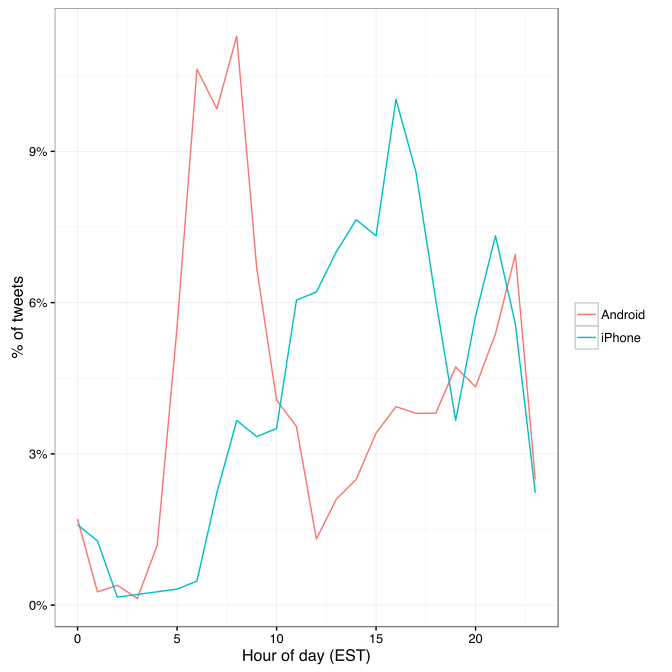
Trump on the Android does a lot more tweeting in the morning, while the campaign posts from the iPhone more in the afternoon and early evening.
Another place we can spot a difference is in Trump’s anachronistic behavior of “manually retweeting” people by copy-pasting their tweets, then surrounding them with quotation marks:
“@trumplican2016: @realDonaldTrump @DavidWohl stay the course mr trump your message is resonating with the PEOPLE”
Almost all of these quoted tweets are posted from the Android:
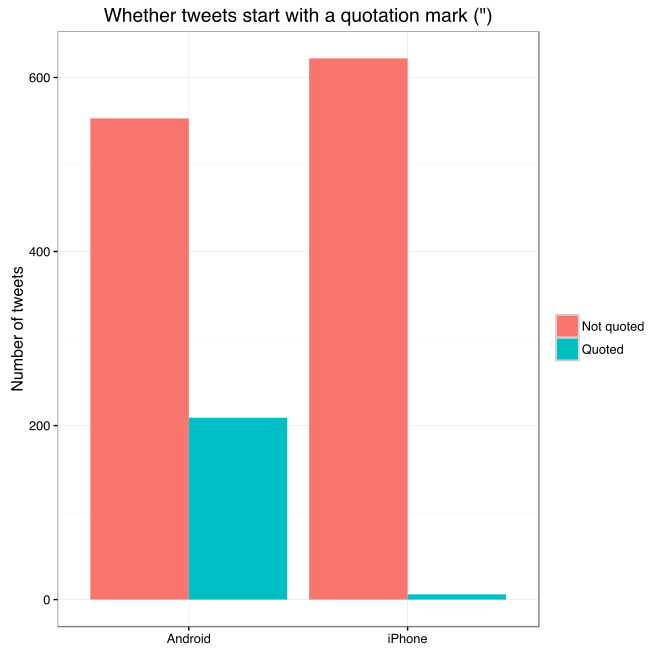
In the remaining by-word analyses in this text, I’ll filter these quoted tweets out (since they contain text from followers that may not be representative of Trump’s own tweets).
Somewhere else we can see a difference involves sharing links or pictures in tweets.
tweet_picture_counts <- tweets %>%
  filter(!str_detect(text, '^"')) %>%
  count(source,
        picture = ifelse(str_detect(text, "t.co"),
                         "Picture/link", "No picture/link"))

ggplot(tweet_picture_counts, aes(source, n, fill = picture)) +
  geom_bar(stat = "identity", position = "dodge") +
  labs(x = "", y = "Number of tweets", fill = "")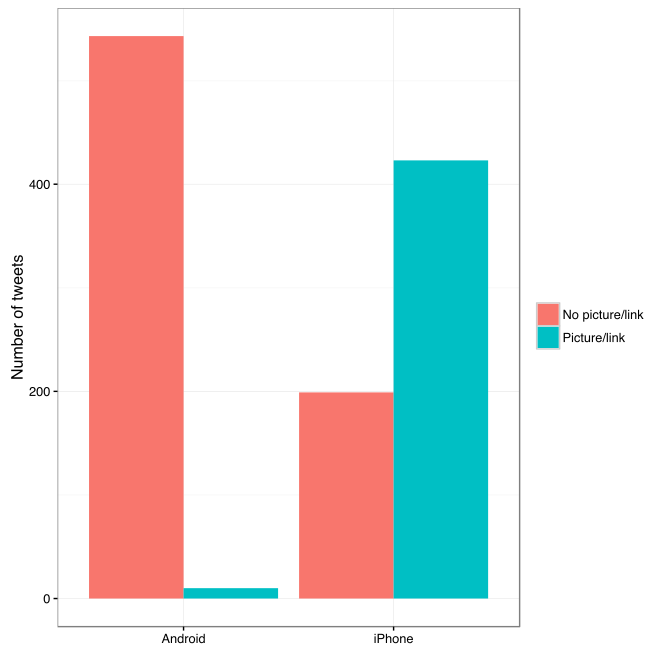
It turns out tweets from the iPhone were 38 times as likely to contain either a picture or a link. This also makes sense with our narrative: the iPhone (presumably run by the campaign) tends to write “announcement” tweets about events, like this:
Thank you Windham, New Hampshire! #TrumpPence16 #MAGA
While Android (Trump himself) tends to write picture-less tweets like:
The media is going crazy. They totally distort so many things on purpose. Crimea, nuclear, “the baby” and so much more. Very dishonest!
Now that we’re sure there’s a difference between these two accounts, what can we say about the difference in the content? We’ll use the tidytext package that Julia Silge and I developed.
We start by dividing into individual words using the unnest_tokens function (see this vignette for more), and removing some common “stopwords”2:
library(tidytext)

reg <- "([^A-Za-z\\d#@']|'(?![A-Za-z\\d#@]))"
tweet_words <- tweets %>%
  filter(!str_detect(text, '^"')) %>%
  mutate(text = str_replace_all(text, "https://t.co/[A-Za-z\\d]+|&", "")) %>%
  unnest_tokens(word, text, token = "regex", pattern = reg) %>%
  filter(!word %in% stop_words$word,
         str_detect(word, "[a-z]"))

tweet_words
## # A tibble: 8,753 x 4
## id source created word
##
## 1 676494179216805888 iPhone 2015-12-14 20:09:15 record
## 2 676494179216805888 iPhone 2015-12-14 20:09:15 health
## 3 676494179216805888 iPhone 2015-12-14 20:09:15 #makeamericagreatagain
## 4 676494179216805888 iPhone 2015-12-14 20:09:15 #trump2016
## 5 676509769562251264 iPhone 2015-12-14 21:11:12 accolade
## 6 676509769562251264 iPhone 2015-12-14 21:11:12 @trumpgolf
## 7 676509769562251264 iPhone 2015-12-14 21:11:12 highly
## 8 676509769562251264 iPhone 2015-12-14 21:11:12 respected
## 9 676509769562251264 iPhone 2015-12-14 21:11:12 golf
## 10 676509769562251264 iPhone 2015-12-14 21:11:12 odyssey
## # ... with 8,743 more rowsWhat were the most common words in Trump’s tweets overall?
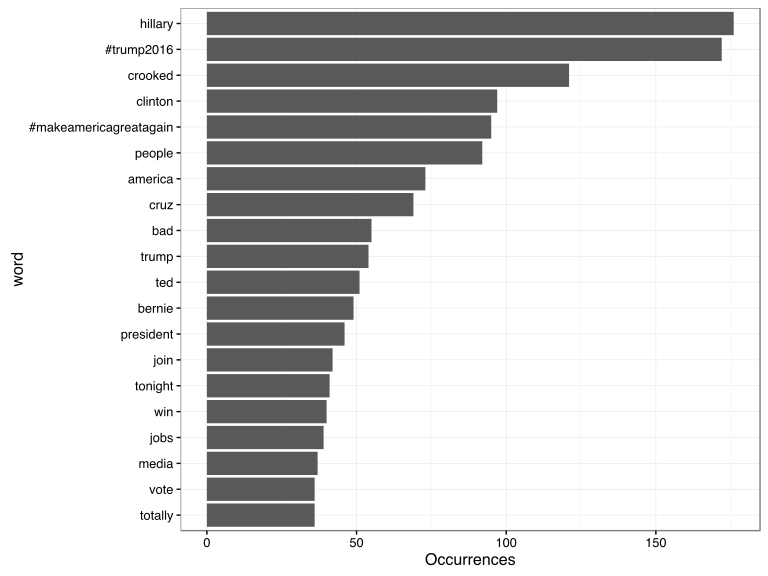
These should look familiar for anyone who has seen the feed. Now let’s consider which words are most common from the Android relative to the iPhone, and vice versa. We’ll use the simple measure of log odds ratio, calculated for each word as:3
log2(# in Android+1Total Android+1# in iPhone+1Total iPhone+1)”>log2(# in Android + 1 / Total Android + log2(# in Android+1Total Android+1# in iPhone+1Total iPhone+1)
“>1 / # in iPhone + 1 / Total iPhone + 1)
android_iphone_ratios <- tweet_words %>%
  count(word, source) %>%
  filter(sum(n) >= 5) %>%
  spread(source, n, fill = 0) %>%
  ungroup() %>%
  mutate_each(funs((. + 1) / sum(. + 1)), -word) %>%
  mutate(logratio = log2(Android / iPhone)) %>%
  arrange(desc(logratio))
Which are the words most likely to be from Android and most likely from iPhone?
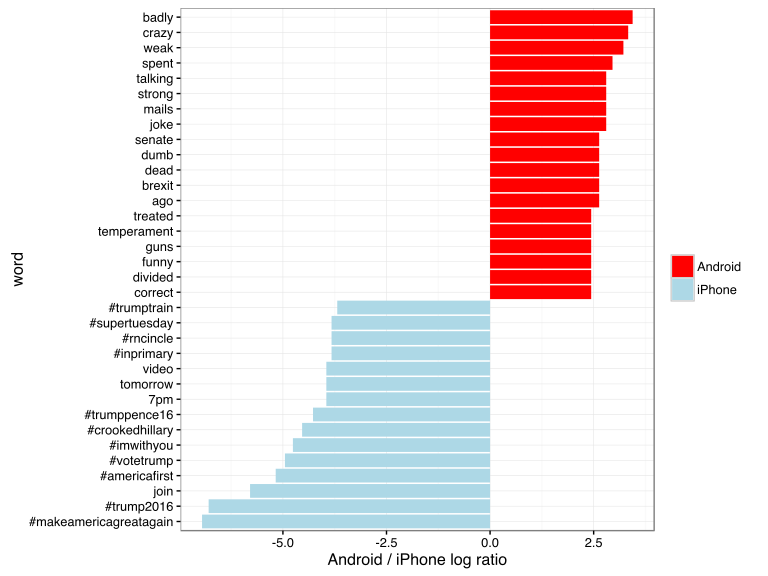
A few observations:
Since we’ve observed a difference in sentiment between the Android and iPhone tweets, let’s try quantifying it. We’ll work with the NRC Word-Emotion Association lexicon, available from the tidytext package, which associates words with 10 sentiments: positive, negative, anger, anticipation, disgust, fear, joy, sadness, surprise, and trust.
nrc <- sentiments %>%
  filter(lexicon == "nrc") %>%
  dplyr::select(word, sentiment)

nrc
## # A tibble: 13,901 x 2
## word sentiment
##
## 1 abacus trust
## 2 abandon fear
## 3 abandon negative
## 4 abandon sadness
## 5 abandoned anger
## 6 abandoned fear
## 7 abandoned negative
## 8 abandoned sadness
## 9 abandonment anger
## 10 abandonment fear
## # ... with 13,891 more rowsTo measure the sentiment of the Android and iPhone tweets, we can count the number of words in each category:
sources <- tweet_words %>%
  group_by(source) %>%
  mutate(total_words = n()) %>%
  ungroup() %>%
  distinct(id, source, total_words)

by_source_sentiment <- tweet_words %>%
  inner_join(nrc, by = "word") %>%
  count(sentiment, id) %>%
  ungroup() %>%
  complete(sentiment, id, fill = list(n = 0)) %>%
  inner_join(sources) %>%
  group_by(source, sentiment, total_words) %>%
  summarize(words = sum(n)) %>%
  ungroup()

head(by_source_sentiment)
## # A tibble: 6 x 4
## source sentiment total_words words
##
## 1 Android anger 4901 321
## 2 Android anticipation 4901 256
## 3 Android disgust 4901 207
## 4 Android fear 4901 268
## 5 Android joy 4901 199
## 6 Android negative 4901 560(For example, we see that 321 of the 4901 words in the Android tweets were associated with “anger”). We then want to measure how much more likely the Android account is to use an emotionally-charged term relative to the iPhone account. Since this is count data, we can use a Poisson test to measure the difference:
library(broom)

sentiment_differences <- by_source_sentiment %>%
  group_by(sentiment) %>%
  do(tidy(poisson.test(.$words, .$total_words)))

sentiment_differences
## Source: local data frame [10 x 9]
## Groups: sentiment [10]
##
## sentiment estimate statistic p.value parameter conf.low
## (chr) (dbl) (dbl) (dbl) (dbl) (dbl)
## 1 anger 1.492863 321 2.193242e-05 274.3619 1.2353162
## 2 anticipation 1.169804 256 1.191668e-01 239.6467 0.9604950
## 3 disgust 1.677259 207 1.777434e-05 170.2164 1.3116238
## 4 fear 1.560280 268 1.886129e-05 225.6487 1.2640494
## 5 joy 1.002605 199 1.000000e+00 198.7724 0.8089357
## 6 negative 1.692841 560 7.094486e-13 459.1363 1.4586926
## 7 positive 1.058760 555 3.820571e-01 541.4449 0.9303732
## 8 sadness 1.620044 303 1.150493e-06 251.9650 1.3260252
## 9 surprise 1.167925 159 2.174483e-01 148.9393 0.9083517
## 10 trust 1.128482 369 1.471929e-01 350.5114 0.9597478
## Variables not shown: conf.high (dbl), method (fctr), alternative (fctr)And we can visualize it with a 95% confidence interval:
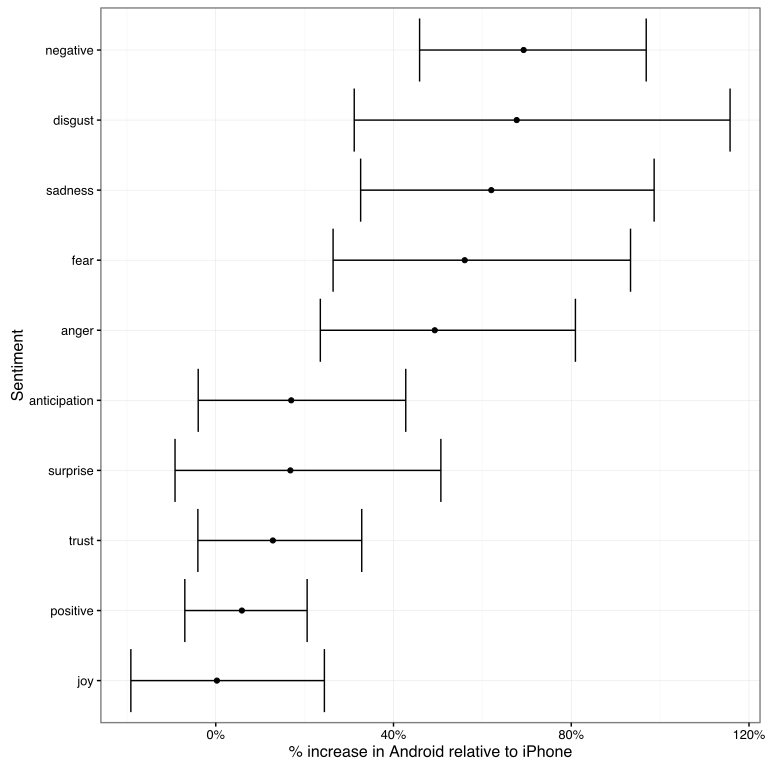
Thus, Trump’s Android account uses about 40-80% more words related to disgust, sadness, fear, anger, and other “negative” sentiments than the iPhone account does. (The positive emotions weren’t different to a statistically significant extent).
We’re especially interested in which words drove this different in sentiment. Let’s consider the words with the largest changes within each category:
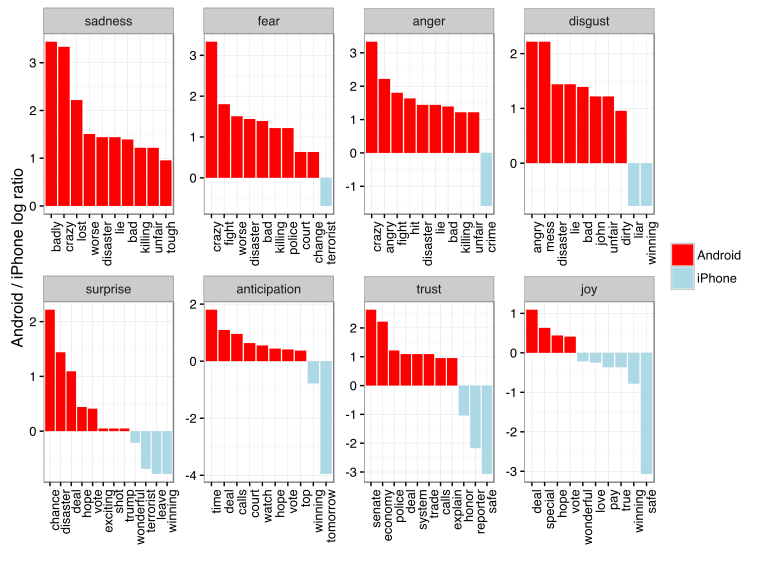
This confirms that lots of words annotated as negative sentiments (with a few exceptions like “crime” and “terrorist”) are more common in Trump’s Android tweets than the campaign’s iPhone tweets.
I was fascinated by the recent New Yorker article about Tony Schwartz, Trump’s ghostwriter for The Art of the Deal. Of particular interest was how Schwartz imitated Trump’s voice and philosophy:
In his journal, Schwartz describes the process of trying to make Trump’s voice palatable in the book. It was kind of “a trick,” he writes, to mimic Trump’s blunt, staccato, no-apologies delivery while making him seem almost boyishly appealing…. Looking back at the text now, Schwartz says, “I created a character far more winning than Trump actually is.”
Like any journalism, data journalism is ultimately about human interest, and there’s one human I’m interested in: who is writing these iPhone tweets?
The majority of the tweets from the iPhone are fairly benign declarations. But consider cases like these, both posted from an iPhone:
Like the worthless @NYDailyNews, looks like @politico will be going out of business. Bad reporting- no money, no cred!
Failing @NYTimes will always take a good story about me and make it bad. Every article is unfair and biased. Very sad!
These tweets certainly sound like the Trump we all know. Maybe our above analysis isn’t complete: maybe Trump has sometimes, however rarely, tweeted from an iPhone (perhaps dictating, or just using it when his own battery ran out). But what if our hypothesis is right, and these weren’t authored by the candidate- just someone trying their best to sound like him?
Or what about tweets like this (also iPhone), which defend Trump’s slogan- but doesn’t really sound like something he’d write?
Our country does not feel ‘great already’ to the millions of wonderful people living in poverty, violence and despair.
A lot has been written about Trump’s mental state. But I’d really rather get inside the head of this anonymous staffer, whose job is to imitate Trump’s unique cadence (“Very sad!”), or to put a positive spin on it, to millions of followers. Are they a true believer, or just a cog in a political machine, mixing whatever mainstream appeal they can into the @realDonaldTrump concoction? Like Tony Schwartz, will they one day regret their involvement?
&) from the text.David Robinson is a Data Scientist at Stack Overflow. In May 2015, he received his PhD in Quantitative and Computational Biology from Princeton University, where he worked with Professor John Storey. His interests include statistics, data analysis, genomics, education, and programming in R.


 paulvanderlaken.com