Tag: C

Screeps: An AI colony simulation game for programmers

Screeps: An AI colony simulation game for programmers

A while back I discovered this free game called Screeps: an RTS colony-simulation game specifically directed AI programmers. I was immediately intrigued by the concept, but it took me a while to find the time and courage to play. When I finally got to playing though, I lost myself in the game for several days on end.

Screeps means “scripting creeps.”

It’s an open-source sandbox MMO RTS game for programmers, wherein the core mechanic is programming your units’ AI. You control your colony by writing JavaScript which operate 24/7 in the single persistent real-time world filled by other players on par with you.

https://screeps.com/

Basically, screeps is very little game. You start with in a randomly generated canyon of some 400 by 400 pixels, with nothing more than some basic resources and your base. Nothing fun will happen. Even better, nothing at all will happen. Unless you program it yourself.

As a player, it is your job to “script” your own creeps’ AI. And your buildings AI for that matter. You will need to write a program that makes your base spawn workers. And next those workers will need to be programmed to actually work. You need to direct them to go to the resources, explain them how to mine the resources, when to stop mining, and how to return the mined resources to your base. You will probably also want some soldiers and some other defenses, so those need to be spawned with their own special instructions as well.

Everything needs to be scripted well, as the game (and thus your screeps) runs on special servers, 24/7, so also when you are not playing yourself. Truly your personal, virtual, mini-AI colony.

The programming mostly occurs in JavaScript. This can be difficult for those like myself who do not know JavaScript, but even I managed to have some basic workers running up and down my screen in a matter of hours. Step by step, you will learn (be forced) to create different worker types (harvestersbuildersrepairmen, and even some stupid soldiers) and even some basic colony management scripts (spawning workers, spending resourcesupgrading stuff). In the mean time, you will silently learn some JavaScript while playing. As I put in more and more hours, I could even see how to improve on my earlier scripts. This makes screeps a fun and rewarding gaming and learning experience.

Do expect to run into frustrations though! If you’re no JavaScript expert you will personally create a lot of bugs. Of which the game by default send you messages, as your colony will get stuck overnight. Moreover, you will likely need to Google every single thing you want to do at the start. I found great help in this YouTube tutorial to get me started. Finally, you are only under nooby-protection for the first so-many hours, after which you will quickly get slaughtered by all the advanced multi-CPU players on the servers.

Heck, it was fun while it lasted : )

PS. I read here that, using WebAssembly, one could also compile code written in different languages and run it in Screeps: C/C++ or Rust code, as well as other supported languages.

How to Design Your First Programs

How to Design Your First Programs

Past week, I started this great C++ tutorial: learncpp.com. It has been an amazing learning experience so far, mostly because the tutorial is very hands on, allowing you to immediately self-program all of the code examples.

Several hours in now, section 1.10b explains how to design of your own, first programs. The advice in this seciton seemd pretty universal, thus valuable regardless of the programming language you normally work in. At least, I found it to resonates with my personal experiences so I highly recommend that you take 10 minutes to read it yourself: www.learncpp.com/cpp-tutorial/1-10b-how-to-design-your-first-programs. For those who dislike detailed insights, here are the main pointers:

A little up-front planning saves time and frustration in the long run. Generally speaking, work through these eight steps when starting a new program or project:

  1. Define the problem
  2. Collect the program’s basic requirements (e.g., functionality, constraints)
  3. Define your tools, targets, and backup plan
  4. Break hard problems down into easy problems
  5. Figure out (and list) the sequence of events
  6. Figure out the data inputs and outputs for each task
  7. Write the task details
  8. Connect the data inputs and outputs

Some general words of advice when writing programs:

Keep your programs simple to start. Often new programmers have a grand vision for all the things they want their program to do. “I want to write a role-playing game with graphics and sound and random monsters and dungeons, with a town you can visit to sell the items that you find in the dungeon” If you try to write something too complex to start, you will become overwhelmed and discouraged at your lack of progress. Instead, make your first goal as simple as possible, something that is definitely within your reach. For example, “I want to be able to display a 2d field on the screen”.

Add features over time. Once you have your simple program working and working well, then you can add features to it. For example, once you can display your 2d field, add a character who can walk around. Once you can walk around, add walls that can impede your progress. Once you have walls, build a simple town out of them. Once you have a town, add merchants. By adding each feature incrementally your program will get progressively more complex without overwhelming you in the process.

Focus on one area at a time. Don’t try to code everything at once, and don’t divide your attention across multiple tasks. Focus on one task at a time, and see it through to completion as much as is possible. It is much better to have one fully working task and five that haven’t been started yet than six partially-working tasks. If you split your attention, you are more likely to make mistakes and forget important details.

Test each piece of code as you go. New programmers will often write the entire program in one pass. Then when they compile it for the first time, the compiler reports hundreds of errors. This can not only be intimidating, if your code doesn’t work, it may be hard to figure out why. Instead, write a piece of code, and then compile and test it immediately. If it doesn’t work, you’ll know exactly where the problem is, and it will be easy to fix. Once you are sure that the code works, move to the next piece and repeat. It may take longer to finish writing your code, but when you are done the whole thing should work, and you won’t have to spend twice as long trying to figure out why it doesn’t.

Learn C++; Section 1.10b

The wondrous state of Computer Vision, and what the algorithms actually “see”

The wondrous state of Computer Vision, and what the algorithms actually “see”

The field of computer vision tries to replicate our human visual capabilities, allowing computers to perceive their environment in a same way as you and I do. The recent breakthroughs in this field are super exciting and I couldn’t but share them with you.

In the TED talk below by Joseph Redmon (PhD at the University of Washington) showcases the latest progressions in computer vision resulting, among others, from his open-source research on Darknet – neural network applications in C. Most impressive is the insane speed with which contemporary algorithms are able to classify objects. Joseph demonstrates this by detecting all kinds of random stuff practically in real-time on his phone! Moreover, you’ve got to love how well the system works: even the ties worn in the audience are classified correctly!

PS. please have a look at Joseph’s amazing My Little Pony-themed resumé.

The second talk, below, is more scientific and maybe even a bit dry at the start. Blaise Aguera y Arcas (engineer at Google) starts with a historic overview brain research but, fortunately, this serves a cause, as ~6 minutes in Blaise provides one of the best explanations I have yet heard of how a neural network processes images and learns to perceive and classify the underlying patterns. Blaise continues with a similarly great explanation of how this process can be reversed to generate weird, Asher-like images, one could consider creative art:

neuralnetart1.png
An example of a reversed neural network thus “estimating” an image of a bird [via Youtube]
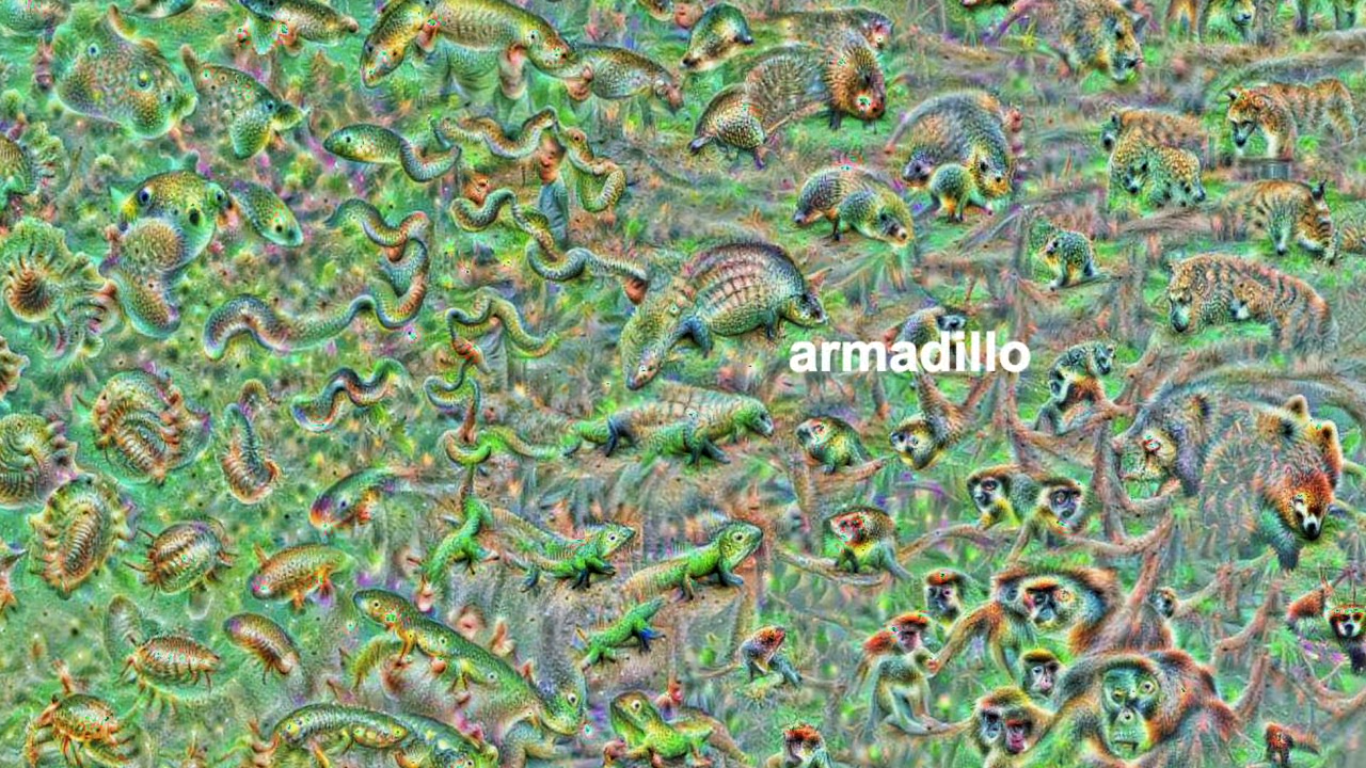
Blaise’s colleagues at Google took this a step further and used t-SNE to visualize the continuous space of animal concepts as perceived by their neural network, here a zoomed in part on the Armadillo part of the map, apparently closely located to fish, salamanders, and monkeys?

neuralnetart2.png
A zoomed view of part of a t-SNE map of latent animal concepts generated by reversing a neural network [via Youtube]
We’ve seen these latent spaces/continua before. This example Andrej Karpathy shared immediately comes to mind:

Blaise’s presentaton you can find here:

If you want to learn more about this process of image synthesis through deep learning, I can recommend the scientific papers discussed by one of my favorite Youtube-channels, Two-Minute Papers. Karoly’s videos, such as the ones below, discuss many of the latest developments:

Let me know if you have any other video’s, papers, or materials you think are worthwhile!

Functional programming and why not to “grow” vectors in R

Functional programming and why not to “grow” vectors in R

For fresh R programmers, vectorization can sound awfully complicated. Consider two math problems, one vectorized, and one not:

math_operations.png
Two ways of doing the same computations in R

Why on earth should R spend more time calculating one over the other? In both cases there are the same three addition operations to perform, so why the difference? This is what we will try to illustrate in this post, which is inspired on work by Naom Ross and the University of Auckland.

R behind the scenes:

R is a high-levelinterpreted computer language. This means that R takes care of a lot of basic computer tasks for you. For instance, when you type i <- 5.0 you don’t have to tell R:

  • That 5.0 is a floating-point number
  • That i should store numeric-type data
  • To find a place in memory for to put 5
  • To register i as a pointer to that place in memory

You also don’t have to convert i <- 5.0 to binary code. That’s done automatically when you hit Enter. Although you are probably not aware of this, many R functions are just wrapping your input and passing it to functions of other, compiled computer languages, like C, C++, or FORTRAN, in the back end.

Now here’s the crux: If you need to run a function over a set of values, you can either pass in a vector of these values through the R function to the compiled code (math example 1), or you could call the R function repeatedly for each value separately (math example 2). If you do the latter, R has to do stuff (figuring out the above bullet points and translating the codeeach time, repeatedly. However, if you call the function with a vector instead, this figuring out part only happens once. For instance, R vectors are constricted to a single data type (e.g., numeric, character) and when you use a vector instead of seperate values, R only needs to determine the input data type once, which saves time. In short, there’s no advantage to NOT organizing your data as vector.

For-loops and functional programming (*ply)

One example of how new R programmers frequently waste computing time is via memory allocation. Take the below for loop, for instance:

iterations = 10000000
 
 system.time({
   j = c()
   for(i in 1:iterations){
     j[i] <- i
   }
 })
##    user  system elapsed 
##    3.71    0.23    3.94

Here, vector j starts out with length 1, but for each iteration in the for loop, R has to re-size the vector and re-allocate memory. Recursively, R has to find the vector in its memory, create a new vector that will fit more data, copy the old data over, insert the new data, and erase the old vector. This process gets very slow as vectors get big. Nevertheless, it is often how programmers store the results of their iterative processes. Tremendous computing power can be saved by pre-allocating vectors to fit all the values beforehand, so that R does not have to do unnecessary actions:

system.time({
   j = rep(NA, iterations)
   for(i in 1:iterations){
     j[i] <- i
   }
 })
##    user  system elapsed 
##    0.88    0.01    0.89

More advanced R users tend to further optimize via functionals. This family of functions takes in vectors (or matrices, or lists) of values and applies other functions to each. Examples are apply or plyr::*ply functions, which speed up R code mainly because the for loops they have inside them automatically do things like pre-allocating vector size. Functionals additionally prevent side effects: unwanted changes to your working environment, such as the remaining i after for(i in 1:10). Although this does not necessarily improve computing time, it is regarded best practice due to preventing consequent coding errors.

Conclusions

There are cases when you should use for loops. For example, the performance penalty for using a for loop instead a vector will be small if the number of iterations is relatively small, and the functions called inside your for loop are slow. Here, looping and overhead from function calls make up a small fraction of your computational time and for loops may be more intuitive or easier to read for you. Additionally, there are cases where for loops make more sense than vectorized functions: (1) when the functions you seek to apply don’t take vector arguments and (2) when each iteration is dependent on the results of previous iterations.

Another general rule: fast R code is short. If you can express what you want to do in R in a line or two, with just a few function calls that are actually calling compiled code, it’ll be more efficient than if you write long program, with the added overhead of many function calls.

Finally, there is a saying that “premature optimization is the root of all evil”. What this means is that you should not re-write your R code unless the computing time you are going to save is worth the time invested. Nevertheless, if you understand how vectorization and functional programming work, you will be able to write more faster, safer, and more transparent (short & simple) programs.