Four of the best professional poker players in the world – Dong Kim, Jason Les, Jimmy Chou, and Daniel McAulay – recently got beat by Libratus, a poker-playing AI developed at the Pittsburgh Supercomputing Center. During a period of 20 days of continuous play (10h/day), each of these four professionals lost to Libratus heads-up in a whopping total of 120.000 hands of No Limit Texas Hold-em Poker.
A player may face 10 to the power of 160 different situations in Texas Hold-em Poker: more than the number of atoms in the universe. It took extensive machine learning to compute and prioritize the computation of the most rewarding actions in these situations. Libratus works by running extensive simulations, taking into account the way the professionals play, and figuring out the best counter strategy. Although it is not without flaws, any “holes” the players found in Libratus’ strategy could not be exploited for long, as the algorithm would quickly learn and adapt to prevent further exploitation. The experience was completely different from playing a human player, the professionals argue, as Libratus would make both tiny and huge bets and would continuously change its strategy and plays.
The video below provides more detailed information and also shows the million-dollar margin by which Libratus won at the end of the twenty day poker (training) marathon:
Seth Bling calls himself a video game designer, a hacker and an engineer. You might know him from MarI/O: his neural network that got extremely good to at playing Super Mario Bros. The video below shows the genetic approach Seth used to train this neural network. Seth randomly generated a starting population of neural networks where the inputs – the current frame in the Mario video game – were randomly connected to the outputs – the eight buttons to press (jump, duck, up, down, right, left, etc). By giving the neural nets that made it furthest into the game a larger chance to pass on their genes (their input-output relations) to the next generation with slight mutations, Seth automatically generated neural networks that were more and more proficient in completing the game. In short, by evolution, Seth’s neural network learned the most effective response to the changing video game environment.
After MarI/O, Seth this week posted his newest creation: MariFlow. Here, Seth trained a neural network on 15 hours of training data, consisting of Seth himself playing Super Mario Kart. The neural network thus learned what buttons (output) Seth would most likely push when he encountered a certain Mario Kart parcours piece (input). However, due to random chance, the neural net would often get itself stuck in situations that Seth had not encountered in his training sessions (e.g., reversed, against a wall). The neural net would fail miserably in such situations because it had not learned how to behave. Accordingly, Seth had to generate new training data for these situations and he did so using Human-Computer Interactions in Machine Learning: Seth and the neural net would play alternatively for a while, thus generating training data for situations that Seth would not have encountered on its own. After the neural net was trained with these additional data, it became quite proficient in playing Mario Kart (like Seth) often even winning matches! If you want to know more, you can read the manual here or watch Seth’s video below. If you want to replicate or just play with the data, Seth made everything available here.
Seth has active YouTube, Twitch and Twitter channels and I recommend you check them out!
A Generative Adversarial Network, GAN in short, is a machine learning architecture where two neural networks compete against each other. One of them functions as a discriminator, seeking to optimize its classification of data (i.e., determine whether or not there is a cat in a picture). The other one functions as a generator, seeking to best generate new data to fool the discriminator (i.e., create realistic fake images of cats). Over time, the generator network will become increasingly good at simulating realistic data and being able to mimic real-life.
The concept of GAN was introduced by Ian Goodfellow in 2014, whom we know from the Machine Learning & Deep Learning book. Although GANs are computationally heavy and still undergoing major development, their potential implications are widespread. We can see these architectures taking over all sort of creative work, where generating new “data” is the main task. Think for instance of designing clothes, creating video footage, writing novels, animating movies, or even whole video games. One of my favorite Youtube channels discusses multiple of its recent applications, and here are a few of my favorites:
If you want to try out these GANs yourself but do not have the programming experience: Reiichiro Nakano made a GAN playground in (what seems) JavaScript, where you can play around with the discriminator and the generator to create an adversarial network that identifies and generates images of numbers.
A few weeks ago, Magic Sudoku was released for iOS11. This app by a company named Hatchlings automatically solves sudoku puzzles using a combination of Computer Vision, Machine Learning, and Augmented Reality. The app works on iPad Pro’s and iPhone 6s or above and can be downloaded from the App Store.
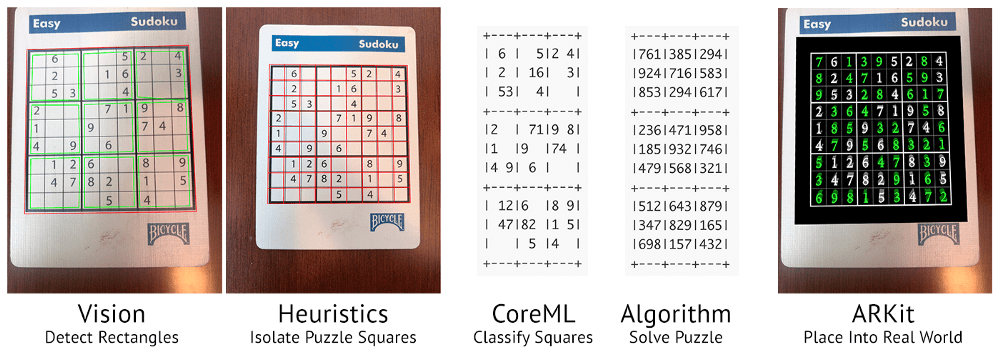
Magic Sudoku gives a magical experience when users point their phone at a Sudoku puzzle: the puzzle is instantaneously solved and displayed on their screen. In several seconds, the following occurs behind the scenes:
“One of the original reasons I chose a Sudoku solver as our first AR app was that I knew classifying digits is basically the “hello world” of Machine Learning. I wanted to dip my toe in the water of Machine Learning while working on a real-world problem. This seemed like a realistic app to tackle.” – Brad Dwyer, Founder at Hatchlings
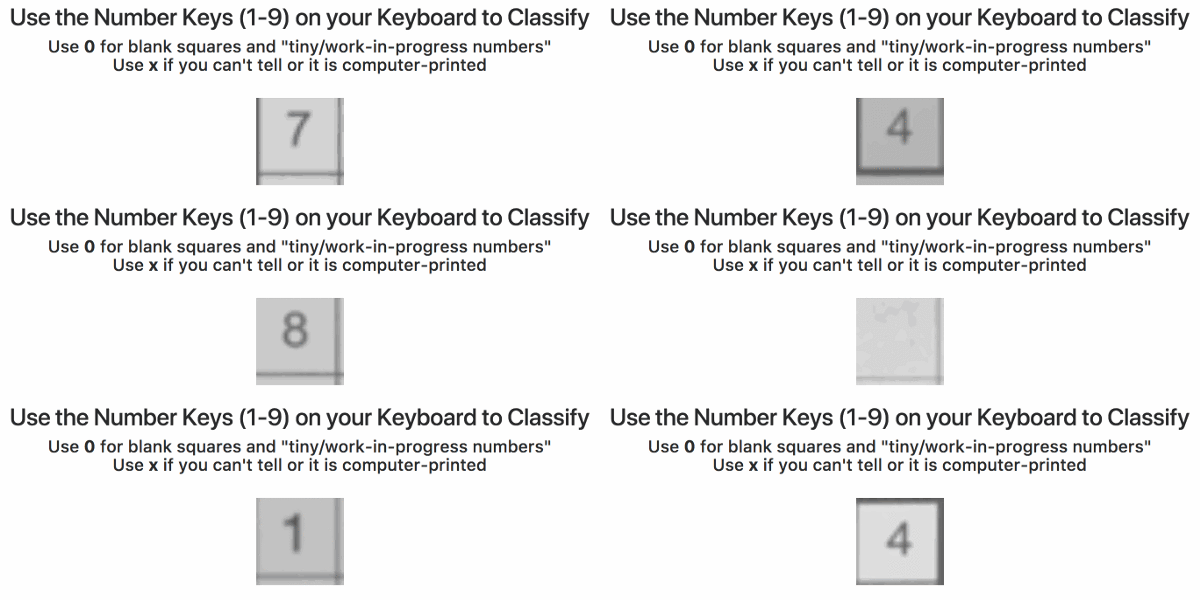
Particularly the training process of the app interested me. In his blog, Brad explains how they bought out the entire stock of Sudoku books of a specific bookstore and, with the help of his team, ripped each book apart to scan each small square with a number and upload in to a server. In the end, this server contained about 600,000 images, but all were completely unlabeled. Via a simple game, they asked Hatchlings users to classify these images by pressing the number keys on their keyboard. Within 24 hours, all 600,000 images were classified!
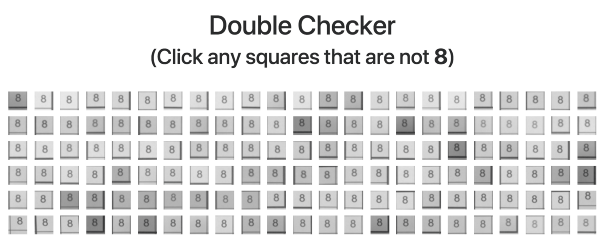
Nevertheless, some users had misunderstood the task (or just plainly ignored it) and as a consequence there were still a significant number of misidentified images. So Brad created a second tool that displayed 100 images of a single class to users, who where consequently asked to click the ones that didn’t match. These were subsequently thrown back into the first tool to be reclassified.
Quickly, the developers had enough verified data to add an automatic accuracy checker into both tools for future data runs. Funnily enough, they programmed it in such a way that users were periodically shown already known/classified images in order to check the validity of their inputs and determine how much to trust their answers going forward. This whole process reminds me on a blog I wrote recently, regarding human-computer interactions in reinforcement learning.
For several more weeks, users classified more scanned data so that, by the time the app was launched, it had been trained on over a million images of Sudoku squares. The results were amazing as the application had a 98.6% accuracy on launch (currently above 99% accuracy). One minor deficit was that the app was trained on paper Sudoku’s. However, when it aired, many users wanted to quickly test it and searched for Sudoku images on Google, which the app wouldn’t process that well.
“Problem number one was that our machine learning model was only trained on paper puzzles; it didn’t know what to think about pixels on a screen. I pulled an all nighter that first week and re-trained our model with puzzles on computer screens.
Problem number two was that ARKit only supports horizontal planes like tables and floors (not vertical planes like computer monitors). Solving this was a trickier problem but I did come up with a hacky workaround. I used a combination of some heuristics and FeaturePoint detection to place puzzles on non-horizontal planes.” – Brad Dwyer, Founder at Hatchlings
Many requests have come in regarding “training datasets” – to practice programming. Fortunately, the internet is full of open-source datasets! I compiled a selected list of datasets and repositories below. If you have any additions, please comment or contact me! For information on programming languages or algorithms, visit the overviews for R, Python, SQL, or Data Science, Machine Learning, & Statistics resources.
This list is no longer being maintained. There are other, more frequently updated repositories of useful datasets included in bold below:
For newcomers, R code can look like old Egyptian hieroglyphs with its weird operators (%in%,<-,||, or %/%). The R language has been said to have a steep learning curve and although there are many introductory courses and books (see R Resources), it’s hard to decide where to start.
Fortunately, I am here to help! The below is a six-step guide on how to learning R, using only open access (i.e., free!) materials.
Although oriented at complete newcomers, it will have you writing your own practical scripts and programs in no time: just start at #1 and work your way to coding mastery!
If you already feel comfortable with the basics of R — or don’t like basics — you can start at #5 and jump into practical learning via the tidyverse.
Good luck!!!
Step 1: An R Folder (15 min)
Create a directory for your R learning stuff somewhere on your computer. Download this (very) short introduction to R by Paul Torfs and Claudia Bauer and store it in that folder. Now read the introduction and follow the steps. It will help you install all R software on your own computer and familiarize you with the standard data types.
Now you’re ready to really start learning and we’re going to accelerate via swirl. Open up your RStudio and enter the two lines of code below in your console window.
install.packages('swirl') #download swirl package
library(swirl) #load in swirl package
swirl (webpage) will automatically start and after a couple of prompts you will be able to choose the learning course called 1: R Programming: The basics of programming in R (see below). This course consists of 15 modules via which you will master the basics of R in the environment itself. Start with module 1 and complete between one to three modules per day, so that you finish the swirl course in a week.
Starting up swirl in RStudioswirl’s R 4 learning courses and the 15 modules belonging to the basics of R programming course
Step 4: A Pirate’s Guide to R (10h)
OK, you should now be familiar with the basics of R. However, knowledge is crystallized via repetition. I therefore suggest, you walk through the book YaRrr! The Pirate’s Guide to R (Phillips, 2017) starting in chapter 3. It’s a fun book and will provide you with more knowledge on how to program custom functions, loops, and some basic statistical modelling techniques – the thing R was actually designed for.
Step 5: R for Data Science (16h)
By now, you can say you might say you are an adapt R programmer with statistical modelling experience. However, you have been working with base R functions mostly, knowledge of which is a must-have to really understand the language. In practice, R programmers rely strongly on developed packages nevertheless. A very useful group of packages is commonly referred to as the tidyverse. You will be amazed at how much this set of packages simplifies working in R. The next step therefore, is to work through the book R for Data Science (Grolemund & Wickham, 2017) (hardcopy here).
Step 6: Specialize (∞)
You are now several steps and a couple of weeks further. You possess basic knowledge of the R language, know how to write scripts in RStudio, are capable of programming in base R as well as using the advanced functionality of the tidyverse, and you have even made a start with some basic statistical modelling.
It’s time to set you loose in the wonderful world of the R community. If you had not done this earlier, you should get accounts on Stack Overflow and Cross Validated. You might also want to subscribe to the R Help Mailing List, R Bloggers, and to my website obviously.
Join 385 other subscribers
On Twitter, have a look at #rstats and, on reddit, subscribe to the rstats, rstudio, and statistics threads. At this time, I can’t but advise you to return to the R Resources Overview and to continue broadening your R programming skills. Pick materials in the area that interests you:









 paulvanderlaken.com