Category: best practices

rstudio::conf 2018 summary

rstudio::conf 2018 summary

rstudio::conf is the yearly conference when it comes to R programming and RStudio. In 2017, nearly 500 people attended and, last week, 1100 people went to the 2018 edition. Regretfully, I was on holiday in Cardiff and missed out on meeting all my #rstats hero’s. Just browsing through the #rstudioconf Twitter-feed, I already learned so many new things that I decided to dedicate a page to it!

Fortunately, you can watch the live streams taped during the conference:

Two people have collected the slides of most rstudio::conf 2018 talks, which you can acces via the Github repo’s of matthewravey and by simecek. People on Twitter have particularly recommended teach the tidyverse to beginners (by David Robinson), the lesser known stars of the tidyverse (by Emily Robinson), the future of time series and financial analysis in the tidyverse (by Davis Vaughan of business-science.io), Understanding Principal Component Analysis (by Julia Silge), and Deploying TensorFlow models (by Javier Luraschi). Nevertheless, all other presentations are definitely worth checking out as well!

One of the workshops deserves an honorable mention. Jenny Bryan presented on What they forgot to teach you about R, providing some excellent advice on reproducible workflows. It elaborates on her earlier blog on project-oriented workflows, which you should read if you haven’t yet. Some best pRactices Jenny suggests:

  • Restart R often. This ensures your code is still working as intended. Use Shift-CMD-F10 to do so quickly in RStudio.
  • Use stable instead of absolute paths. This allows you to (1) better manage your imports/exports and folders, and (2) allows you to move/share your folders without the code breaking. For instance, here::here("data","raw-data.csv") loads the raw-data.csv-file from the data folder in your project directory. If you are not using the here package yet, you are honestly missing out! Alternatively you can use fs::path_home()normalizePath() will make paths work on both windows and mac. You can usebasename instead of strsplit to get name of file from a path.
  • To upload an existing git directory to GitHub easily, you can usethis::use_github().
  • If you include the below YAML header in your .R file, you can easily generate .md files for you github repo.
#' ---
#' output: github_document
#' ---
  • Moreover, Jenny proposed these useful default settings for knitr:
knitr::opts_chunk$set(
collapse = TRUE,
comment = "#>",
out.width = "100%"
)

Another of Jenny Bryan‘s talks was named Data Rectangling and although you might not get much out of her slides without her presenting them, you should definitely try the associated repurrrsive tutorial if you haven’t done so yet. It’s a poweR up for any useR!

Here’s a Shiny dashboard made by Garrick Aden-Buie including all the #rstudioconf tweets so you can browse the posts yourself. If you want to download the tweets, Mike Kearney (author of rtweet) shares the data here on his Github. Some highlights:

These probably only present a minimal portion of the thousands of tips and tricks you could have learned by simply attending rstudio::conf. I will definitely try to attend next year’s edition. Nevertheless, I hope the above has been useful. If I missed out on any tips, presentations, tweets, or other materials, please reply below, tweet me or pop me a message!

Sentiment Analysis: Analyzing Lexicon Quality and Estimation Errors

Sentiment Analysis: Analyzing Lexicon Quality and Estimation Errors

Sentiment analysis is a topic I cover regularly, for instance, with regard to Harry PlotterStranger Things, or Facebook. Usually I stick to the three sentiment dictionaries (i.e., lexicons) included in the tidytext R package (Bing, NRC, and AFINN) but there are many more one could use. Heck, I’ve even tried building one myself using a synonym/antonym network (unsuccessful, though a nice challenge). Two lexicons that did become famous are SentiWordNet, accessible via the lexicon R package, and the Loughran lexicon, designed specifically for the analysis of shareholder reports.

Josh Yazman did the world a favor and compared the quality of the five lexicons mentioned above. He observed their validity in relation to the millions of restaurant reviews in the Yelp dataset. This dataset includes both textual reviews and 1 to 5 star ratings. Here’s a summary of Josh’s findings, including two visualizations (read Josh’s full blog + details here):

  • NRC overestimates the positive sentiment.
  • AFINN also provides overly positive estimates, but to a lesser extent.
  • Loughran seems unreliable altogether (on Yelp data).
  • Bing estimates are accurate as long as texts are long enough (e.g., 200+ words).
  • SentiWordNet‘s estimates are mostly valid and precise, also on shorter texts, but may include minor outliers.

Sentiment scores by Yelp rating, estimated using each lexicon. [original]
The average sentiment score estimated using lexicons, where words are randomly sampled from the Yelp dataset. Note that, although both NRC and Bing scores are relatively positive on average, they also demonstrate a larger spread of scores (which is a good thing if you assume that reviews vary in terms of sentiment). [original]
On a more detailed level, David Robinson demonstrated how to uncover performance errors or quality issues in lexicons, in his 2016 blog on the AFINN lexicon. Using only the most common words (i.e., used in 200+ reviews for at least 10 businesses) of the same Yelp dataset, David visualized the inconsistencies between the AFINN sentiment lexicon and the Yelp ratings in two very smart and appealing ways:

center
Words’ AFINN sentiment score by the average rating of the reviews they used in [original]
As the figure above shows, David found a strong positive correlations between the sentiment score assigned to words in the AFINN lexicon and the way they are used in Yelp reviews. However, there are some exception – words that did not have the same meaning in the lexicon and the observed data. Examples of words that seem to cause errors are die and bomb (both negative AFINN scores but used in positive Yelp reviews) or, the other way around, joke and honor (positive AFINN scores but negative meanings on Yelp).

center
A graph of the frequency with which words are used in reviews, by the average rating of the reviews they occur in, colored for their AFINN sentiment score [original]
With the graph above, it is easy to see what words cause inaccuracies. Blue words should be in the upper section of this visual while reds should be closer to the bottom. If this is not the case, a word likely has a different meaning in the lexicon respective to how it’s used on Yelp. These lexicon-data differences become increasingly important as words are located closer to the right side of the graph, which means they more frequently screw up your sentiment estimates. For instance, fine, joke, fuck and hope cause much overestimation of positive sentiment while fresh is not considered in the positive scores it entails and die causes many negative errors.

TL;DR: Sentiment lexicons vary in terms of their quality/performance. If your texts are short (few hundred words) you might be best off using Bing (tidytext). In other cases, opt for SentiWordNet (lexicon), which considers a broader vocabulary. If possible, try to evaluate inaccuracies, outliers, and/or prediction errors via data visualizations.

A note on Pie Charts

A note on Pie Charts

A table is nearly always better than a dumb pie chart; the only worse design than a pie chart is several of them […] pie charts should never be used.

Edward Tufte in the Visual Display of Quantitative Information

Stop using pie charts, they are evil!

title of Bernard Marr’s LinkedIn post

I hate pie charts. I mean, really hate them.

Cole Nussbaumer in death to pie charts

Many people have criticized the pie chart. The most important critique is that we, humans, are good in comparing lengths and heights, but angles and areas not so much. The following three charts by Kristin Henry demonstrate the phenomenon. Can you spot how the two pie charts below are different? 

And how about now?

OK, I admit that the order of the categories matters quite a lot in the chart above. But alternatively, you can transform the pie charts into grouped bar charts, that will immediately show the difference: 

In general, pie charts should be avoided when a large number of items is considered. Simple pie charts displaying 2-3 categories or one category as opposed to the others may work just fine, but when displaying more data, it is better to choose a different chart type. Oracle hosted a different example some years back:

Data Visualization - Pie Chart Angles

Fortunately, there is some constructive criticism as well. Cole Nussbaumer of storytellingwithdata.com provides some good alternatives to pie charts and David Robinson of VarianceExplained.org does provides alternative charts specifically in R. Datawrapper.de discusses when pie charts may come in handy and when they should definately not be used. Finally, the below GIF funnily shows the steps in which pie charts can be improved:

Pie charts have been used for jokes before, arguably their only good purpose:

Image result for the only good use of a pie chart
(image from Denovo Group)

On a final note, there do seem to be even worse visualizations of data than pie charts:

Data Visualization - Stacked Donut Chart
This monstrosity is apparently called a stacked donut chart (OpenDataScience.com)


Functional programming and why not to “grow” vectors in R

Functional programming and why not to “grow” vectors in R

For fresh R programmers, vectorization can sound awfully complicated. Consider two math problems, one vectorized, and one not:

math_operations.png
Two ways of doing the same computations in R

Why on earth should R spend more time calculating one over the other? In both cases there are the same three addition operations to perform, so why the difference? This is what we will try to illustrate in this post, which is inspired on work by Naom Ross and the University of Auckland.

R behind the scenes:

R is a high-levelinterpreted computer language. This means that R takes care of a lot of basic computer tasks for you. For instance, when you type i <- 5.0 you don’t have to tell R:

  • That 5.0 is a floating-point number
  • That i should store numeric-type data
  • To find a place in memory for to put 5
  • To register i as a pointer to that place in memory

You also don’t have to convert i <- 5.0 to binary code. That’s done automatically when you hit Enter. Although you are probably not aware of this, many R functions are just wrapping your input and passing it to functions of other, compiled computer languages, like C, C++, or FORTRAN, in the back end.

Now here’s the crux: If you need to run a function over a set of values, you can either pass in a vector of these values through the R function to the compiled code (math example 1), or you could call the R function repeatedly for each value separately (math example 2). If you do the latter, R has to do stuff (figuring out the above bullet points and translating the codeeach time, repeatedly. However, if you call the function with a vector instead, this figuring out part only happens once. For instance, R vectors are constricted to a single data type (e.g., numeric, character) and when you use a vector instead of seperate values, R only needs to determine the input data type once, which saves time. In short, there’s no advantage to NOT organizing your data as vector.

For-loops and functional programming (*ply)

One example of how new R programmers frequently waste computing time is via memory allocation. Take the below for loop, for instance:

iterations = 10000000
 
 system.time({
   j = c()
   for(i in 1:iterations){
     j[i] <- i
   }
 })
##    user  system elapsed 
##    3.71    0.23    3.94

Here, vector j starts out with length 1, but for each iteration in the for loop, R has to re-size the vector and re-allocate memory. Recursively, R has to find the vector in its memory, create a new vector that will fit more data, copy the old data over, insert the new data, and erase the old vector. This process gets very slow as vectors get big. Nevertheless, it is often how programmers store the results of their iterative processes. Tremendous computing power can be saved by pre-allocating vectors to fit all the values beforehand, so that R does not have to do unnecessary actions:

system.time({
   j = rep(NA, iterations)
   for(i in 1:iterations){
     j[i] <- i
   }
 })
##    user  system elapsed 
##    0.88    0.01    0.89

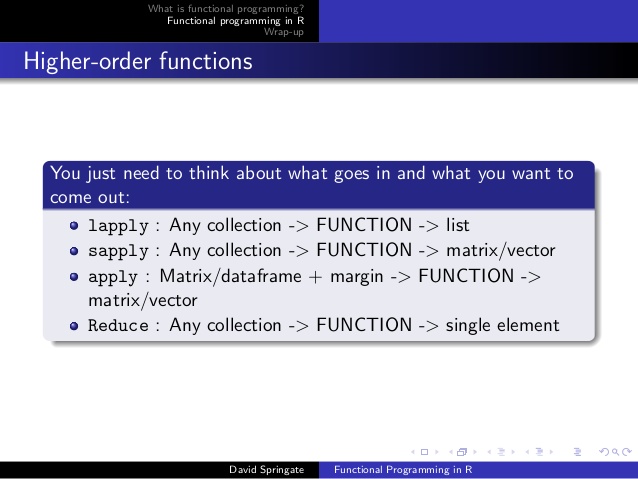
More advanced R users tend to further optimize via functionals. This family of functions takes in vectors (or matrices, or lists) of values and applies other functions to each. Examples are apply or plyr::*ply functions, which speed up R code mainly because the for loops they have inside them automatically do things like pre-allocating vector size. Functionals additionally prevent side effects: unwanted changes to your working environment, such as the remaining i after for(i in 1:10). Although this does not necessarily improve computing time, it is regarded best practice due to preventing consequent coding errors.

Conclusions

There are cases when you should use for loops. For example, the performance penalty for using a for loop instead a vector will be small if the number of iterations is relatively small, and the functions called inside your for loop are slow. Here, looping and overhead from function calls make up a small fraction of your computational time and for loops may be more intuitive or easier to read for you. Additionally, there are cases where for loops make more sense than vectorized functions: (1) when the functions you seek to apply don’t take vector arguments and (2) when each iteration is dependent on the results of previous iterations.

Another general rule: fast R code is short. If you can express what you want to do in R in a line or two, with just a few function calls that are actually calling compiled code, it’ll be more efficient than if you write long program, with the added overhead of many function calls.

Finally, there is a saying that “premature optimization is the root of all evil”. What this means is that you should not re-write your R code unless the computing time you are going to save is worth the time invested. Nevertheless, if you understand how vectorization and functional programming work, you will be able to write more faster, safer, and more transparent (short & simple) programs.


Must read: Computer Age Statistical Inference (Efron & Hastie, 2016)

Must read: Computer Age Statistical Inference (Efron & Hastie, 2016)

Statistics, and statistical inference in specific, are becoming an ever greater part of our daily lives. Models are trying to estimate anything from (future) consumer behaviour to optimal steering behaviours and we need these models to be as accurate as possible. Trevor Hastie is a great contributor to the development of the field, and I highly recommend the machine learning books and courses that he developed, together with Robert Tibshirani. These you may find in my list of R Resources (Cheatsheets, Tutorials, & Books).

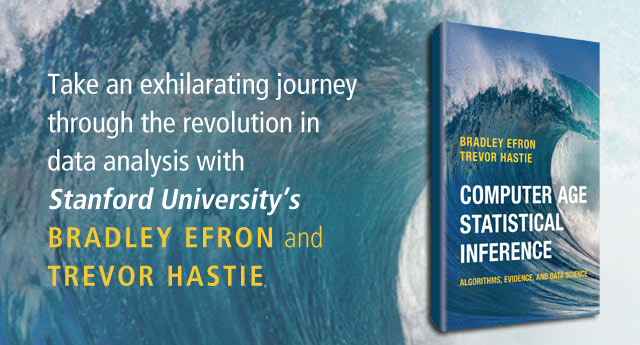
Today I wanted to share another book Hastie wrote, together with Bradley Efron, another colleague of his at Stanford University. It is called Computer Age Statistical Inference (Efron & Hastie, 2016) and is a definite must read for every aspiring data scientist because it illustrates most algorithms commonly used in modern-day statistical inference. Many of these algorithms Hastie and his colleagues at Stanford developed themselves and the book handles among others:

  • Regression:
    • Logistic regression
    • Poisson regression
    • Ridge regression
    • Jackknife regression
    • Least angle regression
    • Lasso regression
    • Regression trees
  • Bootstrapping
  • Boosting
  • Cross-validation
  • Random forests
  • Survival analysis
  • Support vector machines
  • Kernel smoothing
  • Neural networks
  • Deep learning
  • Bayesian statistics


tidyverse 101: Simplifying life for useRs

tidyverse 101: Simplifying life for useRs

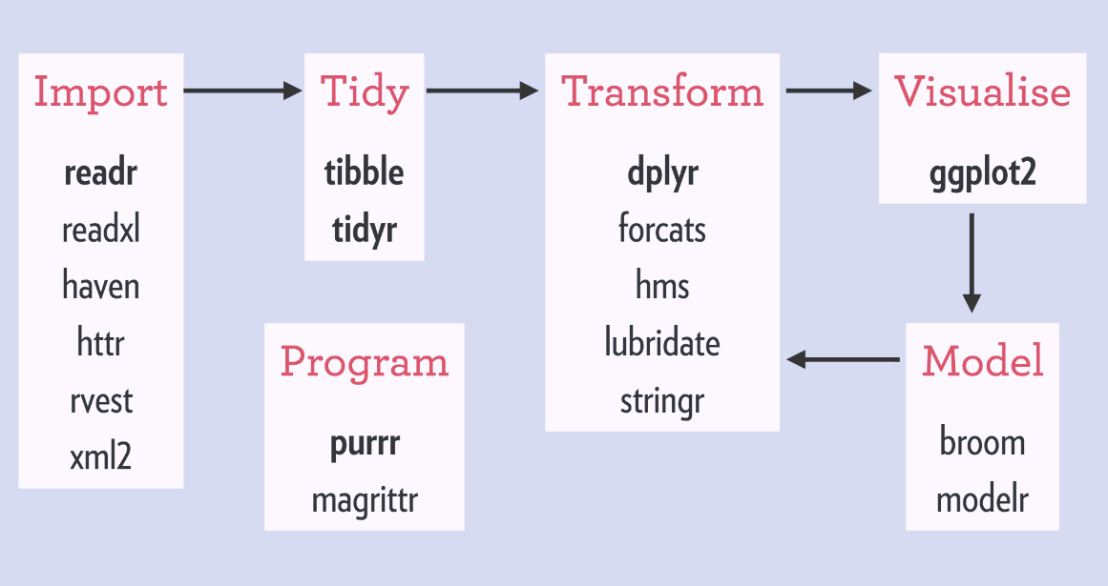
Hadley Wickham‘s tidyverse has improved the workflow of analysts / data scientists, makes coding errors less likely and code more transparent. You’ve got to love the figure below, representing a simplified workflow of the average analysis project.

A simplified, standard cycle of data analysis

The tidyverse provides assistance in each of the stages. Various packages provide functionality to perform analytical tasks more effectively, in fewer lines, with fewer errors, and moreover in more transparent code. As a first step, the analyst will need to import (load) the data to his/her working environment (e.g., Excel, SPSS, R, RStudio, Spyder, Jupyter). In order to guarantee that the data are correct, a next step will be to clean up and tidy the data before continuing to the analysis part. In this early stage, the analyst can handle the explicit errors in the dataset, such as missing and nonsensical data points or records. After these preparatory steps, the main process starts. This consists of three interrelated tasks. (1) The analyst will need to transform the data in order to retrieve statistics, descriptives, and/or new features. (2) The analyst will need to visualize statistics, relations, and results. This is essential for storytelling and effective interpretation and communication of the results. (3) The analyst will try out different models to fit, explain, and predict the data. Finally, the results of this main process (leading to “understanding” of the data and the underlying processing) can be communicated to others.


I will run through each of these stages in separate posts, explaining the various packages, their inner workings, and demonstrating how they affect the process of data analysis in R:

  • Importing data (work in progress)
  • Tidying data (work in progress)
  • Transforming data (work in progress)
  • Visualizing data (work in progress)
  • Modeling data (work in progress)
  • Efficient programming (work in progress)
tidyverse1
Overview of the tidyverse packages that belong to each of the stages.

General tutorials: