PyData provides a forum for the international community of users and developers of data analysis tools to share ideas and learn from each other. The communities approach data science using many languages, including (but not limited to) Python, Julia, and R.
April 2018, a PyData conference was held in London, with three days of super interesting sessions and hackathons. While I couldn’t attend in person, I very much enjoy reviewing the sessions at home as all are shared open access on YouTube channel PyDataTV!
In the following section, I will outline some of my favorites as I progress through the channel:
Winning with simple, even linear, models:
One talk that really resonated with me is Vincent Warmerdam‘s talk on “Winning with Simple, even Linear, Models“. Working at GoDataDriven, a data science consultancy firm in the Netherlands, Vincent is quite familiar with deploying deep learning models, but is also midly annoyed by all the hype surrounding deep learning and neural networks. Particularly when less complex models perform equally well or only slightly less. One of his quote’s nicely sums it up:
“Tensorflow is a cool tool, but it’s even cooler when you don’t need it!”
— Vincent Warmerdam, PyData 2018
In only 40 minutes, Vincent goes to show the finesse of much simpler (linear) models in all different kinds of production settings. Among others, Vincent shows:
how to solve the XOR problem with linear models
how to win at timeseries with radial basis features
how to use weighted regression to deal with historical overfitting
how deep learning models introduce a new theme of horror in production
how to create streaming models using passive aggressive updating
how to build a real-time video game ranking system using mere histograms
how to create a well performing recommender with two SQL tables
how to rock at data science and machine learning using Python, R, and even Stan
The 2018 annual Society for Industrial and Organizational Psychology (SIOP) conference featured its first-ever machine learning competition. Teams competed for several months in predicting the enployee turnover (or churn) in a large US company. A more complete introduction as presented at the conference can be found here. All submissions had to be open source and the winning submissions have been posted in this GitHub repository. The winning teams consist of analysts working at WalMart, DDI, and HumRRO. They mostly built ensemble models, in Python and/or R, combining algorithms such as (light) gradient boosted trees, neural networks, and random forest analysis.
In optimizing their transportation services, Uber uses evolutionary strategies and genetic algorithms to train deep neural networks through reinforcement learning. A lot of difficult words in one sentence; you can imagine the complexity of the process.
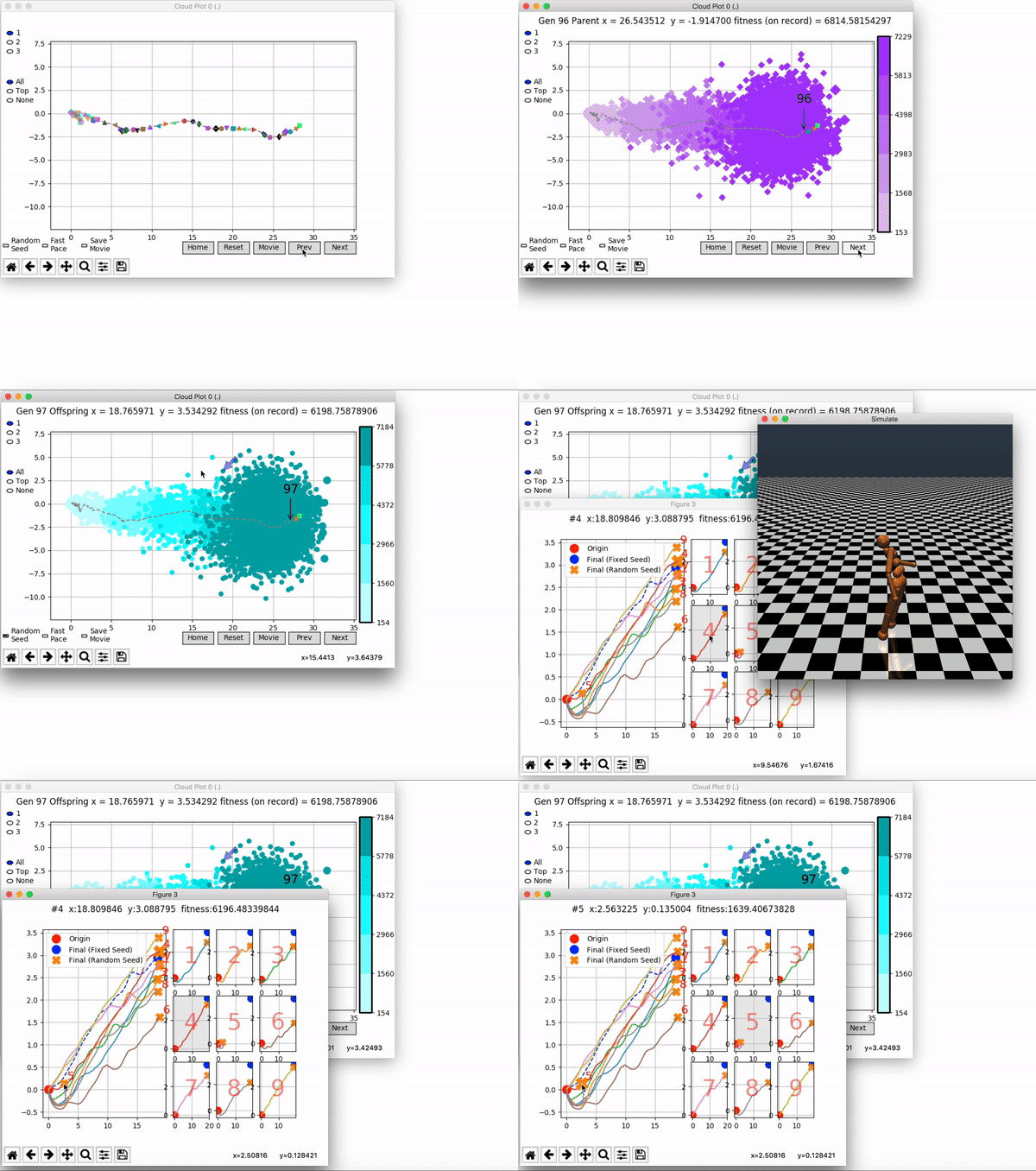
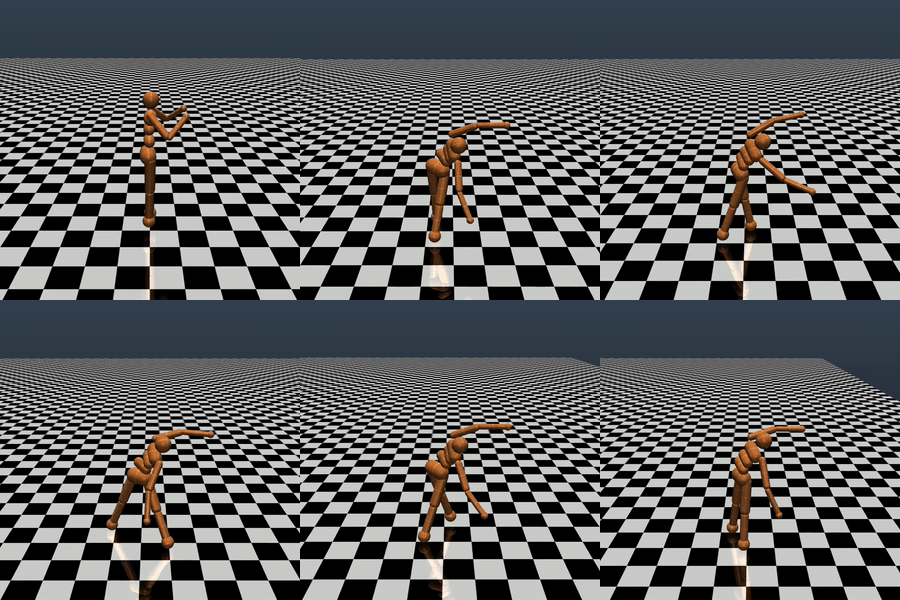
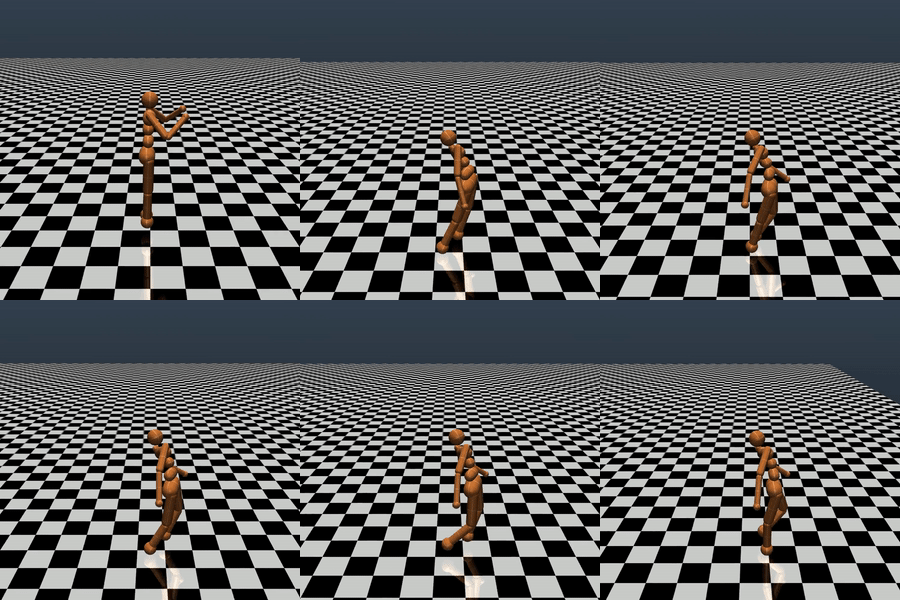
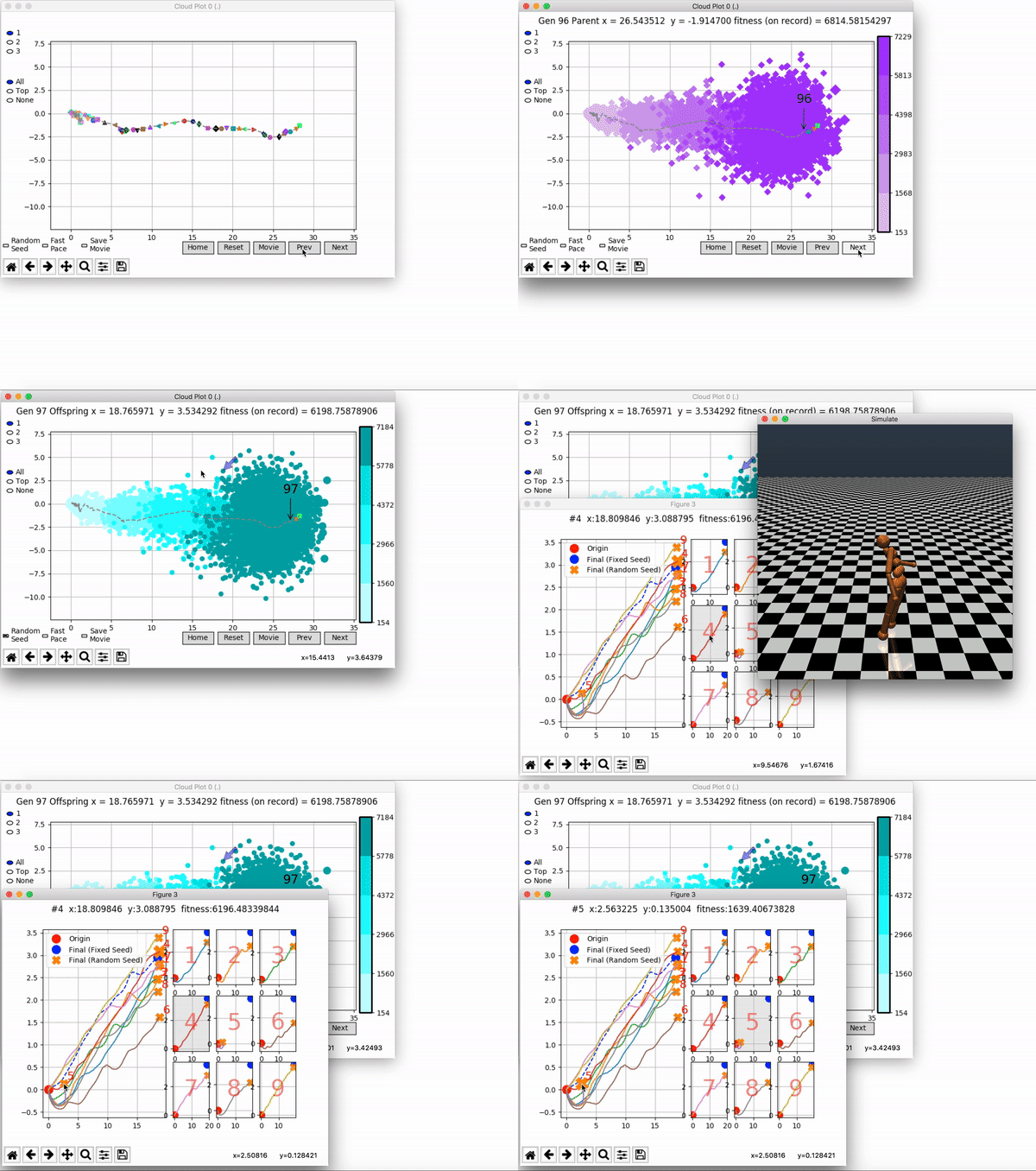
Because it is particularly difficult to observe the underlying dynamics of this learning process in neural network optimization, Uber built VINE – a Visual Inspector for NeuroEvolution. VINE helps to discover how evolutionary strategies and genetic optimizing are performing under the hood. In a recent article, they demonstrate how VINE works on the MujocoHumanoid Locomotion task.
[…] In the Humanoid Locomotion Task, each pseudo-offspring neural network controls the movement of a robot, and earns a score, called its fitness, based on how well it walks. [Evolutionary principles] construct the next parent by aggregating the parameters of pseudo-offspring based on these fitness scores […]. The cycle then repeats.
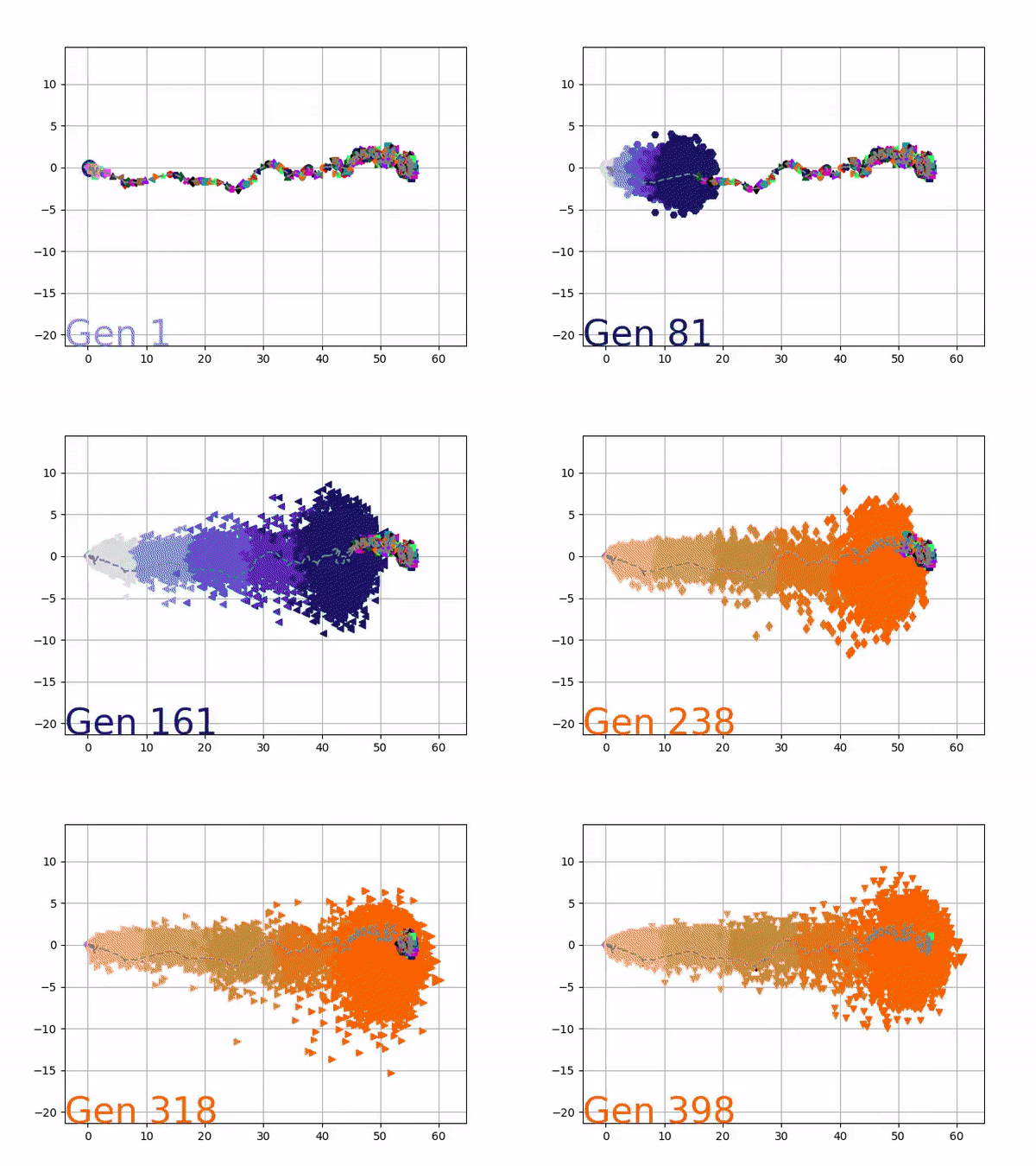
VINE plots parent neural networks and their pseudo-offspring according to their performance. Users can then interact with these plots to:
visualize parents, top performance, and/or the entire pseudo-offspring cloud of any generation,
compare between and within generation performance,
and zoom in on any pseudo-offspring (points) in the plot to display performance information.
The GIFs below demonstrate what VINE is capable of displaying:
The evolution of performance over generations. The color changes in each generation. Within a generation, the color intensity of each pseudo-offspring is based on the percentile of its fitness score in that generation (aggregated into five bins). [original]Vine allows user to deep dive into each single generation, comparing generations and each pseudo-offspring within them [original]VINE can be found at this link. It is lightweight, portable, and implemented in Python.
Past week, I came across two programming initiatives to uncover Twitter bots and one attempt to identify fake Instagram accounts.
Mike Kearney developed the R package botornot which applies machine learning to estimate the probability that a Twitter user is a bot. His default model is a gradient boosted model trained using both users-level (bio, location, number of followers and friends, etc.) and tweets-level information (number of hashtags, mentions, capital letters, etc.). This model is 93.53% accurate when classifying bots and 95.32% accurate when classifying non-bots. His faster model uses only the user-level data and is 91.78% accurate when classifying bots and 92.61% accurate when classifying non-bots. Unfortunately, the models did not classify my account correctly (see below), but you should definitely test yourself and your friends via this Shiny application.
Fun fact: botornot can be integrated with Mike’s rtweet package
Scraping Dirty Bots
At around the same time, I read this very interesting blog by Andy Patel. Annoyed by the fake Twitter accounts that kept liking and sharing his tweets, Andy wrote a Python script called pronbot_search. It’s an iterative search algorithm which Andy seeded with the dozen fake Twitter accounts that he identified originally. Subsequently, the program iterated over the friends and followers of each of these fake users, looking for other accounts displaying similar traits (e.g., similar description, including an URL to a sex-website called “Dirty Tinder”).
Whenever a new account was discovered, it was added to the query list, and the process continued. Because of the Twitter API restrictions, the whole crawling process took literal days before Andy manually terminated it. The results are just amazing:
After a day, the results looked like so. Notice the weird clusters of relationships in this network. [original]The full bot network uncovered by Andy included 22.000 fake Twitter accounts:
At the end of the weekend of March 10th, Andy had to stop the scraper after running for several days even though he had only processed 18% of the networks of the 22.000 included Twitter bots [original]The bot network on Twitter is probably enormous! Zooming in on the network, Andy notes that:
Pretty much the same pattern I’d seen after one day of crawling still existed after one week. Just a few of the clusters weren’t “flower” shaped.
Zoomed in to a specific part of the network you can see the separate clusters of bots doing little more than liking each others messages. [original]In his blog, Andy continues to look at all kind of data on these fake accounts. I found most striking that many of these account are years and years old already. Potentially, Twitter can use Mike Kearney’s botornot application to spot and remove them!
Most of the bots in the Dirty Tinder network found by Andy Patel were 3 to 8 years old already. [original]Andy was nice enough to share the data on these bot accounts here, for you to play with. His Python code is stored in the same github repo and more details around this project you can read in his original blog.
Fake Instagram Accounts
Finally, SRFdata (Timo Grossenbacher) attempted to uncover fake Instagram followers among the 7 million followers in the network of 115 important Swiss Instagram influencers in R. Magi Metrics was used to retrieve information for public Instagram accounts and rvest for private accounts. Next, clear fake accounts (e.g., little followers, following many, no posts, no profile picture, numbers in name) were labelled manually, and approximately 10% of the inspected 1000 accounts appeared fake. Finally, they trained a random forest model to classify fake accounts with a sensitivity (true negative) rate of 77.4% and an overall accuracy of around 94%.
Google has announced to provide open access to its artificial intelligence and machine learning courses. On their overview page, you will find many educational resources from machine learning experts at Google. They announced to share AI and machine learning lessons, tutorials and hands-on exercises for people at all experience levels. Simply filter through the resources and start learning, building and problem-solving.
For instance, up your game straight away with this 15-hour Machine Learning crash course. Zuri Kemp – who leads Google’s machine learning education program – said that over 18,000 Googlers have already enrolled in the course. Designed by the engineering education team, the courses explores loss functions and gradient descent and teached you to build your own neural network in Tensorflow.
Adam Geitgey likes to write about computers and machine learning. He explains machine learning as “generic algorithms that can tell you something interesting about a set of data without you having to write any custom code specific to the problem. Instead of writing code, you feed data to the generic algorithm and it builds its own logic based on the data.” (Part 1)
Adam’s visual explanation of two machine learning applications (original from Part 1)
In the fourth part of his series on machine learning Adam touches on Facial Recognition. Facebook is one of the companies using such algorithms in real-time, allowing them to recognize your friends’ faces after you’ve tagged them only a few times. Facebook reports they recognize faces with 97% accuracy, which is comparable to our own, human facial recognition abilities!
Facebook’s algorithms recognizing and automatically tagging Adam’s family. Helpful or creepy? (original from Part 4)
Adam decided to put up a challenge: would a facial recognition algorithm be able to distinguish Will Ferrell (famous actor) from Chad Smith (famous rock musician)? Indeed, these two celebrities look very much alike:
If you want to train such an algorithm, Adam explain, you need to overcome a series of related problems:
First, look at a picture and find all the faces in it
Second, focus on each face and be able to understand that even if a face is turned in a weird direction or in bad lighting, it is still the same person.
Third, be able to pick out unique features of the face that you can use to tell it apart from other people— like how big the eyes are, how long the face is, etc.
Finally, compare the unique features of that face to all the people you already know to determine the person’s name.
How the facial recognition algorithm steps might work (original from Part 4)
To detect the faces, Adam used Histograms of Oriented Gradients (HOG). All input pictures were converted to black and white (because color is not needed) and then every single pixel in our image is examined, one at a time. Moreover, for every pixel, the algorithm examined the pixels directly surrounding it:
Illustration of the algorithm as it would take in a black and white photo of Will Ferrel (original from Part 4)
The algorithm then checks, for every pixel, in which direction the picture is getting darker and draws an arrow (a gradient) in that direction.
Illustration of how algorithm would reduce a black and white photo of Will Ferrel to gradients (original from Part 4)
However, to do this for every single pixel would require too much processing power, so Adam broke up pictures in 16 by 16 pixel squares. The result is a very simple representation that does capture the basic structure of the original face, based on which we can now spot faces in pictures. Moreover, because we used gradients, the result will be similar regardless of the lighting of the picture.
The original image turned into a HOG representation (original from Part 4)
Now that the computer can spot faces, we need to make sure that it knows that two perspectives of the same face represent the same person. Adam uses landmarks for this: 68 specific points that exist on every face. An algorithm can then be trained to find these points on any face:
The 68 points on the image of Will Ferrell (original from Part 4)
Now the computer knows where the chin, the mouth and the eyes are, the image can be scaled and rotated to center it as best as possible:
The image of Will Ferrell transformed (original from Part 4)
Adam trained a Deep Convolutional Neural Network to generate 128 measurements for each face that best distinguish it from faces of other people. This network needs to train for several hours, going through thousands and thousands of face pictures. If you want to try this step yourself, Adam explains how to run OpenFace’s lua script. This study at Google provides more details, but it basically looks like this:
The training process visualized (original from Part 4)
After hours of training, the neural net will output 128 numbers accurately representing the specific face put in. Now, all you need to do is check which face in your database is most closely resembled by those 128 numbers, and you have your match! Many algorithms can do this final check, and Adam trained a simple linear SVM classifier on twenty pictures of Chad Smith, Will Ferrel, and Jimmy Falon (the host of a talkshow they both visited).
In the end, Adam’s machine had learned to distinguish these three people – two of whom are nearly indistinguishable with the human eye – in real-time:
Adam Geitgey’s facial recognition algorithm in action: providing real time classifications of the faces of lookalikes Chad Smith and Will Ferrel at Jimmy Falon’s talk show (original from Part 4)









 paulvanderlaken.com